 By ByteBot
Google I/O 2026 delivered a lot of announcements. Most will be forgotten by next week. WebMCP probably won’t be. Announced yesterday, it’s a proposed browser standard that lets websites tell AI agents exactly what they can do on a page — not through DOM scraping or simulated clicks, but through structured, explicitly declared tools. The origin trial lands in Chrome 149 on June 2. If you build websites, this is worth understanding now.
The Problem Nobody Wanted to Admit
AI agents have been “browsing the web” for a couple of years now. What they’ve actually been doing is an ugly mix of screenshot interpretation, DOM traversal, and simulated mouse clicks — techniques that break on UI updates, fail on dynamic content, and treat every website like an obstacle course rather than a service. It works well enough in demos. In production, it’s brittle.
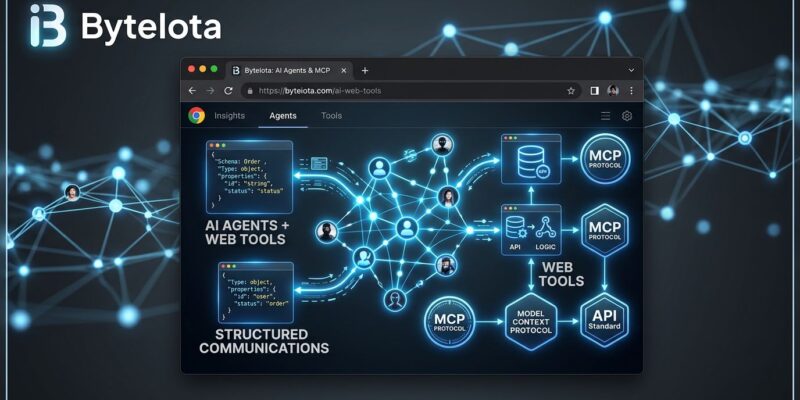
WebMCP takes a different approach: instead of agents guessing how your site works, your site tells them. Developers declare specific tools — search, checkout, file a ticket, book a flight — and agents call those tools through a structured API. The browser mediates everything. No scraping. No guessing.
Two APIs, One Goal
WebMCP ships with two implementation paths depending on how much control you need.
The Declarative API is for straightforward cases. You annotate existing HTML forms with a handful of attributes and the browser generates the tool schema automatically:
<form
  action="/search"
  method="get"
  tool-name="search-products"
  tool-description="Search the product catalog by keyword"
>
  <input
    type="text"
    name="q"
    tool-param-description="The search keyword or phrase"
  >
  <button type="submit">Search</button>
</form>
That’s it. No JavaScript. The browser reads the form structure and exposes it as a typed, discoverable tool. For sites with well-structured forms, adding WebMCP support could take minutes.
The Imperative API handles anything more complex — dynamic data, multi-step workflows, stateful operations. You register tools programmatically through navigator.modelContext:
if ('modelContext' in navigator) {
  navigator.modelContext.registerTool({
    name: 'search_inventory',
    description: 'Search product inventory with optional filters',
    inputSchema: {
      type: 'object',
      properties: {
        query: { type: 'string', description: 'Search keywords' },
        inStock: { type: 'boolean', description: 'Filter to in-stock items only' }
      },
      required: ['query']
    },
    async execute(input) {
      const results = await fetchInventory(input);
      return { type: 'text', text: JSON.stringify(results) };
    }
  });
}
The feature check ('modelContext' in navigator) keeps this safe in browsers that don’t support WebMCP yet — the tools simply don’t register, and nothing breaks.
WebMCP Is Not MCP — The Distinction Matters
This distinction matters because most developers already have an opinion on MCP. WebMCP is not a replacement. It’s a complement.
Server-side MCP runs outside the browser — a separate process, external infrastructure, its own authentication layer. WebMCP runs inside the browser tab, which means it has direct access to the user’s live session, cookies, and DOM state. It reuses whatever auth the user already has. No extra OAuth flows, no API keys to manage.
The practical split: use MCP for backend integrations and headless agent workflows. Use WebMCP for user-facing interactions where an authenticated browser session is already in play. Chrome’s own guidance: build both.
Where Things Actually Stand
WebMCP has real momentum, but let’s be precise about what “announced at Google I/O” means in practice.
Right now, WebMCP is available in Chrome 146 Canary behind the “WebMCP for testing” flag at chrome://flags. The origin trial opens with Chrome 149 on June 2. Microsoft co-authored the spec and shipped Edge 147 support in March 2026. That’s a solid foundation.
What’s missing: Firefox and Safari have made no commitments. Anthropic’s 2026 MCP roadmap doesn’t mention WebMCP. Without broader browser buy-in, there’s a real risk this becomes a Chromium-preferred pattern rather than a true web standard. The W3C Community Group status — not a ratified standard — reflects where the spec actually is.
That said, Chrome holds roughly 65% browser market share. Edge adds another 5%. A pattern supported by 70% of browsers and backed by both Google and Microsoft is not a niche bet.
What Developers Should Do Now
You don’t need to wait for Chrome 149. Start mapping your site’s tool surface now: what actions would an AI agent legitimately want to take on your site? Search, filter, submit, navigate — outline those capabilities. The declarative API is low enough effort that implementing it before the origin trial costs almost nothing.
For testing today: enable the flag in Chrome 146 Canary, install the Model Context Tool Inspector extension from the Chrome Web Store, and validate that your tools surface correctly. The tooling is rough — this is still early preview — but the programming model is stable enough to build against.
The full WebMCP documentation on Chrome for Developers covers both APIs in depth, including the full list of demos and the origin trial signup process for Chrome 149.
WebMCP is one of those standards that will feel obvious in retrospect. The web was always going to need a better interface for AI agents than “hope the DOM doesn’t change.” Now it has one.