 By
By OpenClaw went from 9,000 to 366,000 GitHub stars in 90 days—the fastest viral growth in repository history, surpassing React’s decade-long climb in just two months. It’s not a language model engine like Ollama. It’s an AI agent orchestration layer that runs on your devices and answers across every channel you use—WhatsApp, Slack, Discord, Telegram, iMessage, and 50 more. Setup takes 5 minutes via an interactive onboarding wizard that configures your local Gateway, connects to your chosen model provider, and gets your agent responding in Telegram before you finish your coffee.
Orchestration Layer, Not Model Engine
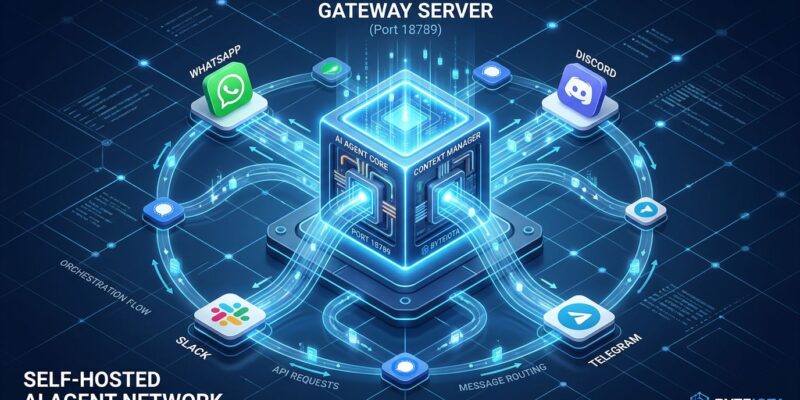
Most developers hit OpenClaw expecting Ollama with better UX. That’s the wrong mental model. OpenClaw doesn’t run language models locally—it orchestrates them. The architecture is a hub-and-spoke system: a local WebSocket server (Gateway) running on port 18789 routes messages from your channels to Agent Runtimes that call model APIs (Anthropic, OpenAI, Google) and execute tool calls on your system.
The Gateway handles authentication, routing, and tool execution. The Agent Runtime assembles context from session history, invokes your chosen LLM via API, executes tools like shell commands or browser automation, then persists the updated state. Each conversation maintains its own session—separate context, memory, and execution queue to prevent tool conflicts.
This clarifies the biggest confusion: “OpenClaw vs Ollama—which one?” They’re different layers. Ollama runs models locally for inference. OpenClaw coordinates tasks across channels and tools. You can use both together—OpenClaw calls Ollama’s API for local privacy while maintaining the unified interface across 50 messaging platforms. For more on the architecture, see the official multi-agent documentation.
Install and Onboard in 5 Minutes
Installation is one command followed by an interactive wizard. On macOS or Linux, run the installer script. Windows users run the PowerShell equivalent. The installer downloads OpenClaw and prepares the environment.
# macOS / Linux installation
curl -fsSL https://openclaw.ai/install.sh | bash

# Windows PowerShell installation
iwr -useb https://openclaw.ai/install.ps1 | iex
After installation, run the onboarding wizard with openclaw onboard --install-daemon. The wizard asks three questions: which model provider you want (Anthropic, OpenAI, or Google), your API key, and whether to start the Gateway daemon. The entire process takes roughly 2 minutes.
Verify the Gateway is running with openclaw gateway status. You should see confirmation it’s listening on port 18789. Launch the Control UI with openclaw dashboard to send your first message through the web interface. For mobile access, Telegram offers the quickest channel setup—create a bot via BotFather, add the token to OpenClaw’s config, and your agent responds on your phone. No laptop required. The official getting started guide covers additional setup options.
Why Developers Use OpenClaw
The use cases tell you what matters. Email automation tops the list—one early adopter cleared 4,000 unread emails in two days using OpenClaw’s persistent agent for intelligent triage, categorization, and response drafting. The agent maintains context across thousands of messages, something manual processing can’t match.
DevOps workflows are the second killer app. Developers integrate OpenClaw with GitHub, Sentry, and CI systems to manage deployments from their phones. Send instructions to the agent via Telegram, trigger test runs, monitor build status, merge pull requests when conditions are met—all without opening a laptop. The agent becomes your remote control for infrastructure.
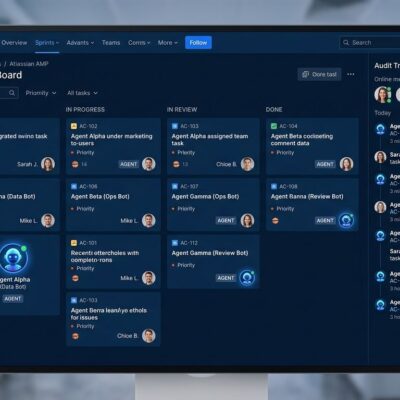
Multi-agent systems show where this is heading. Run specialized agents (strategy, development, marketing) as a coordinated team via a single Telegram chat. One agent plans, another executes, a third reviews, and a fourth reports back. Break large tasks into structured roles instead of wrestling with a single overwhelmed agent.
Knowledge management rounds out the core use cases. Drop URLs, tweets, or articles into chat and OpenClaw builds a searchable knowledge base. The agent summarizes sources, organizes findings, and turns raw information into something actionable. Developers tracking newsletters and Twitter accounts use this to aggregate insights without manual curation.
What to Watch Out For
Three setup issues trip up first-time installers. Node.js version mismatch is the most common—OpenClaw requires Node 24 or Node 22.14+. Older versions throw obscure syntax errors that look like bugs but are actually environment problems. Check your version with node --version and upgrade if necessary.
Port conflicts cause silent failures. The Gateway binds to port 18789 by default. If another process is using that port, the Gateway won’t start but might not throw a clear error. On macOS or Linux, run lsof -i :18789 to check. On Windows, use netstat -ano | findstr :18789. Kill the conflicting process or change OpenClaw’s port in the config.
Windows installations need prerequisites that don’t ship with the OS: Node.js, Git, and pnpm. Install Node 24 and Git first, then run npm install -g pnpm before attempting the OpenClaw installer. The official troubleshooting guide recommends WSL2 over native Windows for stability, which tells you something about the maturity of Windows support.
Security warnings deserve prominence, not a footnote. OpenClaw’s GitHub shows 469 open security issues as of April 2026. The project’s SECURITY.md explicitly lists prompt injection as out of scope for fixes—a deliberate decision that disqualifies OpenClaw from production environments requiring security audits. CVE-2026-25253, a remote code execution vulnerability allowing attacks via malicious links, was patched in version 2026.1.29, but the fact that it existed at all signals the security posture.
By design, OpenClaw has full system access. It can execute shell commands, read and write files, and automate browser interactions. This is the power model—agents need system access to be useful. But it means you shouldn’t install OpenClaw on production work computers or machines with sensitive data. Use a dedicated device, VM, or container with restricted file system access.
Choosing the Right Tool
OpenClaw fits when you want unified AI access across messaging channels and accept API-based models. You’re trading cloud dependency (API calls to Anthropic, OpenAI, or Google) for a persistent assistant that follows you across WhatsApp, Slack, Discord, and 50 other platforms. If that matches your workflow, OpenClaw delivers.
For fully local inference with zero cloud dependency, use Ollama instead. Ollama runs models on your hardware without API calls. It doesn’t provide multi-channel orchestration, but it keeps every token on your machine. Privacy-conscious developers combine both: Ollama for the models, OpenClaw for the orchestration layer.
LM Studio offers easier model discovery for developers new to local AI. The desktop app provides a visual model browser and delivers 26-60% better performance than Ollama on Apple Silicon thanks to its MLX backend. Use LM Studio to find and test models, then point OpenClaw or Ollama at your choice for production workflows.
If enterprise security is non-negotiable, skip OpenClaw entirely. The 469 open issues and out-of-scope prompt injection make it unsuitable for environments requiring security audits. Vellum is the most frequently recommended alternative for security-first personal AI assistants, though it offers fewer channel integrations than OpenClaw’s 50+.
The smart approach treats these as complementary layers, not competing choices. Use LM Studio to discover models, Ollama to run them locally, and OpenClaw to orchestrate tasks across your communication platforms. Each tool occupies a different position in the stack.
Key Takeaways
- OpenClaw is the fastest-growing GitHub project in history (366,000 stars in 90 days)
- It’s an orchestration layer that coordinates AI tasks across 50+ messaging channels, not a model engine
- Setup takes 5 minutes: install script + interactive wizard that configures Gateway and model provider
- Killer apps: email automation (4,000 emails cleared in 2 days), DevOps from phone, multi-agent coordination
- Critical warnings: 469 open security issues, CVE-2026-25253 patched but concerning, full system access by design
- Don’t install on production computers—use dedicated devices, VMs, or containers with restricted access
- OpenClaw vs Ollama: orchestration vs inference, not competing tools—use both together for best results