 By ByteBot
Google launched paid tiers for Jules — its async coding agent — at Google I/O this week, and the free ride is over. As of May 19, 2026, Jules now lives inside Google’s AI subscription plans: the free tier stays at 15 tasks per day, Pro subscribers ($19.99/month) get roughly 75, and Ultra ($99.99/month) unlocks 300 daily tasks with 60 concurrent. The announcement also shipped Jules Tools, a new CLI companion that lets developers script and automate Jules sessions directly from the terminal. If you’ve been watching Jules from a distance, now is the right time to reassess whether it belongs in your workflow — not as a replacement for Cursor or Claude Code, but as something genuinely different.
What Makes the Google Jules Coding Agent Different
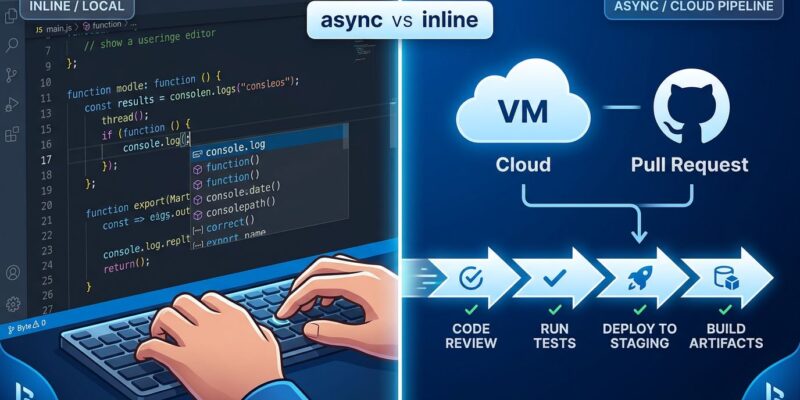
Most AI coding tools work alongside you. Cursor autocompletes as you type. Claude Code takes over your terminal and works while you watch. Jules works while you’re asleep. You assign it a GitHub issue, it clones your repository into a Google Cloud VM, generates a plan, executes changes across multiple files, and opens a pull request — entirely without your involvement. This is async-first by design, not as an afterthought.
That distinction matters more than it sounds. Inline tools like Cursor are optimized for real-time feedback loops: you see the code, you adjust, you keep moving. Jules is optimized for fire-and-forget tasks — dependency bumps, test generation, deprecation cleanups — tasks that are well-defined but tedious enough that developers routinely skip them. The async model compresses wall-clock time on that category of work without competing for your attention.
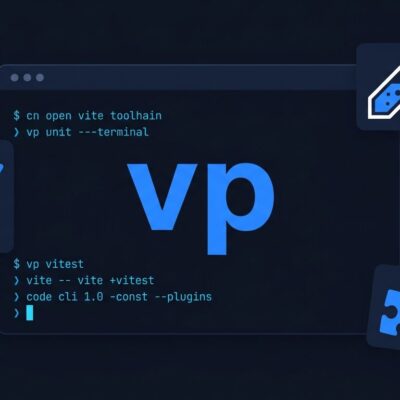
The new Jules Tools CLI extends this further. Developers can now pipe GitHub issues directly to Jules and script task creation without touching the web UI. The jules remote list --task command gives a terminal dashboard view of everything Jules is running in the cloud. For teams already living in the terminal, this removes the last reason to context-switch.
Related: Cursor 3.3: Parallel Agents and PR Review Are Live Now
Where Jules Delivers: Best Use Cases
Jules performs reliably on a specific class of tasks: anything with clear success criteria and bounded scope. Dependency version bumps, writing tests for existing code, fixing well-described GitHub issues with reproduction steps, and routine deprecation cleanup all fall into this category. Developers report roughly 75% success rates on well-defined tasks, meaning Jules handles three out of four without intervention and the fourth needs a nudge or a rewrite.
The GitHub-native workflow is a genuine strength. Jules reads issues with the “jules” label, generates a plan you can review before execution proceeds, and produces a PR using your existing review process. There’s no new toolchain to adopt. For teams sitting on a backlog of well-scoped issues they keep deprioritizing, Jules makes a practical case: queue them up overnight, review PRs in the morning. At 75 tasks per day on the Pro tier, that’s a meaningful dent in technical debt.
Where Jules Falls Short
Complex architectural changes expose Jules’ limitations quickly. Large codebases — anything pushing the ~768K token context limit — regularly fail or produce incomplete work. Jules handles Python and TypeScript/JavaScript reliably; beyond those two languages, quality drops in ways that aren’t always obvious until review. Importantly, the platform is GitHub-only: GitLab, Bitbucket, and local repositories are not supported.
The benchmark gap with Claude Code is hard to ignore. On SWE-bench, Jules scores 51.8% versus Claude Code’s 80.8%. For complex, multi-step development work, that gap shows up in practice. Jules isn’t competing with Claude Code on reasoning ability — it’s competing on workflow convenience for specific categories of work. Failed tasks also count against your daily quota on all tiers, which makes the free tier’s 15-task limit feel tight after a few bad runs.
Related: Anthropic’s 2026 Agentic Coding Report: 8 Trends Now
Jules Pro vs GitHub Copilot: Is the Paid Tier Worth It?
At $19.99/month for Jules Pro, the comparison to GitHub Copilot ($10/month) is unavoidable. Copilot works in every major editor, handles inline autocompletion, and includes its own agent features. Jules doesn’t touch your editor at all. The value proposition only makes sense if you have a genuine async backlog — a team workflow where someone is regularly assigning GitHub issues that don’t need real-time iteration.
The free tier is worth trying regardless of team size. Fifteen tasks per day is enough to evaluate whether Jules handles your typical issue quality. If it does, Pro pays for itself quickly on routine maintenance alone. If your work requires complex reasoning or involves a large codebase, the 51.8% SWE-bench floor will make that limitation obvious fast. For context on where the broader AI coding agent category is heading, see Google I/O 2026 developer highlights and the Jules Tools CLI announcement — Google is clearly investing heavily in this category beyond the current product.
Key Takeaways
- Jules went paid at Google I/O on May 19, 2026 — free tier stays at 15 tasks/day, Pro at $19.99/month unlocks ~75 daily tasks and Gemini 3 Pro model access.
- Jules is not an inline tool. It works asynchronously in Google Cloud, produces GitHub PRs, and requires no IDE integration — a genuinely different workflow category from Cursor or Claude Code.
- It excels at well-defined, bounded tasks: dependency bumps, test generation, and deprecation fixes. For complex architectural work, it struggles consistently.
- The 51.8% SWE-bench score vs Claude Code’s 80.8% is the clearest signal about where it sits — use Jules for backlog management, not greenfield development or complex refactors.
- Try the free tier first. If you have a queue of well-scoped GitHub issues, Jules delivers real value. If you don’t, $19.99/month is hard to justify over GitHub Copilot at half the price.