 By
By Cursor 3.3, released May 7, does something AI IDEs have been promising for three years: it keeps the entire development cycle inside one window. Parallel agents, PR review, and automated PR splitting all live in the Agents Window now. You write code, spawn agents to parallelize the work, review the resulting PR, and merge — without once opening a browser tab. That’s not a marginal improvement. That’s a different way of working.
The Problem: Your Agents Were Waiting in Line
Before Cursor 3.2 and 3.3, queued tasks ran serially. If you were updating an API contract across five services, agents tackled them one at a time. Task one finished, then task two started, then task three. Fast individual execution, slow overall throughput. The bottleneck wasn’t the AI — it was the queue.
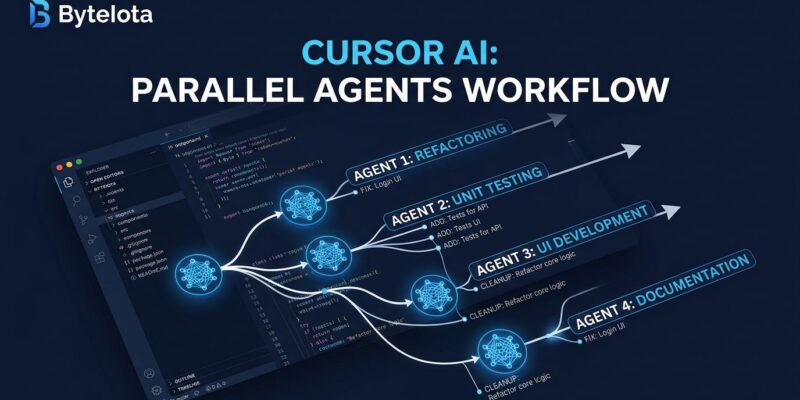
Build in Parallel eliminates that. Click the button on any plan and Cursor identifies independent subtasks automatically, then spawns async subagents to handle them simultaneously. Dependent steps stay serial — Cursor figures out which is which using chat context. On multi-module refactors, documentation passes, or test generation across separate components, wall-clock time collapses.
The /multitask command does the same thing from the editor: describe multiple independent tasks, and Cursor dispatches workers in parallel rather than queuing them. If you’re still running tasks serially in Cursor, you’re leaving the most significant productivity gain of the 3.x release cycle on the table.
/multitask update auth module, add tests for auth.ts, update API docsThe command above spawns three subagents simultaneously. Cursor detects that all three tasks touch separate files — no conflicts, no waiting.
Split PRs: The Discipline You Wanted But Never Enforced
Parallel agents on a large feature accumulate changes across many domains fast. That’s the point — and also the problem. A single PR with auth changes, UI changes, and API changes is a review nightmare. Reviewers skim it, miss things, and it takes longer to merge.
Split PRs handles this automatically. After multitasking, a quick action analyzes the accumulated changes, identifies logical slices using chat context, creates a backup snapshot, and proposes a split plan for your approval. Independent changes become separate PRs. When the AI detects genuine dependencies, it keeps them together and explains why.
Research from Graphite shows PRs under 200 lines merge significantly faster, with the optimal size around 50 lines. Cursor is now enforcing a practice that developers know is correct but rarely maintain under velocity pressure. Parallel agents create the problem; Split PRs manages it.
PR Review Tab: Context Switching Is Over
The new PR review experience completes the loop. Until 3.3, reviewing a PR meant leaving Cursor, switching to GitHub, reading inline comments in one tab, checking CI in another, jumping back to fix something, then repeating. That context tax was real and daily.
The PR Review tab in the Agents Window eliminates it. Three sub-tabs cover the full lifecycle: Reviews shows inline threads and top-level PR comments; Commits gives a focused history view; Changes provides a file tree and picker for navigating large PRs. Reviewer status and pending review banners are visible without leaving the IDE.
The payoff is highest when agents are generating multiple PRs per session. At that velocity, browser tab management becomes the bottleneck. The PR Review tab removes it from the equation.
The Warning: Where Parallel Agents Break
Parallel agents conflict in tightly coupled codebases. If two subagents edit code with shared state or implicit dependencies, they can overwrite each other. The safe pattern: use /multitask on tasks with clear file-level isolation — separate modules, separate services. Enable worktrees for branch isolation on high-risk sessions.
There’s also the review bottleneck. Agents generate PRs faster than humans can evaluate them. Cursor 3.4 addresses this with Bugbot’s high-effort mode: deeper reasoning per review, catching 0.95 bugs per run on average versus 0.7 at default, with over 79% of flagged issues resolved before merge. The full Cursor 3.x stack is designed to work together: generate faster with parallel agents, review smarter with Bugbot.
What to Do Right Now
- Run /multitask on your next multi-file task. Choose something with clear file-level isolation — separate modules, separate test files. Type
/multitask [task 1], [task 2], [task 3]and watch workers dispatch in parallel instead of queuing. - Try Split PRs after your next parallel session. Let Cursor propose the logical splits before pushing. Review the plan and approve or modify — the backup snapshot is there if something goes wrong.
- Move PR review into Cursor. Open the Reviews tab in the Agents Window on your next cycle. The file tree in Changes makes navigating large PRs faster than the GitHub web UI for most codebases.
The official Cursor 3.3 changelog covers the complete feature list. For teams scaling agent usage, Cursor’s agent best practices guide is worth reading before turning parallel agents loose on a production codebase.