 By ByteBot
Docker Engine v29 shipped in May and made containerd the default image store for new installations — the most significant architectural change to Docker since containerd was first introduced. If your CI broke after a recent upgrade, or a cloud VM’s OS disk is inexplicably full, this is the release responsible. Three changes landed simultaneously: where Docker stores images, the minimum API version it accepts, and how Go developers import the Docker library. None of this is optional to know about anymore.
What Actually Changed
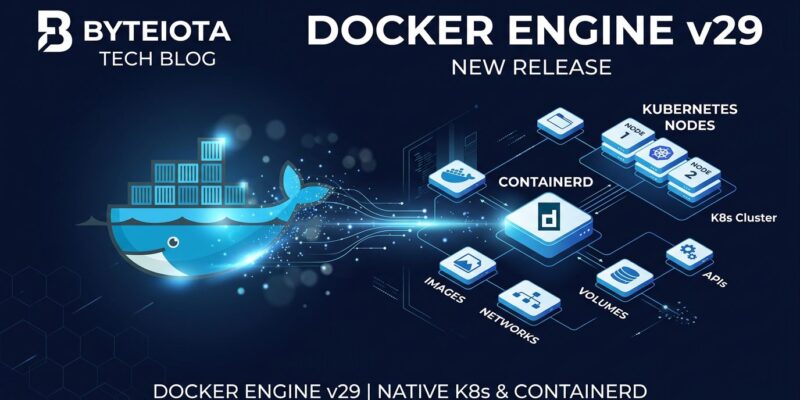
Docker Engine has always used containerd under the hood for running containers. What changed in v29 is that image storage moved there too. Fresh installs now write image layers to /var/lib/containerd instead of /var/lib/docker. Both execution and storage go through the same component, removing a layer of duplication that has existed since Docker first integrated containerd in 2017.
There is a meaningful benefit here, not just breakage. This unification means Docker images and Kubernetes images now use the same storage substrate. Builds done locally with Docker load directly into a K8s node’s containerd without translation overhead. Multi-platform image builds — previously requiring --load workarounds — work natively. The two-world problem, where Docker and Kubernetes could not share images cleanly, is gone. Read the official Docker v29 release post for the full architecture rationale.
Existing installations are not automatically migrated. If you upgraded from v28 rather than performing a fresh install, your daemon continues using overlay2 until you explicitly enable the new store. That is a deliberate decision to avoid surprise data loss during upgrades.
Four Things That Break
1. CI Pipelines Rejecting Old API Clients
Docker v29 raised the minimum accepted API version from 1.41 to 1.44. Any tool that defaults to an older API version is immediately rejected with:
client version 1.32 is too old. Minimum supported API version is 1.44, please upgrade your clientThe most widespread casualty is Testcontainers (Java). Its docker-java dependency defaulted to API 1.32 — now 12 versions behind the floor. Testcontainers fixed this in v2.0.2. Upgrade immediately if you are on an older version. If upgrading the library is not yet possible, add this to src/test/resources/docker-java.properties:
api.version=1.44GitLab Runner and Harness CI agents also hardcoded API 1.41 and broke. Check your CI agent release notes before upgrading the Docker daemon on shared runners. Verify what API version your daemon exposes:
docker version --format '{{.Server.APIVersion}}'2. data-root No Longer Controls Image Storage
Teams running Docker on cloud VMs often set "data-root": "/mnt/data" in /etc/docker/daemon.json to keep images off the small OS disk. In v29, this setting no longer controls where containerd stores image layers. Images accumulate on the root disk regardless of data-root configuration, and OS disks fill up silently. This is well-documented on Azure and affects any cloud environment with separated OS and data disks.
The quickest fix is a symlink:
sudo systemctl stop docker containerd
sudo mv /var/lib/containerd /mnt/data/containerd
sudo ln -s /mnt/data/containerd /var/lib/containerd
sudo systemctl start containerd docker
Alternatively, configure containerd directly in /etc/containerd/config.toml by setting the root path under the appropriate plugin section. The symlink route is faster and requires no containerd config expertise.
3. Paketo Buildpacks Do Not Build
Paketo Buildpacks — used widely with Spring Boot’s ./mvnw spring-boot:build-image workflow — fail when the containerd image store is active. The issue is tracked in paketo-buildpacks/spring-boot#586 and remains unfixed as of June 2026.
The workaround is to revert to the legacy image store in /etc/docker/daemon.json:
{
  "features": {
    "containerd-snapshotter": false
  }
}
Then restart: sudo systemctl restart docker. This restores overlay2 behavior. Revisit once Paketo publishes a fix.
4. Go Library Imports Changed
The Go module github.com/docker/docker is deprecated as of v29 and will not receive further updates. Go developers importing Docker’s client library must migrate to the Moby module:
// Deprecated — no longer updated
import "github.com/docker/docker/client"
import "github.com/docker/docker/api/types"

// Required going forward
import "github.com/moby/moby/client"
import "github.com/moby/moby/api/types"
This is already affecting docker/buildx, golang-migrate, and numerous other tools. See the moby/moby migration discussion for the official guidance. After updating imports, run go get github.com/moby/moby/client@latest.
What’s Coming: nftables
Docker v29 also ships experimental nftables support for managing firewall rules. Most modern Linux distributions have deprecated iptables, and Docker is following. To try it, add "firewall-backend": "nftables" to /etc/docker/daemon.json. Do not enable this in production yet — Swarm mode is unsupported, and overlay network rules still use iptables. This will become the default in a future release. Worth testing in staging now.
Quick Verification Checklist
- Run
docker version --format '{{.Server.APIVersion}}'— confirm 1.44+ - Check disk usage on
/var/lib/containerd— if it’s growing, yourdata-rootredirect is not working - Testcontainers users: upgrade to 2.0.2+ or set
api.version=1.44in properties - Paketo Buildpack users: apply
containerd-snapshotter: falseworkaround until upstream fixes it - Go codebases: search for
github.com/docker/dockerand migrate togithub.com/moby/moby