 By
By Google launched the Colab CLI on June 5 and quietly ended eight years of Colab being a browser-only tool. Install the package, run one authentication step, and you can provision a T4, A100, or H100 GPU from your terminal, execute Python scripts against it, retrieve your artifacts, and terminate the runtime — no browser tab required. That alone is worth noting. What makes it worth reading about is COLAB_SKILL.md: a structured skill file Google ships alongside the CLI so that Claude Code, Codex, and Antigravity can drive Colab runtimes autonomously inside agentic pipelines. GPU compute just got a first-class interface for AI agents.
Four Commands That Replace the Browser Workflow
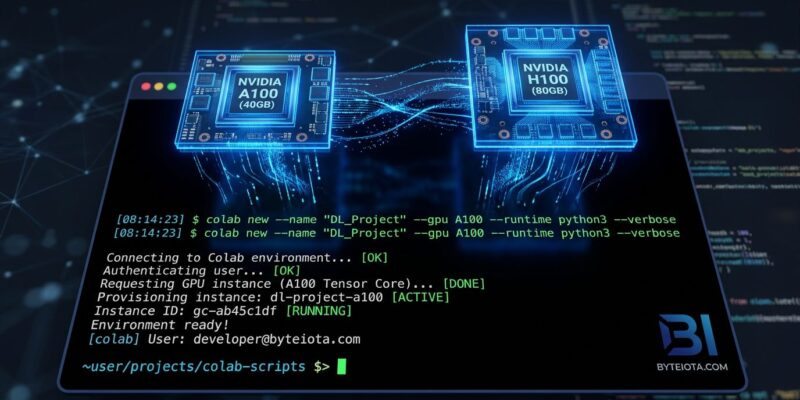
The CLI is built around four command groups. Provisioning: colab new --gpu A100 (or T4, H100, TPU). Execution: colab exec script.py runs a local Python file on the remote runtime. Artifact management: colab download retrieves outputs, colab log --output run.ipynb saves a replayable notebook. Interactive access: colab repl drops you into a remote Python shell. Lifecycle: colab install manages packages, colab stop kills the runtime and stops billing.
Install via uv tool install google-colab-cli or pip. Apache-2.0, open source. Linux and macOS supported.
COLAB_SKILL.md: The Part That Changes Agent Pipelines
The CLI ships with a file called COLAB_SKILL.md that deserves more attention than it’s getting. It’s a structured context document built specifically for AI terminal agents — the same pattern Claude Code uses for skill injection. An agent reads it once at task start, then autonomously provisions hardware, executes scripts, downloads results, and terminates. The loop is: colab new --gpu A100, run work, colab download, colab stop. No human in the loop for the compute part.
This is the first major GPU cloud to ship explicit AI agent support as a launch feature. Modal and RunPod are excellent platforms, but they require you to wire up agent integration yourself. Google baked it in from day one, targeting Claude Code, Codex, and its own Antigravity specifically. If you’re building agentic workflows that need GPU compute mid-pipeline, you now have a standardized way to reach for it.
Hardware Tiers
What you can provision depends on your Colab plan:
- Free: T4 (limited availability, sessions up to 12 hours)
- Pro ($11.99/month): T4, L4, A100
- Pro+ ($49.99/month): T4, L4, A100, H100, TPU v5e and v6e
No CLI-specific pricing exists — you use Colab compute units at the same rates as the browser interface. The CLI doesn’t change what hardware you can access; it changes how you access it.
The QLoRA Fine-Tuning Demo
Google’s launch example demonstrates a complete ML workflow with no browser interaction. The sequence: provision a T4 with colab new --gpu T4, install dependencies (transformers, peft, trl, bitsandbytes), execute a QLoRA fine-tuning script against Gemma 3 1B, download the adapter weights, save the run log as a replayable notebook, then stop. What previously required a browser session with constant supervision now runs as a terminal script — or as part of a CI/CD pipeline.
That last point is significant. Colab was effectively unusable in GitHub Actions or GitLab CI because it required browser authentication. With the CLI, you can drive Colab runtimes from automated workflows for the first time:
colab new --gpu A100
colab exec fine_tune.py
colab download weights/
colab stop
Where It Fits vs. Modal and RunPod
Modal offers a better Python-native developer experience with sub-four-second cold starts and a cleaner function-as-infrastructure model. RunPod offers cheaper raw compute for A100 and H100 workloads. Neither is wrong. Colab’s advantages are different: a free tier that still exists (T4 when available), existing Google account authentication that millions of developers already have, and native Google AI stack integration that Modal and RunPod don’t replicate.
If you’re already using Colab for research and want to automate those workflows — or wire them into an Antigravity-based agent pipeline — the CLI is the obvious path. If you’re optimizing for raw compute cost at scale, RunPod or Modal still win on pricing.
The One Caveat Worth Stating
The free tier constraints are unchanged. The CLI does not give you preferential hardware access during peak periods. If T4 runtimes are scarce when you run colab new --gpu T4, you’ll wait or get queued — same as the browser interface. Pro+ gives better availability, not guaranteed availability. For agent pipelines where GPU latency matters, test your capacity assumptions before committing the workflow to production.
The CLI is available now. The official announcement has the setup guide, and the GitHub repository has COLAB_SKILL.md for agent integration. For coverage of related developer tools, see our post on GitHub Agentic Workflows.