 By
By Warp open-sourced its terminal client on April 28, gaining 12,822 GitHub stars in a single day and introducing “Agentic Development Environments”—terminals that orchestrate AI agents rather than just execute commands. With OpenAI as founding sponsor and 700,000 developers already using it at Docker and half the Fortune 500, Warp is betting terminals will become agent platforms, not just tools.
This matters because the paradigm is shifting: developers will orchestrate agents to write code rather than writing it manually. Warp’s Oz platform turns terminals into cloud agent coordination systems, potentially reshaping how we work.
What Is an Agentic Development Environment?
Traditional terminals execute commands you type. Agentic Development Environments orchestrate AI agents that write code, debug issues, and implement features while you guide and verify.
The difference is fundamental. In iTerm2, you type git commit -m "fix bug". In Warp, you describe what you want in natural language—”find all files larger than 1GB modified in the last week”—and it generates the exact command: find . -type f -size +1G -mtime -7. It’s like having a senior developer who knows every obscure bash incantation sitting next to you.
However, Warp’s real innovation is Oz, the cloud agent orchestration platform. Oz agents triage GitHub issues, generate implementation plans, write code, and open pull requests—all automated. A VP of Products using Warp reported tasks that “would normally take me 10 minutes instead take just a few seconds.” A Field CTO with 30 years in tech called it “the single greatest productivity tool” he’s used.
The terminal client itself is built in Rust with block-based navigation, syntax highlighting, and LSP support. Nevertheless, the architecture reveals the strategy: the client is now open source (AGPLv3), while Oz orchestration remains proprietary. That’s where the real value lives.
How Oz Orchestration Works
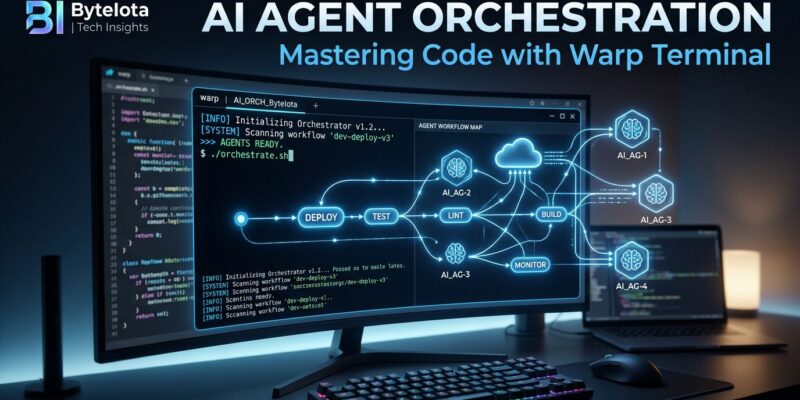
Oz manages the full agent lifecycle: trigger, orchestration, execution, and artifacts. Here’s how it flows:
Trigger: A schedule, webhook, CI step, API call, or manual run fires an event. This could be a cron job, a Slack notification, a Linear issue update, or a GitHub Action.
Orchestration Layer: Warp’s orchestration creates a cloud agent task and tracks its state transitions. This is the system of record for what’s running and what ran.
Execution: The agent runs on a host (local or cloud), optionally inside a Docker environment. Environments are Docker containers plus git repos plus startup commands—shared across your team by default and set up in under five minutes.
Artifacts: The agent produces PRs, branches, plans, and session links, all reviewable in real-time. If you need to step in, there’s human-agent handoff to continue work locally.
This is not traditional CI/CD. Oz agents support interactive steering through session sharing links mid-execution, cross-repository changes for coordinated modifications, and programmable workflows for any app needing intelligence injection. Moreover, a DevOps team can turn ad-hoc incident commands into repeatable Workflows, share specific blocks from an incident timeline for postmortems, and maintain a clean, searchable history of what was executed and when.
For teams whose daily work centers on SSH sessions, deployment pipelines, and log analysis, Oz maps directly to operational workflows without leaving the terminal.
Getting Started with Warp
The open-source client is available at github.com/warpdotdev/warp under AGPLv3 (main codebase) and MIT (UI framework). Clone the repository, build it, and you’ll immediately notice the difference from traditional terminals.
Commands are organized as blocks, not lines. You can navigate with your cursor, copy specific blocks, and edit commands like code with multi-line editing and syntax highlighting. For incident management, this block-based output is perfect for creating timelines and sharing specific command sequences in postmortems.
Furthermore, the AI command generation is genuinely useful, not hype. Describe what you need (“kill the process on port 3000”) and Warp suggests the command (lsof -ti:3000 | xargs kill -9). For team collaboration, Warp Drive lets you save and share workflows, notebooks, prompts, and environment profiles with version control integration.
To try Oz cloud agents, you’ll need to set up triggers. Oz supports cron schedules, webhooks from GitHub or Slack, REST API calls for custom apps, or interactive “Cloud Mode” for real-time control. Agents can handle complex tasks: triaging issues, asking clarifying questions, generating implementation plans, writing code, and opening PRs. All in the open—session links, reviews, and progress are visible to anyone.
Pricing is usage-based (AI plus compute consumption), with cloud hosting costs included. Contributors who merge PRs can request complimentary Oz credits—effectively turning the open-source workflow into a live product demo.
Why Warp Opened the Client but Not Oz
CEO Zach Lloyd’s original 2021 concern was that “a competitor could fork Warp and start another terminal company.” That risk disappeared. AI terminal tools became commoditized—Claude Code, Codex, Gemini CLI all made client features like rendering, output blocks, and AI suggestions table stakes rather than defensible IP.
Consequently, Warp opened the terminal when the moat eroded and kept Oz, the real moat, proprietary. This follows the Cursor/Vercel playbook: give away the client, monetize the cloud agent. It’s strategic timing—Warp held the line on closed-source longer than peers because the terminal actually had defensible value. Opening it once that moat evaporated while keeping agent infrastructure proprietary signals confidence in where real differentiation lives.
The business model is clear. Apache-2.0 SDKs lower barriers to building integrations with Warp’s agent platform. Developers get auditable, forkable source code, addressing the “rug-pull” concern that kept many away for years. The trade-off: cloud agent services remain locked behind authentication and paid tiers. Trust in the foundation (open terminal) now anchors adoption of the premium layer (Oz).
Additionally, the open repository deliberately showcases Oz capabilities through machine-readable agent skill files (.agents/skills/), spec formats, and engineering guides designed for AI consumption. It’s not just open source—it’s a product demo.
Terminal Wars and What Comes Next
Warp now competes in two markets: traditional terminals and agentic development environments. In the terminal space, it faces iTerm2 (macOS standard, free, feature-rich), Alacritty (speed-focused, minimal), and Ghostty (new, Zig-based, ~2.5x faster than Warp). The 2026 consensus among developers: install Ghostty as your default for speed, then evaluate whether Warp’s AI features justify the cost for Oz.
Nevertheless, Warp’s unique position is terminal-first ADE. All competitors in the agentic space—Cursor, Windsurf, Zed—are IDE-first. Cursor’s Composer model powers up to 8 parallel agents within a code editor for deep multi-file refactoring. Windsurf offers Codeium’s autonomous Cascade model. Zed combines Rust-based speed with Claude Code as an agentic companion.
The core trade-off is operational breadth at the terminal versus deep in-editor integration. Warp excels at DevOps and infrastructure workflows—cron, webhooks, Slack, Linear, GitHub Actions all trigger agents without leaving the terminal. However, it loses semantic codebase search over SSH and falls back to grep/sed, making it less effective for teams primarily working on remote servers with large repositories.
Many teams are adopting both in hybrid workflows: Cursor for code editing, Warp for ops and deployment. This suggests future convergence—ADEs and IDEs may merge as the boundaries between terminals and editors blur.
The real story here isn’t just that Warp went open source. It’s that terminals are becoming platforms. The shift from command execution to agent orchestration is happening, and Warp is positioning itself at the center of that transition.
—