 By ByteBot
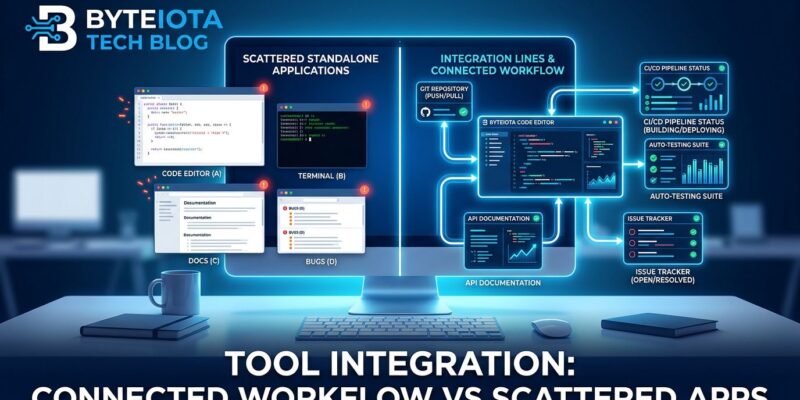
The developer tool wars ended in 2026, and the feature-obsessed lost. VS Code didn’t capture 75% market share because it has more features than JetBrains—it won because it integrates with everything. The shift is decisive: tools that minimize context switching now matter more than tools with the longest feature lists. For developers, this isn’t academic. Context switching costs the average developer $78,000 per year in lost productivity, and tool fragmentation is the primary culprit.
2025 was the year of AI tool explosion. 2026 is the year of consolidation. The lesson developers learned the hard way: integration quality beats feature counts. Evil Martians’ analysis identified six requirements that superseded traditional feature checklists—speed, discoverability, consistency, multitasking support, resilience, and AI governance. Notice what’s missing: raw capability.
Why Context Switching Costs $78,000 Per Developer
The average digital worker toggles between applications 1,200 times per day—one switch every 24 seconds. For developers, the cost is brutal. Programming requires maintaining complex mental models of code architecture, variable states, and logic flows. Once broken, these models take 20 to 23 minutes to reconstruct.
The math is unforgiving. Average developer: 12 to 15 major context switches daily. Recovery time per switch: 23 minutes. That’s 4.5 hours of lost deep focus every single day. Extrapolated across a year, context switching costs mid-level developers $78,000 in lost productivity. Economy-wide, the damage reaches $450 billion annually. Chronic multitasking consumes 40% of productive time—eight hours at your desk translates to 4.8 hours of actual output.
Tools that minimize context switching are worth more than feature-rich tools that force app switching. Thunder Client isn’t more powerful than Postman, but it lives inside VS Code. That eliminated context switch is worth more than Postman’s feature advantage. GitLens doesn’t have more capabilities than the Git CLI, but inline blame and hover details mean developers never leave their code. Integration trumps power.
The 6 Must-Haves Replace Feature Checklists
Evil Martians identified six critical requirements for developer tools in 2026 that supersede traditional feature lists. First, speed: visible feedback around 100 milliseconds, treating 200 milliseconds as the upper bound. Second, discoverability without overwhelming users—command palettes that teach shortcuts as a side effect. Third, UI consistency, because 69% of developers report losing eight or more hours weekly to unclear navigation and fragmented tools.
Fourth, designing with multitasking in mind through workspaces and keyboard shortcuts. VS Code Profiles became the all-time most requested feature because it addresses context switching directly. Fifth, resilience and stability—preserving work automatically through features like VS Code’s Hot Exit and JetBrains’ Local History. Sixth, AI governance: making AI assistance opt-in, reversible, and explainable, not black-box magic.
These criteria focus on how tools fit workflow, not what features they have. They’re a direct response to developer pain points: tool fragmentation, context switching, unpredictable recovery. The industry finally figured out what matters.
AI Became Baseline, Integration Became Differentiator
By 2026, AI coding assistants graduated from novelty feature to table stakes. 84% of developers use or plan to use AI tools, up from 76% in 2024. 51% of professional developers use AI tools daily. 41% of global code output is AI-generated or AI-assisted. 90% of Fortune 100 companies use GitHub Copilot. AI stopped being a differentiator.
The new competitive advantage is integration quality. GitHub Copilot has 76% awareness and 29% workplace usage. Claude Code captures 28% of primary-tool selections. Cursor takes 24%. But most developers run a three-tool stack rather than committing to one. Why? Because no single AI tool integrates perfectly with every workflow. The question changed from “Does it have AI?” to “Does its AI integrate seamlessly into my workflow?”
Claude Code’s value isn’t AI capability—many tools have that. Its value is understanding repo structure, dependencies, and comments. It’s context-aware integration, not raw power. The same pattern repeats across tools: AI is baseline, integration is the differentiator.
How VS Code Won with Integration, Not Features
VS Code dominates with 75% market share. 75.9% of developers use it daily. Over 7,520 companies worldwide have adopted it. The ecosystem includes 60,000 extensions. It didn’t win on features. JetBrains IDEs have deeper language tooling—84% of Java developers use IntelliJ IDEA, and IntelliJ users log 85.7 hours per user, nearly three times VS Code’s per-user average.
VS Code won on integration. Prettier integrates formatting directly into the editor, enforcing rules consistently across teams without tool switching. GitLens transforms Git from a separate tool into a first-class editor feature with inline blame and hover details. Dev Containers define development environments as code, giving entire teams identical setups without leaving the editor. The integration ecosystem, not the feature list, is what matters.
The competitive divide is clear. VS Code wins on integration, ecosystem, and versatility. JetBrains wins on deep language tooling for enterprise codebases. Both succeed, but for different reasons. Choice depends on integration needs, not feature counts. This proves the 2026 thesis: integration beats features.
How to Choose Tools in 2026
Developer tool selection criteria fundamentally changed. Old criteria prioritized feature list length, capabilities, standalone performance, and price. New criteria in 2026 prioritize integration quality first: Does it work with my existing tools? Then context switching cost: How often do I leave my flow? Speed and responsiveness come next—100-millisecond feedback loops. Then discoverability, stability, and AI governance.
Real-world examples illustrate the shift. Thunder Client versus Postman: Thunder Client isn’t more powerful—Postman has more features—but Thunder Client lives inside VS Code, eliminating the context switch. GitLens versus Git CLI: the Git CLI has all features, but GitLens provides inline integration, making Git context available without leaving code. VS Code Profiles aren’t about code editing—they’re about multitasking and context switching, which is why they became the most requested feature.
The evaluation framework changed. Pre-2026 asked, “Does this tool have feature X?” and led to tool comparison spreadsheets. 2026 asks, “Does this tool fit my workflow without forcing context switches?” Integration friction matters more than feature gaps. Context preservation matters more than powerful capabilities. When evaluating tools, prioritize integration with existing workflows over feature counts. Choose tools that minimize app switching. Favor strong defaults with selective customization to avoid tool fragmentation.
The developer tool wars are over. Integration won. Features lost. The $78,000-per-year context switching tax proved it.