 By
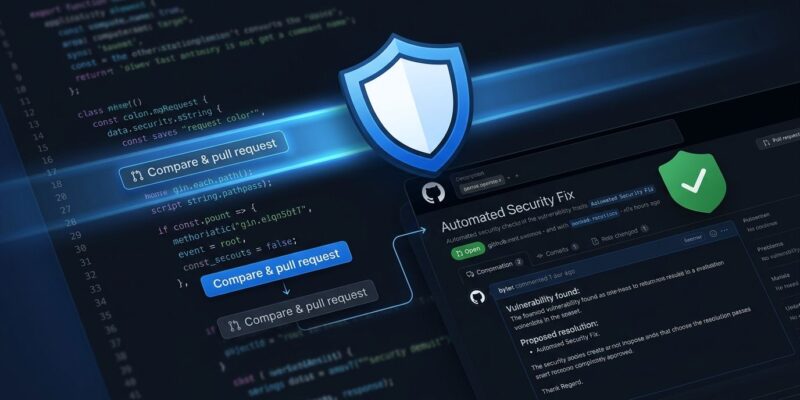
By Security scanners have always had the same problem: they find the bug and leave you to fix it. Codex Security Cloud, announced at OpenAI DevDay on September 29, changes that contract. It scans your GitHub repositories commit-by-commit, validates each finding in an isolated sandbox to eliminate false positives, then opens a pull request with a proposed patch — while your laptop is off. That is not a scanner. That is an on-call engineer.
How It Works: Three Stages, Not One
Most static analysis tools run a single pass: scan for patterns, generate a report, hope someone reads it. Codex Security does three things in sequence, and the middle step is what sets it apart.
Stage 1 — Analysis. Codex builds a project-specific threat model. It maps attacker entry points, trust boundaries, sensitive data flows, and critical code paths — scoped to your repository’s architecture, not a generic ruleset.
Stage 2 — Validation. Each potential finding gets reproduced inside an ephemeral container. If Codex cannot trigger the vulnerability in a sandbox, it discards the finding. This cuts false positives from the industry-standard ~50% down to roughly 15%. Every surviving finding has evidence attached: test output, stack traces, reproduction steps.
Stage 3 — Patching. Validated findings get a proposed fix as a GitHub pull request. You review the diff, approve or reject, and merge yourself. There is no auto-merge. OpenAI is not that reckless.
Getting Started: Five Steps
The gating requirement matters upfront: Codex Security requires a ChatGPT Business, Enterprise, or Edu workspace. Free, Plus, and Pro accounts are excluded. Business starts at $20 per user per month.
- Enable the toggle. In your ChatGPT workspace admin panel, turn on Codex Security. If you do not see it in navigation, your account team enables it after an eligibility check.
- Connect GitHub. Go to chatgpt.com/codex/security, click New scan, and grant repository access. GitLab and Bitbucket are not supported at this time.
- Create environments. Each repository needs a matching Codex environment at chatgpt.com/codex/settings/environments. This is where sandbox validation runs — configure dependencies, secrets, and setup scripts so Codex can execute your code.
- Choose scan type. Full scan backlogs your commit history (expect hours for large repos). Commit scan monitors new commits as they land. Start with commit scan on your most active repository; run a full scan during off-hours.
- Review findings. Each finding shows severity, file location, root cause, and an attached PR diff. Merge what you trust. Close what you do not.
What It Covers — and What It Doesn’t
Codex Security is a code-level SAST tool with agentic patching. That is a specific lane, and it does not cover adjacent ones.
| Tool | Platform | Auto-patches? | SCA | False Positive Rate | Price |
|---|---|---|---|---|---|
| Codex Security | GitHub only | Yes (PR) | No | ~15% | Business ($20/u/mo) |
| Snyk | Multi-platform | Partial | Yes | ~40% | ~$98/u/mo |
| GHAS (CodeQL) | GitHub only | No | Partial | ~50% | $49/u/mo |
You still need Dependabot or Snyk for dependency vulnerabilities. You still need GitHub’s native secret scanning for leaked credentials. You still need a DAST tool for runtime authorization issues. Codex Security fills the gap between “we know there is a vulnerability” and “here is a patch.” It does not replace your existing AppSec stack.
The Caveat Worth Taking Seriously
A 15% false positive rate is better than the 50% you get from traditional SAST. It is not zero. In a security context, a false-fix — a patch that introduces a new vulnerability while resolving the flagged one — is worse than no patch at all. LLM-generated code in security-sensitive paths deserves the same review you would give a junior engineer’s PR.
The community has also flagged a separate problem: Codex’s own request filter incorrectly blocks legitimate engineering tasks. Static analysis scripts, fuzz testing harnesses, and compiler tooling have all been flagged as security violations (GitHub Issue #44614). OpenAI is aware of this; it remains unresolved at launch.
Scale and Strategic Context
Codex Security is not a standalone product — it is the technical core of OpenAI’s Daybreak cybersecurity initiative, launched in May 2026. Since March, the system has scanned more than 30 million commits across 30,000 codebases. Cloudflare, Cisco, CrowdStrike, Oracle, and Zscaler are running it. Those numbers suggest this is not a demo.
OpenAI’s play is bigger than a security feature: they want Codex to own the full developer workflow — code, review, test, secure, deploy. Codex Security is the security layer in that stack. Whether that vertical integration becomes a convenience or a lock-in risk is a question worth watching.
Verdict
If you are on GitHub with a ChatGPT Business or Enterprise plan, enabling Codex Security costs nothing incremental and can reduce the backlog of unresolved SAST findings. The PR-based workflow keeps a human in the loop. The sandbox validation is a real differentiator versus traditional scanners. Enable it, review its patches carefully, and do not dismantle your existing AppSec tooling because of it.
If you are on GitLab, Bitbucket, or a Free/Plus/Pro plan: this is not for you yet. Check back in six months. Full setup documentation is available in the Codex Security developer docs.