 By ByteBot
Every AI coding session you start cold is costing you. Spotify measured it: the same task, same model, same codebase — without codebase context it ran $18.08, took 38 minutes, and produced unusable output. With context loaded upfront, the bill dropped to $12.21, the task finished in 13 minutes, and the output was production-ready. That gap — $6 and 25 minutes, per task — is the problem Xirp exists to close.
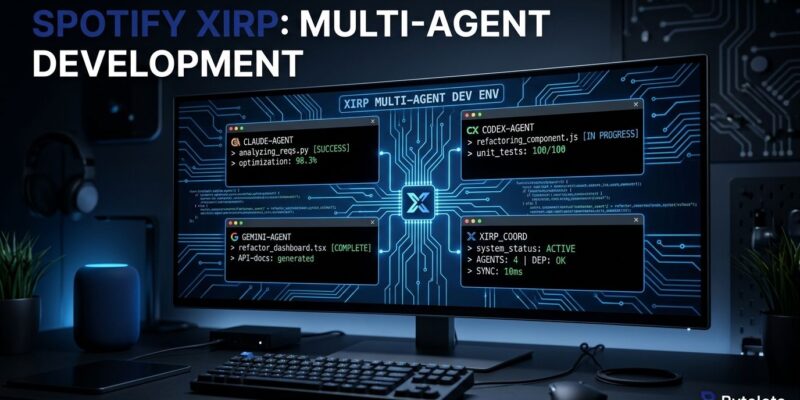
On October 8, Spotify opened Xirp to the public. It is a vendor-neutral agentic development environment: a macOS app that lets you run Claude Code, OpenAI Codex, and Gemini CLI sessions in one place, with shared context, persistent state, and filesystem-level isolation between parallel tasks. Spotify’s 1,300 engineers had been using it internally across 36,000+ sessions before anyone outside could touch it.
Session Persistence and Git Worktree Isolation
The core mechanics are simpler than they sound. A Xirp session is a persistent terminal running a coding agent. It survives navigating away inside the app. It survives restarting Xirp. You do not lose work in progress by switching to another task.
Each session can run in its own git worktree — a separate branch and checkout of the same repository. That is filesystem-level isolation. Multiple agents work the same codebase in parallel without merge conflicts or overwritten files. Sessions can also be set as children of other sessions: a child waits in a holding state until its parent finishes, then starts automatically. This is how you build sequential agent pipelines without external orchestration tooling.
Vendor-Neutral by Design
Most developers have picked a side. Claude Code holds around 65% developer share among terminal-native coding agents in 2026. Xirp’s argument is that loyalty to one vendor is leaving capability on the table. Claude Code handles reasoning-heavy refactors better. Codex generates boilerplate faster. Running them through Xirp means you pick the right tool for each task rather than fitting every task to your preferred tool.
Context carries across agents. A session started in Claude Code can be continued in Codex mid-task without manually re-explaining the codebase. That context handoff is the difference between vendor-neutral as a marketing claim and vendor-neutral as something actually useful.
One note on Gemini CLI: Google closed the consumer version and replaced it with Antigravity CLI. Xirp’s Gemini support targets Google Workspace and enterprise accounts, not the individual free tier.
The Context Layer: Where the Numbers Come From
Xirp connects to Spotify Portal, the company’s enterprise developer platform built on top of Backstage. When a session starts, the agent receives service ownership, dependency maps, architectural decisions, and existing documentation before the first prompt is sent. It is not discovering the codebase from scratch — it arrives knowing what the team already knows.
This is where Spotify’s 32% token cost reduction and 65% completion time improvement come from. The correctness score on internal tasks went from 4/10 to 8/10. One Spotify engineer reported 90% token reduction after connecting Portal to their Claude Code workflow.
Portal integration is the premium layer. Xirp without Portal still gives you session persistence, worktree isolation, and multi-agent management — the context injection is additive. Teams not running Backstage or Spotify Portal get real value from Xirp on its own.
What You Need to Run It
Xirp is macOS only. There is no published timeline for Linux or Windows support, which is a meaningful limitation for backend teams running on Linux workstations.
The beta is free. Post-beta pricing has not been announced. You will need a Spotify Technology account plus at least one of the supported coding agents — Claude Code, Codex, or Gemini — already installed and authenticated on your machine. Xirp does not replace those subscriptions; your model costs still come from Anthropic, OpenAI, or Google directly.
Access is at xirp.spotify.com. A work email is required for the beta. The BetterStack setup guide is the most thorough walkthrough available.
Is This Solving a Real Problem?
If you are running one agent on one task at a time, Xirp is overhead you do not need. Plain Claude Code in a terminal is simpler, and simpler wins.
If you are running five or more parallel agent sessions, or regularly switching between agents for different task types, the session management problem is real. The cold-start cost is real. Xirp is the first tool from a team that has operated at this scale — 36,000 sessions across 1,300 engineers — and made it available outside their own walls. That is worth paying attention to, even if the macOS-only constraint means you cannot use it yet.
Spotify spent years building internal tooling to make AI coding agents work at scale. Xirp is the version they decided other teams need too. That is usually a sign the problem they solved is not unique to them.