 By ByteBot
AI agents are only as reliable as your ability to understand why they failed. In 2026, for most developers, that still means sifting through log files, adding print statements, and re-running with slightly different prompts until something sticks. It’s 1990s debugging applied to non-deterministic, multi-turn systems that call fifteen tools in ten minutes and produce garbage at step eight because of a decision they made at step three.
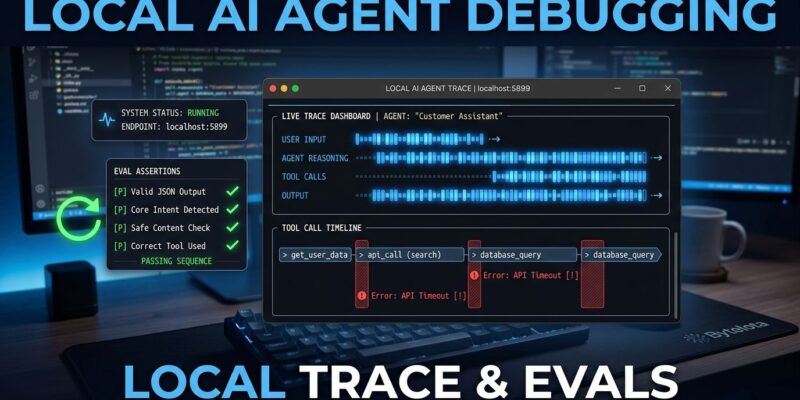
Raindrop AI shipped Workshop on May 14 to fix that. It’s a free, open-source, MIT-licensed local debugger that streams every token, tool call, and decision your agent makes directly to a dashboard on your machine. No cloud account required. No data leaving your network. Just your agent’s full execution trace, readable in real time, in a browser tab.
What Workshop Actually Is
Workshop is two things: a local daemon that captures agent telemetry, and a Vite-based UI that displays it at localhost:5899. Every model call, tool invocation, span, payload, timing, and error lands in a single lightweight SQLite .db file on disk. Open a run and you get a complete timeline — not a flat log, a structured trace you can navigate by model call, tool call, and span.
Installation is one command:
curl -fsSL https://raindrop.sh/install | bashThat handles binary placement and PATH configuration for bash, zsh, and fish across macOS, Linux, and Windows. Run raindrop drip to start the daemon and open the dashboard. Then run your agent. Traces stream in live — no polling, no refresh button.
The Self-Healing Eval Loop
The installation story is table stakes. The feature that separates Workshop from a trace viewer is what happens after you see a failure.
Workshop ships with an MCP server that lets your coding agent — Claude Code, Cursor, Devin — read the active trace directly. You don’t describe what happened. You don’t copy-paste error messages. The agent reads the structured execution data, understands what the sub-agent did wrong, and writes an eval assertion against your codebase.
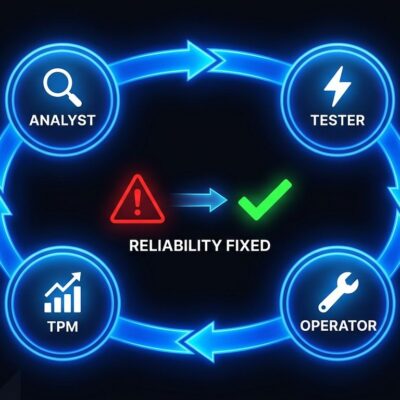
The loop: Claude Code reads the trace → writes a specific eval → runs your agent → sees the failure → fixes the code → re-runs. It continues until all assertions pass. The /setup-agent-replay command scaffolds an HTTP endpoint that replays any production trace against your local agent code, so you can reproduce prod failures without recreating the exact input conditions.
“This is actually incredible — it had been a nightmare locally to get decent observability and a feedback loop.”
Developer using Workshop with a Pi-based agent in a Cloudflare container
That’s the gap Workshop closes: not just visibility, but a closed debug-fix-verify loop that runs without leaving your terminal.
Your Stack Probably Works
Workshop supports TypeScript, Python, Go, and Rust. Framework support covers the full landscape of where AI agents run in 2026:
- Vercel AI SDK, OpenAI Agents SDK, Anthropic SDK, Claude Agent SDK
- LangChain, LangGraph, CrewAI, Mastra, Pydantic AI, DSPy
- Google ADK, Strands, Agno, Deep Agents
- AWS Bedrock, Azure OpenAI, Vertex AI, MCP, Temporal, OpenCode
It pairs with Claude Code CLI, Cursor, and Devin as the debugging agent on top. If your framework isn’t on this list, the HTTP API and OpenTelemetry-compatible spans mean you can likely instrument it yourself.
Local vs. Cloud: When to Use What
Workshop isn’t competing with Honeycomb Agent Observability, Arize, or Datadog AI. Those are production platforms — designed for scale, team visibility, alerting pipelines, and long-term trace storage. Workshop is a development tool. It lives on your machine, not in your infrastructure.
Use Workshop when you’re building and debugging locally, where you need fast iteration and don’t want development traces in a third-party cloud. Use production observability tools when your agents are live and you need team-wide visibility and SLA monitoring. They’re complementary — Workshop fills the gap that cloud platforms never targeted because it wasn’t their market.
The privacy argument matters here too. Sending local agent traces to a cloud service during development means exposing your prompt engineering, tool definitions, and intermediate reasoning to a third party. Workshop keeps all of that on your machine, in a SQLite file you control.
Get Started
Workshop is live, free, and available now at raindrop.ai/workshop. The GitHub repository hit 641 stars within days of launch — strong signal for a niche tool targeting a specific dev workflow. The docs cover framework integration in detail if you’re on a less common stack.
Agent debugging has been the unglamorous problem everyone ignored while racing to ship more capable agents. Workshop is the acknowledgment that the toolchain has to catch up. If you’re building anything with Claude Code, Cursor agents, or any of the 15+ supported frameworks, install it before your next debugging session.