 By ByteBot
OpenClaw hit 247,000 GitHub stars in just four months, making it one of the fastest-growing developer tools in 2026. This self-hosted AI assistant framework runs entirely on your own devices and connects AI models—Claude, GPT, Gemini, or 200+ others—to 50+ messaging platforms including WhatsApp, Telegram, Slack, Discord, Signal, and iMessage. Unlike cloud-based AI assistants, OpenClaw is local-first: you control the infrastructure, choose the models, and decide what data gets accessed. However, monthly costs hit $20-60 for typical users despite being “free” open source, and 512 security vulnerabilities were discovered in January 2026.
What OpenClaw Actually Is
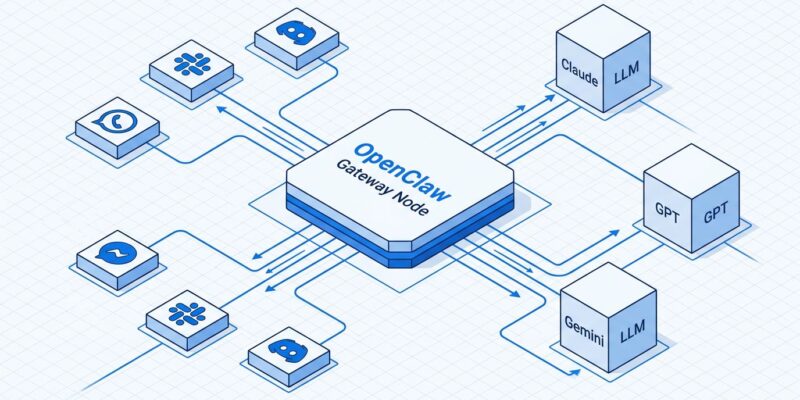
OpenClaw is a self-hosted personal AI assistant framework created by Austrian developer Peter Steinberger, founder of PSPDFKit. It’s NOT a cloud service or SaaS product—it’s infrastructure you deploy yourself. The system runs as a Node.js Gateway daemon on your machine, routing messages between 50+ messaging platforms and any LLM provider you choose.
The Gateway binds to port 18789 and acts as the control plane managing sessions, channels, tools, and events. When a WhatsApp message arrives, the Gateway routes it to an agent session, invokes the configured LLM with tools and skills, and sends the response back through WhatsApp. Furthermore, you can switch models anytime—use cheap Gemini Flash ($0.30/mo) for simple tasks, Claude Sonnet ($9/mo) for balanced work, or GPT-5.4 ($21/mo) for complex reasoning.
Installation requires Node.js 22.14+ and the onboarding wizard walks you through Gateway setup, workspace creation, channel configuration, and skill installation:
npm install -g openclaw@latest

# Run onboarding wizard (recommended)
openclaw onboard --install-daemon
The Real Costs of “Free” Software
OpenClaw itself is MIT-licensed and free, but monthly operational costs range from $3-15 for light users to $20-60 for typical use to $200+ for heavy developers. Consequently, costs break down into VPS hosting ($4-6/mo for always-on operation) and LLM API usage ($1-200+ depending on model choice and message volume).
Routing tasks by model tier cuts API costs by 60-80%. Moreover, use Gemini Flash for simple Q&A, Claude Sonnet for code review, GPT-5.4 only for complex reasoning. Caching repeated prompts reduces input token costs by up to 90%. For comparison, ChatGPT Plus and Claude Pro both charge a fixed $20/mo, making OpenClaw MORE expensive unless you optimize model usage carefully.
Setup Requirements: Not Beginner-Friendly
Each messaging platform requires manual configuration: WhatsApp Web QR code pairing, Slack OAuth tokens, Discord bot creation, iMessage BlueBubbles bridge. Additionally, one Reddit user summed up the experience: “I spent a week just getting WhatsApp and Slack connected properly. The docs are incomplete and half the community guides are already outdated.”
Developers comfortable with Node.js, npm, and terminal commands will manage setup. However, non-technical users or developers wanting “install and go” should use cloud alternatives instead. The onboarding wizard guides you through each step, but expect hours or days of configuration work, not minutes.
Skills System: OpenClaw’s Killer Feature
OpenClaw’s extensibility comes from a skills-based system: markdown files that teach the AI how to combine tools for specific workflows. Specifically, the system includes 53 official skills (Google Workspace, GitHub, Obsidian notes, WhatsApp, smart home) plus 2,857+ community skills from ClawHub.
Skills are textbooks for the AI. For example, the gog skill teaches OpenClaw how to use Google Workspace (email, calendar), github skill handles repos/PRs/issues, obsidian skill manages notes, and wacli skill integrates WhatsApp. In fact, writing custom skills is straightforward:
# SKILL: code-review

## Description
Reviews pull requests on GitHub, checks for common issues.

## Tools Required
- github
- web_fetch
- sessions_send

## Workflow
1. Monitor GitHub webhook for new PRs
2. Fetch PR diff and file changes
3. Check against project conventions
4. Run linting rules and security checks
5. Post review comments on GitHub
6. Send summary to team Slack channel
Real use cases from the community include automated code review (teams report 30% fewer review cycles before merge), CI/CD monitoring that alerts when builds fail, daily standup automation that fetches calendar events and posts to Slack, and smart home integration that locks doors when you leave home.
Related: Claude Code Routines: Anthropic Kills Cron Jobs, Adds Lock-In
Security Reality: 512 Vulnerabilities, 135k+ Exposed Instances
A security audit in late January 2026 discovered 512 vulnerabilities (8 critical), including CVE-2026-25253—a critical remote code execution exploit with a CVSS score of 8.8. Researchers found 135,000+ publicly accessible OpenClaw installations running without authentication, with 50,000+ directly vulnerable to RCE. Therefore, version 2026.3.13 had 13 point releases in one month with 9 CVEs patched.
Common security failures include Gateway port (18789) exposed directly to the internet with no firewall, no authentication enabled for channels, default sandbox mode OFF (tools execute on host), and outdated versions missing critical patches.
Essential security hardening steps:
# .openclaw/config.yml
agents:
  defaults:
    sandbox:
      mode: "non-main"  # Sandbox group/channel interactions

gateway:
  port: 18789
  auth:
    enabled: true  # Require authentication
    dm_protection: true  # Pairing codes for unknown senders
Never expose Gateway port to the internet—use firewall rules (UFW, iptables) to block external access. Additionally, enable authentication for all channels. Run in Docker sandbox mode for multi-user scenarios. Implement pairing-based DM protection where unknown senders need codes before OpenClaw processes messages. Furthermore, check GitHub releases weekly for security updates. Use VPN (Tailscale, WireGuard) for remote access instead of public exposure.
Privacy-conscious developers attracted to “local-first” OpenClaw must become security-conscious to run it safely. Indeed, the paradox: you want privacy but get exposed vulnerabilities if you don’t harden properly.
When to Use OpenClaw (And When to Avoid It)
Choose OpenClaw if you’re comfortable with Node.js, terminal, and config files; need AI across WhatsApp + Slack + Discord + iMessage simultaneously; want to choose your own LLM models (not locked to one vendor); privacy is critical (local-first, data stays on your devices); need custom workflows via skills (email automation, GitHub monitoring, smart home); and you’ll deploy on VPS for 24/7 operation.
Conversely, avoid OpenClaw if you want AI working in 5 minutes (use ChatGPT or Claude Code instead); you’re not technical (non-developers will struggle with setup); you need enterprise features (SLAs, audit trails, multi-user permissions); security vulnerabilities are unacceptable (512 vulns in Jan 2026); you have low tolerance for instability (13 releases in one month); or coding is your only use case (Claude Code is more focused and polished).
Key Takeaways
- OpenClaw is self-hosted infrastructure, not a cloud service—expect $20-60/mo operational costs despite MIT-licensed “free” software, with expenses coming from VPS hosting and LLM API usage
- The skills system (53 official + 2,857+ community skills) enables custom workflows beyond basic chatbots—automated code review, CI/CD monitoring, smart home control, and multi-platform messaging integrations
- Security requires active hardening: 512 vulnerabilities were discovered in January 2026, with 135,000+ exposed instances on the public internet—never expose Gateway port, enable authentication, use sandbox mode, and check for weekly security patches
- Setup takes hours or days, not minutes—requires Node.js 22.14+, manual messaging platform configuration, API keys, and comfort with terminal commands; cloud alternatives (ChatGPT, Claude Code) offer faster onboarding
- Choose OpenClaw for control and privacy (local-first, model choice, custom workflows); avoid it for simplicity, enterprise reliability, or minimal security tolerance—the trade-off is complexity for flexibility