 By ByteBot
Google shipped Antigravity 2.0 at I/O 2026 on May 19 and turned a coding assistant into a five-surface agent platform in one drop: desktop app, CLI, SDK, hosted agent infrastructure, and an enterprise tier. It is the most complete competitor to Claude Code and Cursor that Google has ever put on the table. It also broke thousands of developer setups overnight through a forced migration that wiped terminals, extensions, and project history without warning. Both things are true, and both matter before you decide whether to touch it.
Five Surfaces, Not One
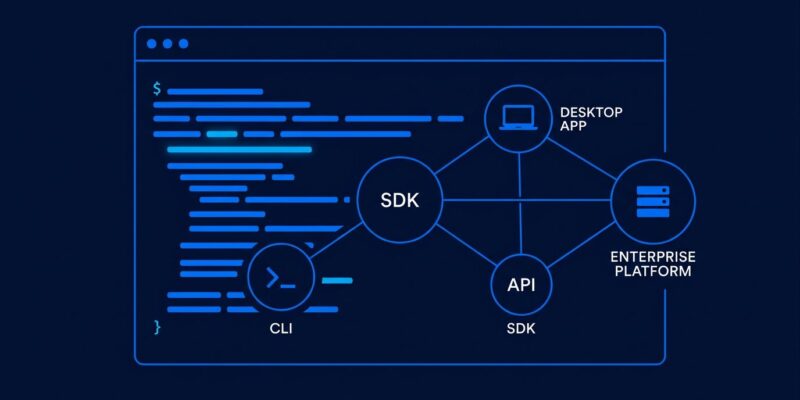
Most coverage of Antigravity 2.0 frames it as a desktop app refresh. It is not. Five products shipped simultaneously at Google I/O 2026:
- Desktop app — a rebuilt multi-agent orchestration hub with a visual Agent Manager dashboard
- CLI (
agy) — a Go-based, terminal-native tool running the same agent runtime as the desktop - SDK (
google.antigravity) — a Python library for building custom agents on Google’s infrastructure - Managed Agents API — serverless agent hosting inside the Gemini API, billing per run rather than per token
- Gemini Enterprise Agent Platform — enterprise path with SLAs and managed deployment
The distinction matters. A developer who only wants a terminal tool can go straight to agy and never open the desktop app. A team building internal tooling gets hosted agent infrastructure via a single API call. These are genuinely different products that happen to share a name and a runtime.
Getting In Fast: The CLI
The lowest-friction entry point is agy. Install from the official CLI repository with one command on macOS and Linux:
curl -fsSL https://antigravity.google/cli/install.sh | bashWindows users can run the PowerShell equivalent. Authenticate with a Google account, and you have the full agent runtime: multi-step reasoning, multi-file editing, MCP tool connections, and conversation history. Resume a previous session with agy --conversation=<id>. The CLI is built for developers who already live in the terminal and do not want to adopt a new GUI just to evaluate a new tool.
Multi-Agent Orchestration: The Real Differentiator
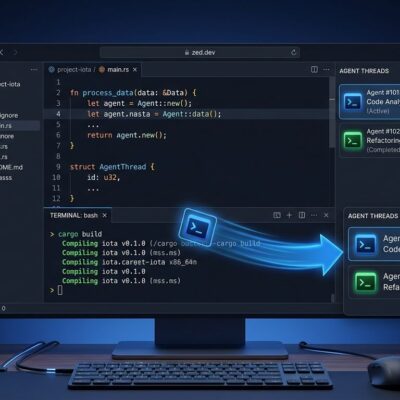
The desktop app exists because of one feature no other consumer-tier agent tool currently offers: a visual multi-agent orchestration interface. The Agent Manager dashboard lets you spawn multiple agents running in parallel, see each agent’s status and artifacts in real time, and approve or reject actions before they land. The main agent breaks a task into subtasks, sub-agents work those concurrently, and the system surfaces the consolidated output when it is done.
Google calls the recommended mode Review-Driven Development: the agent moves autonomously but pauses for human approval before significant changes. According to XDA Developers’ hands-on testing across all three major agent tools, Antigravity has the best speed and multi-agent visualization of any tool currently available. That is not a small claim, and it holds up across independent reviews.
The SDK and Managed Agents
The Python SDK supports MCP server connections, which means your custom agent can plug into the same tool ecosystem as Claude Code or Cursor. The basic pattern from the official repository:
from google.antigravity import Agent, LocalAgentConfig
from google.antigravity.types import McpStdioServer

config = LocalAgentConfig(
    mcp_servers=[McpStdioServer(name="my_server", command="npx", args=["my-mcp-server"])],
)
async with Agent(config) as agent:
    response = await agent.chat("Use the MCP tools to help me.")
Managed Agents takes this further: call the Gemini API with your agent config and Google provisions a secure Linux sandbox, handles the infrastructure, and charges per run. No containers to manage, no scaling to configure. The per-run billing model is sound in principle — but there is a catch in the next section.
What Broke — and What It Signals
The forced update on May 19 did not go cleanly. For a significant number of users, Antigravity 2.0 wiped terminals, file explorers, keybindings, and project history. Active work became inaccessible. The migration was mandatory. TechCrunch covered the launch — the developer forum threads covered the damage.
There are also structural issues in the new billing model. Antigravity 2.0 uses compute-based quota, which is more accurate than daily prompt limits — but Google has not published a compute-unit conversion table. Developers cannot estimate how much a given agent run will cost before starting it. The /usage command only refreshes after a quit-and-reload. Multiple users reported 7-day lockouts after less than 30 minutes of use. This is not a minor UX oversight; it is a material problem for any team running automated workflows.
This is a recognizable Google pattern: technically impressive launch, insufficient attention to the developer trust equation. It does not mean Antigravity 2.0 is not worth using. It means you should go in with eyes open.
How It Compares to Claude Code and Cursor
A direct comparison at the team level:
| Tool | Speed | Reasoning Depth | Multi-Agent Visual | Annual Cost (10 devs) |
|---|---|---|---|---|
| Antigravity 2.0 | Fastest | Good | Yes | $2,400 |
| Claude Code | Slowest | Best | No | $18,000 |
| Cursor | Middle | Good | No | $4,800 |
On price, Antigravity wins by a wide margin. On reasoning depth, Claude Code (running Opus 4.7) still leads. On IDE polish, Cursor is the most mature experience. Antigravity’s unique card is the multi-agent visualization — if that maps to a real workflow problem you have, it justifies a serious look.
Where to Start
Antigravity 2.0 is the most ambitious developer agent platform Google has shipped. The five-surface architecture, the visual multi-agent orchestration, and the MCP-compatible SDK represent genuine progress. The pricing is aggressive. The launch execution was not.
Start with the CLI. It is the lowest-risk surface, it runs the full agent runtime, and it does not require touching the desktop app that caused most of the launch chaos. Give the desktop app a few patch cycles before committing a live project to it. The Managed Agents API is worth watching for teams that want hosted agentic infrastructure — once Google publishes the compute-unit pricing table, the cost model will make sense.
The multi-agent orchestration is good enough to warrant a serious evaluation even if you are already productive on Claude Code or Cursor. Whether it is good enough to switch is a different question, and right now the honest answer for most teams is: not yet.