 By ByteBot
The Model Context Protocol just stopped being a text protocol. On January 26, 2026, Anthropic and OpenAI shipped MCP Apps — the first official MCP extension — and it does exactly what the name suggests: your tools can now return interactive interfaces that render directly inside Claude, ChatGPT, and four other hosts. Not links to external UIs. Not markdown tables dressed up as dashboards. Actual iframes, with bidirectional communication, rendering in the conversation window. The TypeScript SDK updated today. Six hosts are live. The window for waiting this one out is closing fast.
What Changed (and Why It Matters)
Every MCP tool call before January 26 returned text or structured data. The LLM received it, formatted it, and handed it back as more text. That was the contract. MCP Apps breaks that contract in the best possible way.
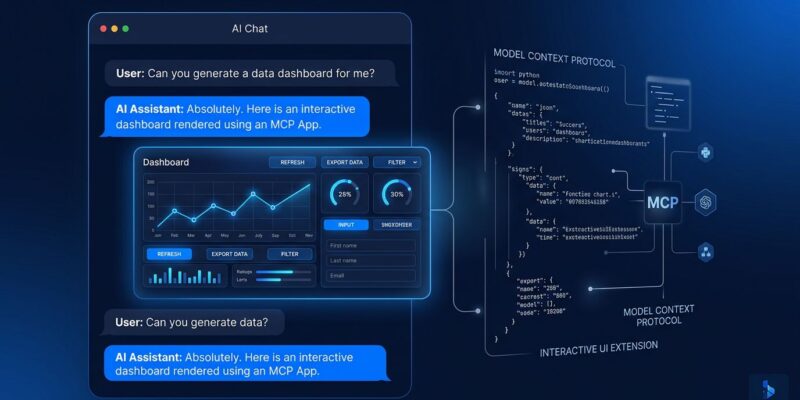
Tools can now declare a ui:// resource alongside their response. The host fetches that resource — an HTML bundle your server serves — and renders it in a sandboxed iframe inside the chat. The user interacts with it. Those interactions can trigger further tool calls via JSON-RPC over postMessage. The LLM does not need to be in the loop for each step.
This is the architectural shift worth paying attention to: conversations become stateful workspaces. Instead of asking an agent to “show me system metrics,” the agent opens a live dashboard with charts you can filter and time ranges you can adjust, right there in the chat window. The response is not a terminal output. It is a persistent surface.
Where It Works Right Now
Six hosts confirmed support as of launch:
- Claude (web and desktop)
- ChatGPT
- VS Code (Copilot)
- Goose
- Postman
- MCPJam
The cross-platform story is the headline: build one MCP App, and it runs on Claude and ChatGPT without code changes. Both hosts implement the same spec. That is a meaningful departure from the fragmented, vendor-specific UI workarounds developers were kludging together before this extension existed.
The Security Model Is Mandatory, Not Optional
Every MCP App UI runs in a sandboxed iframe. That means no access to the host’s DOM, no cookies, no local storage access, no parent page navigation. All UI-to-host communication goes through JSON-RPC over postMessage — auditable, loggable, and interceptable by the host before it reaches your server. User consent is required for any tool call the UI initiates.
This is the right default. A malicious or buggy MCP server cannot use a UI payload to hijack the host application. Developers inherit these protections automatically — there is nothing to opt into. The downside is that you cannot reach outside the iframe boundary, which rules out some patterns (direct DOM injection, reading ambient host context). The upside is that hosts will actually ship this, because the trust model is clear.
How to Build One
The toolchain is straightforward:
npm install @modelcontextprotocol/ext-apps @modelcontextprotocol/sdkTwo pieces on the server: register your tool with a _meta.ui.resourceUri field pointing to your ui:// resource, and register the resource itself as an HTML bundle. On the client side, the App class from @modelcontextprotocol/ext-apps handles receiving tool results and calling further tools from within the UI.
Framework support covers React, Vue, Svelte, Preact, Solid, and vanilla JS. The server-side code is identical across all of them — swap the UI layer as you see fit. The official ext-apps repository ships working examples: a Three.js 3D server, an interactive map server, a real-time system monitor, and a PDF viewer, among others.
The Ecosystem Numbers Make the Timing Argument
MCP has gone from experiment to infrastructure fast. Monthly SDK downloads hit 97 million in March 2026 — a 970x increase in 18 months. 78% of enterprise AI teams report at least one MCP-backed agent in production. 10,000+ public MCP servers are indexed. Nine launch partners — Amplitude, Asana, Box, Canva, Clay, Figma, Hex, monday.com, and Slack — shipped MCP Apps on day one. Salesforce is confirmed coming.
The point: this is not a speculative extension waiting for adoption. The servers are running. The hosts are live. The spec is stable — the SEP-1865 specification is finalized and the official documentation is shipping.
Start Building
If you are running an MCP server today, the upgrade path is additive. You do not rewrite your tools — you augment them with a ui:// resource and let supporting hosts render it. Non-supporting hosts continue to receive the text response and ignore the metadata. The rollout is backward-compatible.
The deeper case for moving now: the developers who ship MCP Apps early get first-mover advantage in a category that is about to get crowded. Once Salesforce, GitHub, and the rest of the enterprise wave arrives, the interesting UI patterns will be table stakes. The official MCP Apps launch post and the ext-apps GitHub repo have everything you need to get started today.