 By
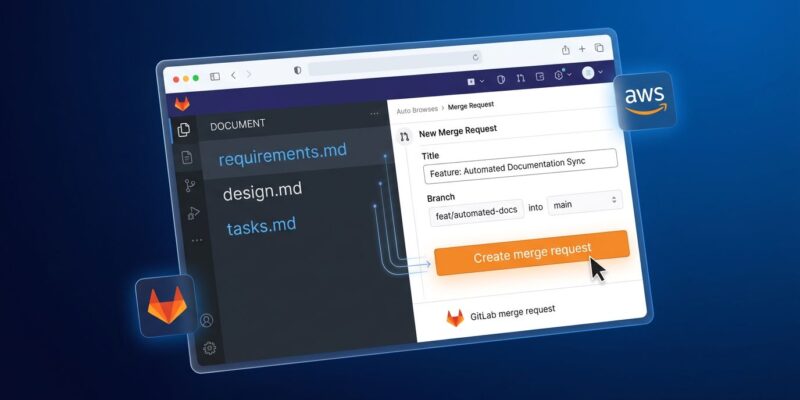
By Kiro Web added GitLab support and the full Specs workflow on June 11. If your team runs GitLab — and most enterprise and self-hosted shops do — you can now connect repos, generate a structured plan, and have the agent open merge requests, all from a browser tab. No desktop install required.
This matters more than it sounds. Kiro‘s pitch has always been spec-driven development: generate requirements, architecture, and task plans before the agent writes a single line of code. That discipline is most valuable on complex team projects — which are also the projects most likely to live on GitLab. Kiro spent its first several months locked out of exactly the audience it was built for. That changes now.
What Shipped on June 11
Three changes in this release:
- Full GitLab support. Connect any GitLab repository with a personal access token. The agent clones the repo into its cloud sandbox, writes code, and opens merge requests on your behalf. You can also inspect existing MRs and review issues directly from the chat window — without switching tabs.
- Specs in the browser. The requirements-design-tasks workflow is now available in Kiro Web. Previously, Specs were a desktop-only feature. That gap is closed.
- Cross-repo sessions. Mix GitLab and GitHub repositories in a single session. If a feature touches services on different platforms, Kiro coordinates both changes and opens the appropriate pull or merge requests for each.
Separately, Claude Opus 4.8 is now available across Kiro IDE, CLI, and Web. It ships with a 1M context window, 128K max output, and a 2.2x credit multiplier versus Sonnet. If you are on the 1,000-credit Pro plan, that cost difference matters. Use Sonnet for routine tasks; reach for Opus on long-horizon, multi-service work where its stronger self-verification earns the overhead.
How the Specs Workflow Works
The Specs workflow is Kiro’s defining feature. Here is how it works in the browser:
- Describe what you want to build, fix, or restructure in plain language.
- Kiro generates three files:
requirements.md(user stories and acceptance criteria),design.md(architecture, components, data models), andtasks.md(sequenced implementation steps). - Review and edit these files through chat. The agent does not start coding until you approve.
- Run all tasks or select specific ones. Download the artifacts when done.
The approval gate in step 3 is what prevents the context drift that turns a “quick feature” into a three-day debugging session. Most AI coding tools race to produce code. Kiro makes you sign off on the plan first.
When Specs Are Worth It — and When They Are Not
Specs add roughly 10-15 minutes of upfront structuring. On a two-day feature touching multiple services, that is a good trade. On a five-line bug fix, it is not.
Use Specs for
- Features touching multiple files or services
- Architectural decisions needing documentation
- Team features where shared understanding reduces back-and-forth
- Greenfield multi-service projects
Skip Specs for
- Single-file bug fixes
- CSS and style-only changes
- Quick local prototyping
- Exploratory experiments
Kiro Web supports both Vibe mode (chat-first) and Specs mode. Switching between them mid-session is now supported as of the June 2 update.
Connecting GitLab in Practice
You need a personal access token with three scopes: api, read_repository, and write_repository. Generate it in GitLab under Settings → Access Tokens, then add it in Kiro Web under Settings → Integrations.
Once connected, Kiro clones the repository, makes changes in an isolated cloud sandbox, and opens a merge request when the work is done. The agent can also read your existing MRs and issues, so you can ask it about your current work state without copy-pasting context into the chat.
One note: CVE-2026-0830 disclosed a remote code execution flaw in the Kiro GitLab Helper earlier this year. Confirm you are on a patched version before connecting production repositories.
Why This Release Is Actually Significant
Andrej Karpathy — who coined “vibe coding” — was explicit that the approach is for throwaway weekend projects, not production systems. Two years of AI-generated drift and technical debt have made enterprise teams receptive to exactly the structured alternative Kiro offers. The spec-driven model is not new; Kiro’s contribution is automating the spec generation from a plain-language description, then holding the developer accountable to it before the agent runs.
Whether that model fits your team depends on how much you value documentation and traceability versus raw iteration speed. For teams burned by agentic sessions that “worked” but left no one understanding why, the spec-driven approach is worth a serious evaluation.
The full Kiro Web documentation is at kiro.dev/docs/web. GitLab setup instructions are in the Web → GitHub/GitLab section.