 By
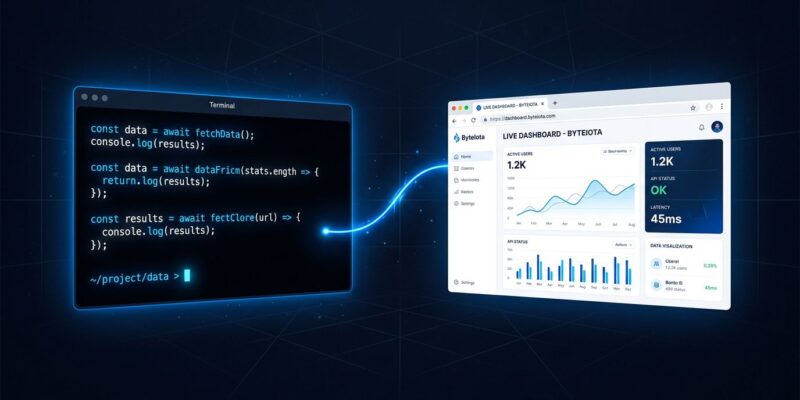
By Every AI coding session is a black box to your team. Claude spends forty minutes inside your terminal — pulling logs, annotating the diff, building a dependency graph — and the only output your teammates see is a PR description you typed afterward. Anthropic shipped a fix for that on June 18: Claude Code Artifacts. It publishes session work as a live, shareable web page at a stable URL. The page updates as Claude keeps working. Your team opens the link and watches the investigation unfold instead of waiting for your Slack update.
What Artifacts Is
An artifact is a live HTML or Markdown page that Claude Code publishes from your terminal session to a private URL on claude.ai. Not a screenshot. Not a copied chat log. A rendered page that refreshes in place every time Claude publishes a new version — at the same URL, with scroll position preserved. Version history is saved. Share the link once; it stays current.
The mechanism: Claude writes an .html or .md file to your local project, asks permission before first publish, then pushes it to claude.ai. Anyone with the link — within your org — sees the latest version the moment it lands. The official Anthropic announcement describes it as turning a session’s work into “a live, interactive, and shareable custom HTML webpage.”
How to Enable It
Artifacts is in beta and requires a Claude Code Team or Enterprise plan. If you are on an individual plan, you cannot use it yet. Once you are on a qualifying plan:
- Run
/loginin your Claude Code session to authenticate. - Ask Claude in plain English to build an artifact. There is no slash command — Claude decides to publish when the output suits a page format.
- Claude prints the URL and opens your browser. Use
Ctrl+]to reopen the most recent artifact from the terminal at any point.
Prompts that work well:
# PR walkthrough
"Make an artifact walking through this PR — the diff, the reasoning, and what I tested."

# Incident investigation
"Build me a live incident page as we work through these logs."

# Data visualization
"Render this query output as a bar chart artifact I can share with the team."
The Three Use Cases That Change How Teams Work
PR Walkthroughs
Instead of a reviewer reconstructing intent from a two-sentence PR description, you get a rendered page with the diff annotated inline, reasoning in the margin, and findings color-coded by severity. Reviewers read the thinking next to the code. Review cycles that normally require a synchronous walkthrough become fully async. This is the use case that will convert skeptics fastest.
Incident Response
During an outage, share the artifact URL in your incident channel instead of composing status updates. Claude republishes the timeline as the investigation progresses — the current hypothesis, the suspect commits, the error-rate chart — and anyone watching the page sees updates without interrupting the on-call engineer. By the time the post-incident standup starts, the draft postmortem is already half-written. This is the use case that pays back its setup cost in the first incident.
One-Off Data Dashboards
Pull a data set in session, ask Claude to render it as an interactive chart. Stakeholders get a visual answer without you spinning up a BI tool or sending a spreadsheet. One constraint applies here: the page cannot fetch live data at view time. Everything is embedded at publish time. For snapshot reporting, that is fine. For live feeds, it is not the right tool.
The Constraints Your Team Needs to Know
The limits are real and intentional. Anthropic’s official documentation is direct: an artifact is a capture of work, not an application.
- 16 MiB hard cap per artifact. Render large datasets in summary form, not raw.
- No external network requests. All CSS, JavaScript, and images must be inlined. The strict CSP blocks every external host — no fonts from Google Fonts, no scripts from a CDN, no API calls at view time.
- No form submissions, no multi-route apps. One self-contained page only.
- Org-authenticated only. You cannot make an artifact publicly accessible. Sharing is limited to people inside your Claude organization.
- Team and Enterprise plans only during beta. Individual plan users are not eligible.
The CSP constraints mean Artifacts will not replace your actual dashboards. What it replaces is the friction between the AI doing the work and the team seeing the output — a different problem, and a more tractable one. For a deeper look at the operator-level configuration options, the operator’s guide on Dev.to covers permission models and org-level controls.
What This Signals About Where Claude Code Is Headed
Every other major AI coding tool — Cursor, GitHub Copilot, Codex — keeps session work private to the developer. Anthropic is moving Claude Code in a different direction: the team’s shared visibility surface, not just a personal terminal assistant. Claude Cowork brought background agents to mobile; Artifacts brings session output to anyone with a browser. The pattern is a product that increasingly treats the team, not the individual, as the unit of value.
Whether that bet pays off depends on how fast the beta matures — specifically whether individual plan access and public sharing arrive. For now, if your team is on Claude Team or Enterprise, this is worth enabling today. The PR walkthrough use case alone justifies the ten seconds it takes to ask. VentureBeat’s enterprise analysis frames it as bridging the gap between backend engineering work and non-technical stakeholders — which is the right framing.