 By ByteBot
Amazon Bedrock AgentCore Runtime added bring-your-own file system (BYOF) support on May 6, and it is one of the more quietly important releases AWS has shipped this year. Every previous AgentCore session booted into a blank microVM — tools re-downloaded, datasets reloaded, context rebuilt from zero. If your agent needed a 2 GB skills library and a reference dataset at startup, you paid that cost every single session. BYOF eliminates the pattern entirely.
You now attach your Amazon S3 Files or EFS filesystem to an AgentCore Runtime and it mounts at whatever path you specify inside the microVM. The agent reads and writes using standard file operations. Changes to S3 Files sync back to S3 automatically. No custom mount code, no privileged containers, no download orchestration before the agent starts working.
Session Storage vs BYOF — Get This Right
AWS shipped managed session storage in March and BYOF in May, and the two features solve different problems. Conflating them is a guaranteed way to introduce data isolation failures or waste money.
Managed session storage is isolated per-session scratch space. One session cannot read another session’s storage. No VPC required. Hard cap at 1 GB per session, retained 14 days. Use it for intermediate results that belong to exactly one task.
BYOF is shared storage — multiple sessions, multiple agent instances, and external applications can all read and write the same filesystem simultaneously. It requires VPC connectivity (NFSv4.2 over TLS with IAM auth through port 2049). Use it for data that needs to exist across sessions and across agents: skill libraries, tool collections, curated datasets, knowledge bases, project files.
The practical rule: session storage is a scratch pad; BYOF is the team library.
Multi-Agent Collaboration Without Message Queues
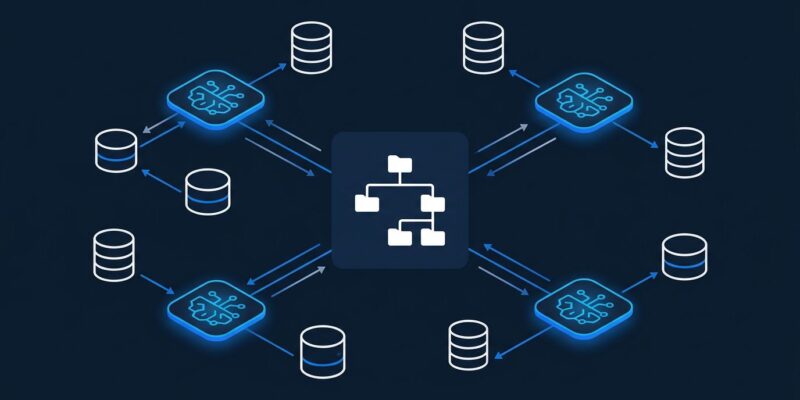
The immediate implication most teams will care about is multi-agent data pipelines. Before BYOF, coordinating data between agents required custom messaging — writing to SQS, reading from DynamoDB, or building bespoke handoff protocols. Now a research agent writes its findings to /shared/findings/ and a synthesis agent reads them directly. That is standard Unix pipeline semantics applied to AI agents.
There is an important consistency note: AgentCore uses NFS close-to-open semantics, which means writes from one agent session become visible to another immediately after the writer closes the file. Build your coordination logic around file-close events, not timed polling.
Multiple agent instances can also mount the same filesystem to get a single canonical version of shared tools and prompt templates. No version drift across your fleet. One update to /shared/skills/ propagates to every new session that mounts it.
S3 Files or EFS — Which One to Pick
Both options deliver sub-millisecond latency on active data. The choice comes down to access patterns:
- S3 Files: Choose this when you need both filesystem access and the S3 API against the same data — presigned URL generation, S3 event triggers, or S3 Select queries on your agent’s output.
- EFS: Choose this when you need true POSIX NFS semantics across multiple services simultaneously — EC2 instances, Lambda functions, containers, and now AgentCore all reading the same filesystem.
Close the Loop With Evaluations
AgentCore Evaluations reached general availability on March 31. It continuously samples live agent interactions and scores them across dimensions — correctness, helpfulness, tool selection accuracy, harmfulness — feeding results into CloudWatch with configurable alerting thresholds. You can also run on-demand evaluations in CI/CD pipelines for regression testing before deployments.
The practical value here is measurement. BYOF improves agent startup speed and enables persistent workflows, but you need Evaluations to know whether those improvements translate into better agent output quality. Adding Evaluations to your AgentCore setup is not optional if you care about maintaining production performance over time.
What to Do Now
If you are running AgentCore in production, the path forward is straightforward:
- Decide between session storage and BYOF based on whether your data needs to be shared across sessions or agents.
- If using BYOF, ensure your AgentCore Runtime has VPC configuration enabled — this is a prerequisite.
- Choose S3 Files if you need S3 API access; choose EFS if you need POSIX NFS semantics.
- Add AgentCore Evaluations to your CI pipeline for regression testing before any agent update ships.
Full configuration details are in the AgentCore Runtime filesystem documentation. The feature is available across all 15 AgentCore regions with no additional service charge beyond standard S3 and EFS pricing.