 By ByteBot
Google launched Android CLI on April 16, 2026—an official command-line interface that reduces LLM token usage by 70% and completes Android development tasks 3x faster than standard toolsets. The tool consolidates fragmented Android SDK commands (sdkmanager, avdmanager, adb) into a single agent-optimized binary with four core capabilities: SDK management, project creation, device handling, and updates. Available in preview at d.android.com/tools/agents, it works seamlessly with Gemini, Claude Code, Codex, and third-party agents across phones, tablets, Wear OS, Auto, and TV.
The 70% token reduction translates to real cost savings for developers using paid LLM APIs like Claude or GPT-4. For CI/CD pipelines, it means faster builds. For agent-driven development, it means lower barriers to entry. This marks Google’s strategic pivot toward agent-first development infrastructure—announced one day after Apple banned AI coding via its Vibe Coding policy on April 15.
The 70% Token Reduction: What It Actually Means
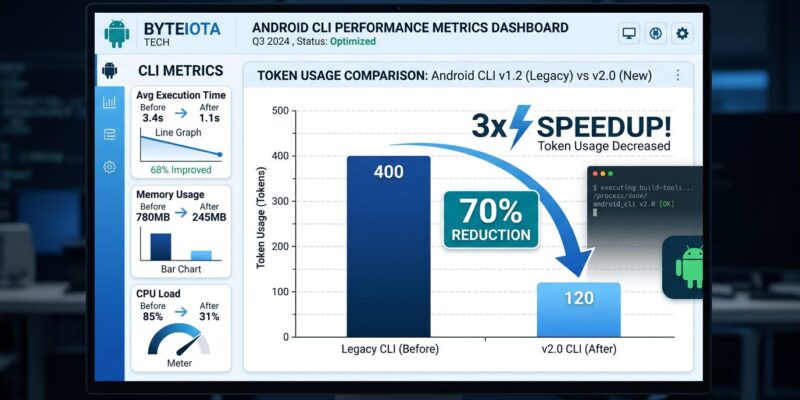
Android CLI reduces LLM token consumption by 70% on project and environment setup tasks compared to agents navigating standard Android SDK tools manually. Internal Google testing shows tasks completing in roughly 33% of the original time—a genuine 3x speedup, not marketing fluff.
Here’s the breakdown. A typical setup task (project creation + SDK configuration + emulator setup) consumes about 400 tokens when an agent manually parses verbose documentation, guesses command syntax, and interprets error messages. With Android CLI’s concise syntax and structured output, that drops to 120 tokens. The math for a developer using Claude Opus API ($15 per million input tokens): before Android CLI, 400 tokens costs $0.006 per setup. After, 120 tokens costs $0.0018. At 10 setups per day over 250 workdays, that’s ~$10.50 in annual savings per developer—modest for individuals but significant at team scale.
The bigger win isn’t dollars saved. It’s the iteration speed. 70% fewer tokens means agents spend less time on setup and more time generating code. CI/CD pipelines provision environments in minutes, not hours. Token efficiency compounds across workflows.
Four Core Capabilities Make Setup Instant
Android CLI consolidates Android development workflows into four commands. First, android sdk install downloads only necessary SDK components for lean environments—no more full Android Studio bloat. Second, android create generates projects from official templates with recommended architecture built in. Third, android emulator and android run handle device management and app deployment across all Android form factors. Fourth, android update ensures latest capabilities without manual maintenance.
Here’s what that looks like in practice:
# Lean SDK setup (vs full Android Studio)
$ android sdk install --packages "platform-tools,build-tools;35.0.0,platforms;android-35"

# Create Compose project in seconds
$ android create --name BookManager --template compose-empty --package com.example.books

# Output: Project created at ./BookManager with Jetpack Compose, Material 3, recommended architecture
The result: project created with Jetpack Compose, Material 3, and recommended architecture built in. Only essential SDK components downloaded, saving disk space and setup time. CI/CD pipelines provision clean environments without configuration debates.
Skills and Knowledge Base: Solving the LLM Training Cutoff Problem
Android CLI integrates with Android Skills (markdown-based workflow specs that auto-trigger when agent prompts match metadata) and Android Knowledge Base (accessible via android docs, providing current guidance from developer.android.com, Firebase, Google Developers, Kotlin docs). This overcomes a critical limitation: LLM training data goes stale, but Knowledge Base stays current.
Even if your LLM trained a year ago, it can still provide latest recommendations by querying the Knowledge Base. Android Skills currently cover Navigation 3 setup, edge-to-edge UI implementation, and AGP 9 migrations. When an agent detects a prompt like “add edge-to-edge UI support,” it executes android skills implement-edge-to-edge and automates build.gradle updates, MainActivity changes, and theme adjustments.
This isn’t a one-time productivity hack. It’s infrastructure for sustained agent productivity. Teams avoid outdated patterns from stale LLM training. Skills enable consistent workflows across projects—imagine defining a “set up company auth library” skill shared across the entire team.
Google Embraces Agents, Apple Bans Them
Google’s Android CLI launch (April 16) and Apple’s Vibe Coding ban (April 15) represent opposite strategic bets on the future of development. Google invests in agent-first tooling—CLI, Skills, Knowledge Base, Android Studio Otter 3 with LLM flexibility and MCP support. The Android team’s mission statement: “Whether you are using Gemini in Android Studio, Gemini CLI, Antigravity, or third-party agents like Claude Code or Codex, our mission is to ensure that high-quality Android development is possible everywhere.”
Apple blocks AI coding assistance via App Store Guideline 2.5.2, restricting tools that generate code without human oversight. The timeline matters: Apple bans AI coding on April 15, Google launches agent CLI on April 16. One day apart, stark contrast.
Related: Apple Vibe Coding Ban: App Store Guideline 2.5.2 Workarounds
The ecosystem split is real. Android developers get official agent tooling. iOS developers face restrictions. Android becomes more attractive for agent-driven development workflows while iOS development remains traditional. Google’s openness—supporting Claude, Codex, not just Gemini—signals long-term commitment to the agent ecosystem, not vendor lock-in.
The Continuum Model: CLI + Android Studio, Not Replacement
Android CLI isn’t replacing Android Studio. It’s the first step in a “development continuum” where agents use CLI for rapid setup and deployment, then developers transition to Android Studio for visual debugging, UI design, performance profiling, and production refinement. Google explicitly positions them as complementary: CLI for automation, Studio for deep work.
Android CLI excels at CI/CD pipelines (lean environments, fast builds), rapid prototyping (agent generates initial code), scripted maintenance (dependency updates, migrations), and multi-form-factor testing (phones, tablets, wearables, auto, TV). Android Studio remains essential for visual UI/UX design (Layout Editor, Compose preview), interactive debugging (breakpoints, variable inspection), performance profiling (CPU, memory, network, battery), and production hardening (obfuscation, signing, release builds).
The continuum model corrects the misconception that CLI replaces Studio. Teams get the best of both worlds: agent efficiency for boilerplate, human expertise for critical work. This is workflow evolution, not tool replacement. Developers who understand the continuum will outpace those who treat tools as either/or.
Key Takeaways
- Android CLI reduces agent development token usage by 70% and completes setup tasks 3x faster—real efficiency gains measured on project creation, SDK configuration, and device management workflows
- Four core commands (SDK install, project create, device/emulator, update) consolidate fragmented Android SDK tools into a single agent-optimized interface with concise syntax and structured output
- Skills and Knowledge Base overcome LLM training cutoff dates—agents access current best practices from developer.android.com even if trained a year ago
- Google’s agent-first strategy (Android CLI, Skills, Otter 3) contrasts sharply with Apple’s Vibe Coding ban announced one day earlier—Android becomes the agent-friendly mobile ecosystem
- CLI + Android Studio continuum model: agents initiate workflows (setup, automation), humans refine in Studio (debugging, profiling, production)—complementary tools, not replacements
The tool launched in preview today at d.android.com/tools/agents. Expect bugs, breaking changes, and incomplete documentation—this is day one. Test the 3x speedup on your own projects before committing to production workflows. The benchmark claims are real for setup tasks, but don’t expect magic across all development phases.