 By
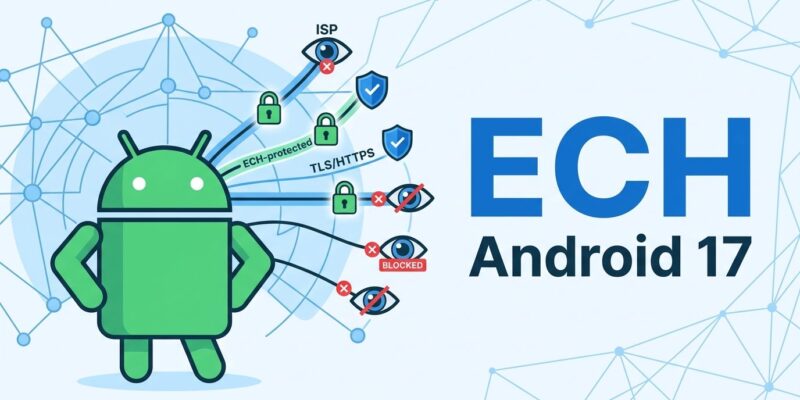
By Android 17 ships Encrypted Client Hello (ECH) as a default-on feature for apps targeting API level 37, making it the first major mobile OS to close a surveillance gap that HTTPS has carried since its inception. Published August 27, ECH hides the domain names your app connects to from ISPs, carriers, and network observers. The catch: it only activates if you have upgraded OkHttp to 5.5.0 and set your target SDK correctly — and a second silent change, Certificate Transparency going default-on at the same API level, will break apps using internal certificate authorities if you are not prepared.
The Gap HTTPS Never Closed
HTTPS encrypts the content of every request, but there has always been something it left exposed: the destination hostname. In every TLS handshake, the client sends a Server Name Indication (SNI) field in plaintext. That field tells the server which certificate to present when multiple domains share an IP address. It also tells every router, ISP, corporate firewall, and network observer exactly which domain your app is connecting to.
This is not a theoretical risk. ISPs have long used SNI data to build browsing profiles, serve targeted ads, and comply with government blocking orders — all while the content of your HTTPS traffic remains completely encrypted. Private DNS (DNS-over-HTTPS) hides your DNS queries, but until now, the SNI in the TLS handshake still gave the game away.
What Android 17 Actually Does
ECH (RFC 9849) encrypts the ClientHello message, including the SNI, using a public key the server publishes in its DNS record. Network observers see only a generic outer SNI — the CDN’s domain, typically — not the real destination. The server, holding the private key, unwraps the real hostname. No connection errors, no user-facing changes: it is transparent when it works and falls back silently when the server does not support it.
Android 17 ships ECH alongside three other network security changes: a new LOCAL_NETWORK_ACCESS runtime permission apps must request before scanning or connecting to local network devices; Certificate Transparency enforced by default for apps targeting API 37+; and a carrier-controlled toggle that lets mobile operators disable 2G for subscribers, cutting off the attack surface that SMS blasters exploit. Google’s security blog covers all four features.
Three Things Developers Must Do
ECH does not activate automatically. Three steps are required for your app to benefit.
Step 1: Upgrade OkHttp to 5.5.0. OkHttp 5.5.0 is the first stable release with ECH support built in. Apps using WebView or HttpEngine (Cronet) get ECH for free — those libraries already include it. Apps still on legacy HttpURLConnection or custom socket stacks get nothing; ECH does not apply to those code paths.
Step 2: Set targetSdkVersion to 37. ECH is disabled by default for apps targeting API 36 or lower. Setting targetSdkVersion = 37 flips it on. On Android 16 devices and older, ECH is silently unavailable — no error, no action needed.
Step 3: Update your Network Security Config for internal servers. The default is ECH enabled for all domains. If your app connects to internal servers or services using private certificate authorities, you need to opt those domains out — otherwise the Certificate Transparency change (which also goes default-on at API 37) will cause connection failures on those endpoints.
<network-security-config>
    <base-config cleartextTrafficPermitted="false">
        <domainEncryption mode="enabled"/>
    </base-config>
    <domain-config>
        <domain includeSubdomains="true">internal.example.com</domain>
        <domainEncryption mode="disabled"/>
    </domain-config>
</network-security-config>
The full implementation reference is available in the Android ECH developer documentation.
The Honest Coverage Picture
ECH only protects traffic to servers that support it. Headline adoption figures quote 4–9% of the top websites — which sounds unimpressive. What those numbers miss is that Cloudflare enables ECH by default for every zone it serves, and Cloudflare routes a substantial share of global web traffic. In practice, your app’s calls to popular APIs, consumer services, and CDN-backed endpoints are more likely to already be ECH-capable than the aggregate percentages suggest.
For servers that do not support ECH, the client falls back to standard TLS — no errors, no breakage. Android also sends ECH GREASE (fake ECH data) in those fallback connections to train network middleboxes not to block the ECH extension bytes, making the internet safer for ECH as adoption grows.
What ECH Still Does Not Cover
ECH hides the hostname, not the IP address. A network observer who sees a connection to a Cloudflare IP still knows it went somewhere behind Cloudflare. For meaningful protection, combine ECH with Private DNS (DNS-over-HTTPS), which prevents DNS queries from leaking hostnames separately. ECH alone is not a VPN replacement and does not hide traffic patterns.
iOS remains without OS-level ECH support as of August 2026. Safari does not support it. Android 17 is the first mobile OS to ship this at the platform level, and that gap puts real pressure on Apple to follow. It also means cross-platform apps have asymmetric privacy properties by platform — worth noting in your privacy documentation.
Upgrade OkHttp Now
The OkHttp upgrade is the one thing you can do today regardless of when you plan to raise your target SDK. ECH will quietly activate as users upgrade to Android 17 devices and as your target SDK follows. Waiting to upgrade OkHttp means those users get no benefit at all. Android developers who ship to hundreds of millions of users and want to claim their apps respect user privacy owe it to those users to take the three steps above. Review the full API 37 behavior changes before your next release.