 By ByteBot
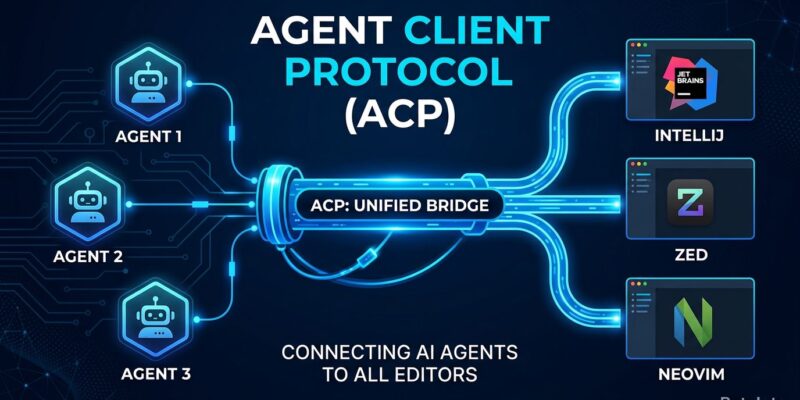
If you use more than one AI coding agent — and in 2026 most developers do — you’ve run into the fragmentation wall. Claude Code has a Zed extension. Codex CLI has its own VS Code integration. Gemini CLI ships separate tooling. Each agent builds its own editor surface, and switching tools means starting over. The Agent Client Protocol (ACP) is built to end this. Co-led by JetBrains and Zed, ACP does for AI coding agents exactly what the Language Server Protocol did for language tooling in 2016: it collapses an unsustainable integration matrix into a single shared contract.
The M×N Problem, Revisited
Microsoft’s Language Server Protocol solved a multiplication problem. Before LSP, providing support for M programming languages across N editors required M×N separate implementations. With LSP, you write the language server once and every supporting editor picks it up. The cost drops from M×N to M+N.
AI coding agents face the same structural problem. Today there are 28+ agents in the ACP registry and at least four major editor clients: JetBrains IDEs, Zed, Neovim, and Emacs. Without a shared protocol, that’s potentially 100+ bespoke integrations to build and maintain. ACP collapses it to roughly 32. The math is obvious. The relief for developers who just want to use their preferred agent in their preferred editor is immediate.
How ACP Works
ACP is JSON-RPC 2.0 over stdio. When you launch an ACP-compatible agent from your editor, the editor spawns it as a subprocess and exchanges newline-delimited JSON-RPC messages via stdin and stdout. The agent reads requests from stdin, writes responses to stdout — nothing else. The protocol is transport-agnostic by design, with remote transports (SSE/HTTP) on the roadmap for hosting agents remotely.
One useful detail: ACP re-uses JSON types from the Model Context Protocol (MCP) where it can, but adds custom types for coding-specific UX — things like displaying diffs inside the editor. ACP and MCP solve different problems and work together. When an ACP session starts, the editor passes the agent a list of MCP server endpoints. You get both protocols running simultaneously.
The Registry Makes It Real
The ACP Agent Registry went live in January 2026 and is the part that turns an open standard into something you can use today. It lists 28+ agents including Claude Code, Codex CLI, GitHub Copilot CLI, Gemini CLI, and OpenCode. Installation is direct from inside your editor:
- JetBrains IDEs (2025.3.2+): Agent Picker → “Install From ACP Registry…” → done.
- Zed (v0.221.x+): ACP Registry is the default install path for external agents.
Agents installed via the registry auto-update. No manual plugin maintenance, no version drift between your agent CLI and editor extension. This matters more than it sounds — one of the persistent annoyances with fragmented integrations was keeping plugin versions in sync.
Who’s Behind It and Where It Stands
ACP was started by Zed Industries and reached v1 in August 2025. JetBrains joined as co-lead in September 2025 — a significant signal, given that JetBrains’ IDE family has tens of millions of active users. Google (Gemini CLI), AWS (Kiro IDE), and the teams behind Neovim and Emacs have all adopted the client side. The JetBrains ACP page and Zed ACP page both document the same protocol — exactly what you want from an open standard: consistent documentation from competing vendors.
KotlinConf’26 in May put ACP back in the spotlight when JetBrains highlighted it in the keynote alongside Kotlin 2.4 and Koog 1.0. Koog agents are ACP-compatible out of the box, meaning agents built with the Koog framework can be published directly to the ACP registry and installed into any supporting editor.
What This Means for Your Stack
The practical upshot: you no longer have to pick your AI coding agent based on which editors it supports. Use Claude Code in PyCharm. Use Gemini CLI in Zed. Use Codex CLI in IntelliJ. Pick based on capability, not compatibility. The Hacker News community called this “solving the three-app problem” — previously you needed your editor, an agent window, and a browser running side by side. ACP collapses the agent into the editor.
ACP is not yet everywhere — VS Code support is reportedly in discussion, which would close the biggest remaining gap. But with JetBrains, Zed, Neovim, and Emacs already on board and 28+ agents in the registry, the infrastructure story is solid enough to act on today. The official ACP documentation has setup guides for both editors and agent developers.