 By ByteBot
OpenClaw 2.0 shipped on August 31, and the headline feature is one no other major open-source AI agent platform offers: multiplayer. Multiple people can now participate in a single live agent session, pick up mid-task without a handoff document, and collaborate on automation workflows in real time. The release took 933 contributors and 16,000+ pull requests to ship — and it repositions OpenClaw from a personal automation tool into something that looks a lot more like team infrastructure.
How Multiplayer Sessions Actually Work
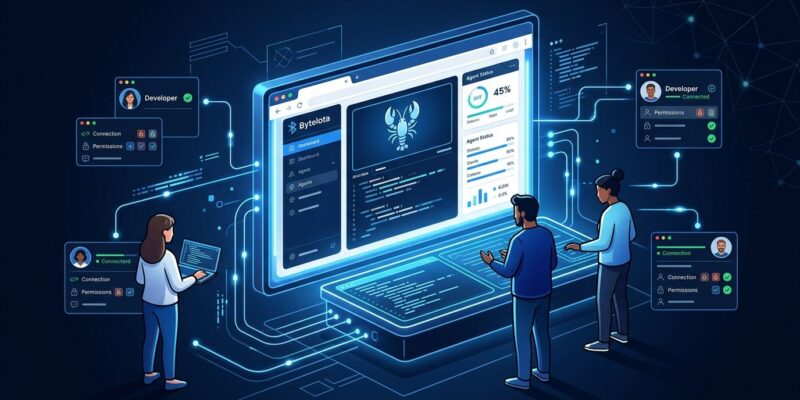
Shared cloud sessions in OpenClaw 2.0 let teammates join a live agent conversation while the context stays intact. No summarizing, no re-explaining the project. A colleague joins and the agent already knows what’s been discussed.
Permission levels are granular: read-only, guarded, workspace, and full-access (admins only). Approvals bind to the specific request, command, session, and person — so you’re not handing out blanket access. A team credential store keeps secret values write-only, meaning participants can use stored credentials without being able to read them.
Before you spin up a shared session for your whole organization, read the fine print: OpenClaw’s own documentation explicitly states that multi-user permissions are “not tenant isolation and not a security boundary.” The feature is designed for teams who already share a trust boundary — coworkers, a family, a small team. It’s not built to keep hostile tenants apart. If your use case involves untrusted parties sharing the same instance, 2.0 does not solve that problem.
The Browser UI Is Now the Main Interface
In earlier versions, the browser dashboard was a secondary control surface bolted onto the terminal setup. In 2.0, it’s been rebuilt as the primary interface. You open it, start a conversation with your agent, configure settings, monitor running tasks, and manage workflows — all from the same screen.
This matters for adoption. OpenClaw’s user base has grown well beyond developers: there’s a documented wave of non-technical users managing family calendars, automating admin work, and running personal workflows. A terminal-first UX was always a barrier. The rebuilt browser interface removes it.
Setup Just Got Much Simpler
OpenClaw 2.0 auto-detects what you already have installed. If you’re running Claude Code, Codex CLI, or an Ollama setup locally, the installer finds them, verifies them with a real completion, and configures them automatically. Additional setup happens through conversation with the agent itself after it starts — not through a configuration file before you ever get to use it.
For developers already deep in the Claude Code or OpenCode ecosystem, adding OpenClaw as a complementary automation layer is now a five-minute task.
# Install OpenClaw 2.0
curl -fsSL https://install.openclaw.ai | bash

# Auto-detects Claude Code, Codex CLI, Ollama, and more
openclaw setup

# Launch
openclaw start
Memory and Skills: The Agent That Learns From You
The memory system was rebuilt in 2.0. OpenClaw now maintains built-in memory with search and recall, backed by local SQLite storage. Background consolidation promotes meaningful interactions into long-term memory over time. More interestingly, the agent now proposes new skills based on repeated patterns in your usage — a Skill Workshop interface lets you review and approve these proposed automations.
Persistent memory across sessions is what separates OpenClaw from chat-based tools. Your agent knows what project you were debugging last Tuesday. The self-learning skill proposals take that further: if you find yourself doing the same sequence of tasks repeatedly, OpenClaw will notice and suggest automating it.
Where OpenClaw 2.0 Sits in the AI Agent Landscape
The comparison is worth making explicit:
| Tool | Multi-user | Self-host | Cost |
|---|---|---|---|
| OpenClaw 2.0 | Yes | Yes | Free (MIT) |
| Claude Code | No | No | $20/mo per seat |
| OpenCode | No | Yes | Free (MIT) |
| Cursor | No | No | $20/mo per seat |
OpenClaw 2.0 is currently the only major open-source AI agent platform with native collaborative sessions. Claude Code, OpenCode, and Cursor are all single-user tools by design. That’s a meaningful gap — and OpenClaw is filling it at a price point ($0) that enterprise tools can’t easily match.
The trade-off is compliance posture. OpenClaw doesn’t offer SOC2 certification, FedRAMP authorization, or true multi-tenancy. For regulated industries, those gaps matter a lot. For self-hosting development teams and small organizations comfortable with MIT-licensed software and their own infrastructure, 2.0 is a serious option worth evaluating.
A Realistic Look at Security
OpenClaw has had a rocky security history: CVE-2026-25253, a one-click RCE, was patched in June 2026. A separate analysis by Help Net Security found that 36% of marketplace extensions contain prompt injection vulnerabilities, and an estimated 155,000 instances remain publicly accessible without authentication. These are pre-existing problems, not new ones introduced by 2.0 — but they’re context worth having before you add team collaboration to your deployment.
The 2.0 release adds structural improvements: tighter approval controls, session-level permissions, write-only credential storage. Those are real gains. But self-hosted team deployments require the same discipline any self-hosted infrastructure does: keep it off the public internet unless you’ve deliberately secured it, update promptly, and audit your extensions.
Getting Started
OpenClaw 2.0 runs on any VPS with Docker, 2GB+ RAM, and a domain with SSL. Managed hosting is available from third-party providers if you’d rather skip the infrastructure work. The official quick start guide walks through the full setup.
If you’re already running an earlier version, the upgrade path preserves your existing sessions and configurations. Check the release notes covered by VentureBeat for breaking changes in the memory and skills subsystems before upgrading production instances.