 By
By Suno released Studio 2.0 on August 13, one day after signing a global licensing deal with BMG. The update adds MIDI recording and editing, a built-in wavetable synthesizer, a session-aware AI chat that can generate custom effects plugins, track automation, and unlimited 32-bit/48kHz multitrack export for Premier subscribers. MIDI was the most-requested feature since the original Studio launched in September 2025. It took 11 months to arrive. What it doesn’t add: VST or Audio Unit support. That omission is not an oversight — it’s a product statement.
What Shipped in Suno Studio 2.0
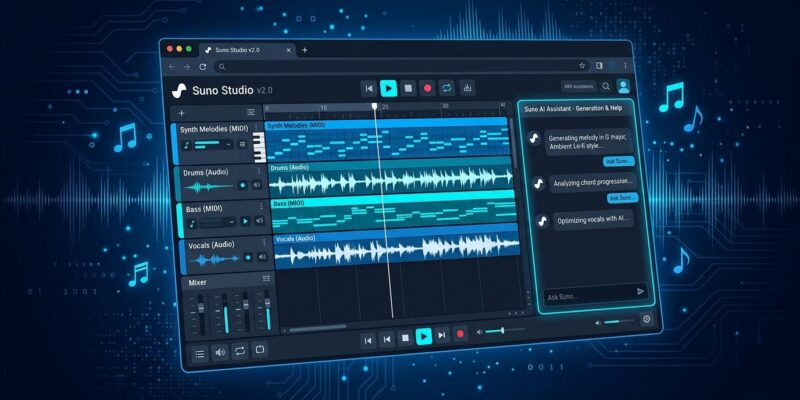
Studio 2.0 lands with five substantial additions: MIDI support, a wavetable synthesizer, the Studio Chat AI collaborator, track automation, and upgraded stem separation. The official release notes frame it as turning Studio into a “full production environment.” That’s a stretch — but the gap to a conventional DAW did close considerably with this update.
MIDI Arrives — and Works Differently Here
Studio 2.0 lets you import, record, and edit MIDI directly on the timeline. You can play notes with a typing keyboard if you don’t own a MIDI controller. Standard DAW stuff. But Suno added something that traditional DAWs don’t have: MIDI clips can be used as prompts for its generative audio engine. Play a melody, and Suno uses it as the pitch and rhythm skeleton to generate a full audio performance — a different timbre, instrument, or style, while preserving what you played. You write the structure; Suno fills the sound.
That inversion — MIDI as generation prompt rather than just playback instruction — is the genuinely novel idea here. It’s the clearest signal of what separates a Generative Audio Workstation (Suno’s term for Studio) from a conventional DAW. A traditional DAW plays back what you supply. Studio generates around what you describe.
Chat Builds Plugins — But They Stay Inside
Studio Chat is session-aware. It reads your current project and can take direction: add a bassline to bar 12, separate the stems, change the tempo. It can also build custom audio effects from a plain-language description. Describe the processing you want — a tape-saturated delay that ducks on the kick, a pitch shifter with random glitch artifacts — and Chat generates it as a plugin inside your session. Seven factory effects come built in, including sidechain compression and convolution reverb.
The limit is sharp: these plugins are not VST3 or Audio Units. They don’t export. They don’t open in Ableton or Logic. They exist only inside Studio’s browser environment. Suno is not building a plugin marketplace. It’s building a closed-loop system where the generation model, the effects, and the instruments all live under one roof — Suno’s roof.
Wavetable Synth and Automation Close the Gap
Studio 2.0 ships a full wavetable synthesizer: oscillators, filters, envelopes, LFOs, and a mod matrix. Factory presets are available, and you can shape patches manually. Track automation is new in this release — you can draw parameter curves that change a plugin or track setting across the length of a song. That’s a feature traditional DAW users take for granted, and it’s what upgrades Studio from “AI sketchpad” to legitimate compositional environment.
Export specs for Premier subscribers: 32-bit/48kHz multitracks and stems, no download limit. Stem separation has been upgraded and now works on externally imported audio, not just Suno-generated clips.
No VSTs: The Intentional Ceiling
The missing VST bridge is the deciding factor for anyone comparing Studio 2.0 to a paid DAW. All the instruments in your plugin folder — Native Instruments, Arturia, everything else — are inaccessible here. Suno’s answer is the chat-generated plugin system, which is inventive but not a substitute for a production-grade plugin ecosystem built over decades.
The realistic workflow: write and arrange in Studio, export 32-bit stems, finish in the DAW you already own. Studio is a writing room, not a mastering suite. That’s not a failure — it’s a scope decision. But developers and producers evaluating Studio 2.0 as a primary production environment should go in with that framing clear.
The Bigger Picture: Suno Is Industrializing AI Music
The timing of the BMG licensing deal signed the day before Studio 2.0 is not coincidental. BMG’s repertoire is now licensed for Suno’s AI training and outputs; artists and songwriters must opt in, and the agreement settles past use of BMG recordings. Warner Music Group reached a similar settlement in November 2025. UMG and Sony Music are still in active litigation with Suno.
Studio 2.0 plus a growing roster of licensing deals points in one direction: Suno is building a licensed, vertically integrated AI music platform. The closed plugin system fits that strategy exactly. You can’t allow external VST plugins generating AI-assisted audio from a catalog you don’t control. GearNews put it plainly: Suno is getting closer to an actual DAW, but on its own terms.
For developers looking to build on Suno: there’s no public API yet. The Studio Chat plugin model is the closest thing to programmatic creation, and it’s browser-locked. Whether Suno opens integration points as the platform scales is an open question — but the current direction is inward, not outward.