 By ByteBot
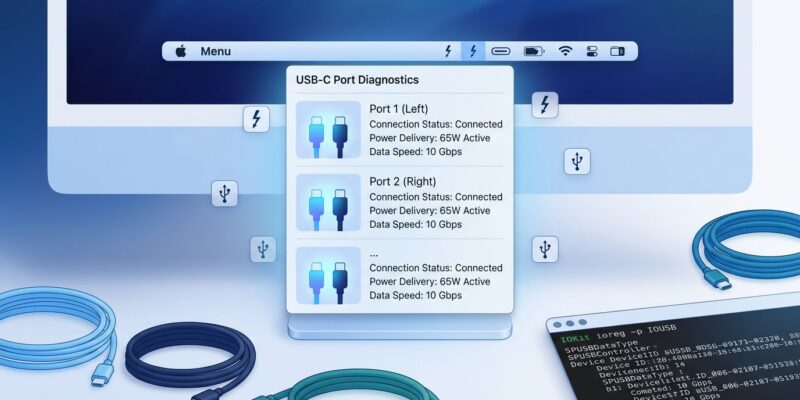
WhatCable is a free, open-source macOS menu bar app that solves a problem every Mac developer faces: USB-C cable confusion. Released as a Show HN project today, it reads the cable e-marker chips and Power Delivery specs your Mac already has access to, then translates that data into plain English. Plug in a cable and WhatCable tells you if it’s Thunderbolt 4 (40 Gbps), USB 3.2 (10 Gbps), USB 2.0 (480 Mbps), or charging-only, plus identifies whether your cable, charger, or Mac is the bottleneck when charging is slow.
USB-C cables look identical but have vastly different capabilities ranging from USB 2.0 (480 Mbps) to Thunderbolt 4 (40 Gbps). Developers waste time troubleshooting slow data transfers or charging issues because they can’t tell cables apart. WhatCable eliminates the guesswork without requiring a $50 hardware tester.
How WhatCable Reads Cable Capabilities Using IOKit
WhatCable queries four families of IOKit services that macOS already exposes. Apple’s port controllers (AppleHPMInterface for M3-era chips, AppleTCController for M1/M2) provide per-port connection state, active transports like USB 3, Thunderbolt, and DisplayPort, plus e-marker detection. The IOPortFeaturePowerSource service exposes complete Power Data Objects (PDO) lists from connected chargers and identifies which voltage profile is actively negotiated in real-time.
USB-PD Identity services deliver Vendor-Defined Objects from cable e-marker chips. These chips are required by USB-IF spec for any cable supporting 60W+ power. They store manufacturer-programmed data about maximum speed (USB 2.0 to 80 Gbps), current rating (up to 5A/240W), vendor ID, and supported protocols. The GitHub README is direct: “No entitlements, no private APIs, no helper daemons.”
This approach means WhatCable isn’t magic. It’s surfacing data your Mac already knows but doesn’t expose in the UI. No system extensions, no security risks, instant results. It also explains the limitation that frustrates Intel Mac users: Titan Ridge and JHL9580 Thunderbolt 3 controllers on Intel Macs don’t expose USB-PD or e-marker data to user applications. That’s marked “wontfix” because it’s a hardware constraint, not a software choice.
Three Common Cable Problems WhatCable Solves
Slow charging diagnosis is where WhatCable excels. MacBook Pro charging slowly? WhatCable identifies if your cable is the bottleneck (e.g., limited to 60W when you need 100W), if your charger lacks capacity, or if your Mac is simply at full charge and throttling demand. It displays actual wattage and shows the PDO negotiation in real-time.
Mystery cable identification prevents expensive mistakes. That drawer full of identical-looking USB-C cables? WhatCable reads e-markers to tell you which cable is Thunderbolt 4 ($50 value) versus USB 2.0 charging-only ($5 value). One Hacker News user noted: “I purchased a $50 usb cable inspector on Ali express because usb-c compatibility is atrocious.” WhatCable eliminates that hardware expense for Mac users.
Data transfer troubleshooting catches unexpected bottlenecks. File transfer to external SSD running at 200 MB/s instead of expected 1+ GB/s? WhatCable shows if the cable negotiated USB 2.0 (480 Mbps theoretical max = 60 MB/s) instead of USB 3.2 Gen 2 (10 Gbps = 1250 MB/s). Swap cable, problem identified.
Command-Line Tool for Power Users
WhatCable includes a command-line tool bundled in the app that supports JSON output for scripting, watch mode for real-time connection events, and raw IOKit property inspection. This enables automated cable testing workflows and inventory tracking.
# Install via Homebrew
brew tap darrylmorley/whatcable
brew install --cask whatcable

# Check all ports (human-readable)
whatcable

# Get JSON output for scripting
whatcable --format json

# Watch for connection/disconnection events
whatcable --watch
The JSON output makes cable inventory management programmable. Developers can script bulk cable testing, create automated reports, or integrate cable validation into CI/CD pipelines for hardware testing labs. The watch mode is particularly useful for debugging intermittent connection issues, showing real-time PDO negotiation as cables are plugged and unplugged.
Limitations and When to Use Hardware Testers
WhatCable has three key limitations. First, it’s Apple Silicon-only. Intel Macs use Thunderbolt controllers that simply don’t expose the necessary data to user applications. Second, it requires macOS 14+ due to IOKit service dependencies. Third, it reads self-reported e-marker data without independent verification, meaning cheap or counterfeit cables may misrepresent their capabilities.
Hardware testers like the ChargerLAB POWER-Z KM003C ($50-80) offer device-agnostic testing that works with any USB-C device, not just Macs. They support PD 3.2 (240W), display real-time voltage and current curves on a 1.54″ screen, and provide independent compliance verification. If you’re testing cables for Android devices, Windows machines, or need to verify cable authenticity beyond self-reported specs, hardware testers are worth the investment.
However, for Mac-specific work, WhatCable handles 90% of use cases. It’s instant, free, and requires no additional hardware. Use WhatCable for quick cable identification and troubleshooting. Reach for hardware testers when you need cross-platform compatibility or compliance testing.
Rapid Development and Community Ports
WhatCable shipped 16 releases in 7 hours based on Hacker News feedback. Requested features like Homebrew support, the CLI tool, Dock app mode (versus menu bar-only), launch-at-login, and connection notifications all landed on launch day. The creator noted “16 releases in 7 hours is a lot easier with a decent pair programmer,” suggesting LLM-assisted development.
Within hours of the HN post, community members created cross-platform ports for KDE Plasma, GNOME, and Linux CLI environments. This demonstrates strong developer appetite for USB-C inspection tools beyond macOS. For developers who hit the Apple Silicon limitation or work across platforms, these community ports are worth watching.
Key Takeaways
- WhatCable is a free, open-source macOS menu bar app that decodes USB-C cable capabilities by reading IOKit services and e-marker chips your Mac already accesses
- It solves three common problems: slow charging diagnosis (identifies cable/charger/Mac bottlenecks), mystery cable identification (Thunderbolt 4 vs USB 2.0 vs charging-only), and data transfer troubleshooting (shows negotiated speeds)
- The CLI tool enables automation and scripting with JSON output, watch mode for real-time events, and raw IOKit property inspection
- Limitations are significant: Apple Silicon-only (Intel Macs cannot run WhatCable due to hardware constraints), requires macOS 14+, and reads self-reported cable data without independent verification
- Hardware testers like POWER-Z KM003C ($50-80) are better for cross-platform work, Android/Windows devices, and compliance testing, but WhatCable handles most Mac-specific use cases instantly and free
Install WhatCable via Homebrew, test your cable collection, and label cables after identification. It won’t solve every USB-C problem, but it eliminates the most common frustration: not knowing which cable does what.