 By ByteBot
North Korea got formally named today. Japan’s National Police Agency, the US FBI, and agencies from Australia and Germany jointly attributed the “WaterPlum” hacker group — also called Contagious Interview — to North Korea’s 313th Bureau of Munitions Industry Department. Their campaign ran December 2025 through July 2026, infected over 30,000 developer machines across 100+ countries, drained 7,000 crypto wallets, and cleared $10.71 million. The entry point in most cases: a fake job interview and a GitHub link.
How Opening a Folder Can Own Your Machine
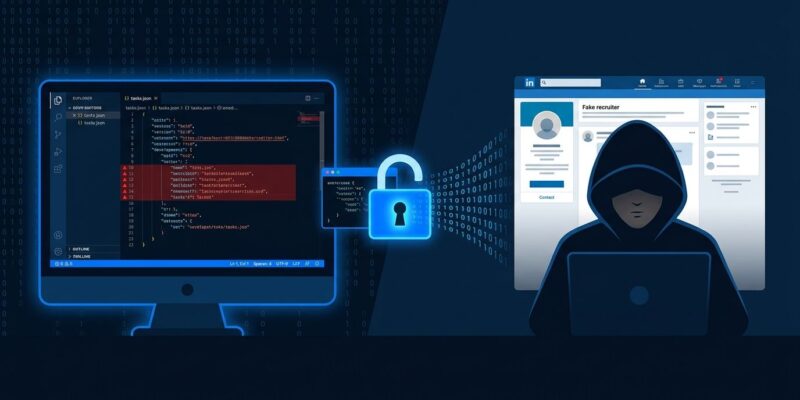
The VSCode angle is the part most coverage has underplayed. WaterPlum’s newer attack vector doesn’t require you to run anything manually. Attackers send a “test project” link — a GitHub repo that looks like a blockchain SDK or AI toolkit — and ask you to open it in VS Code as part of a technical assessment.
Inside the repo is a hidden .vscode/tasks.json file. It contains one setting: "runOn": "folderOpen". When you open the folder and mark the workspace as trusted — as most developers do reflexively — VS Code silently executes the task. No prompt. No visible terminal output. The task reaches out to a remote server, downloads StoatWaffle malware, and installs itself.
StoatWaffle is a modular Node.js malware with two components: a stealer that grabs browser-saved credentials, crypto wallet browser extensions, and on macOS, the entire Keychain database; and a RAT that gives the attacker persistent remote access to your machine.
This is not a VS Code vulnerability. It is a feature working as designed. Microsoft has known about this attack pattern since at least GitHub Issue #309406 and has not changed the default. The setting task.allowAutomaticTasks still defaults to on. Disable it now:
// VS Code settings.json
"task.allowAutomaticTasks": "off"
The npm Package Track
The VSCode trick is the newer method. The older one — malicious npm packages — has only gotten bigger. WaterPlum has published over 1,700 malicious packages across npm, PyPI, Go Modules, crates.io, and Packagist since January 2025. The latest wave uses 35 npm packages specifically.
The attack flow is the same: recruiter, technical assessment, “please clone this repo and run the tests.” You run npm install. BeaverTail drops. It steals your browser credentials and crypto wallet extension data, then silently installs InvisibleFerret — a Python backdoor that gives the attacker full remote command execution and exfiltrates session cookies.
The campaign now spans five package ecosystems. If you write Python, Go, or Rust, you are no longer out of scope.
What They Actually Take
The malware is not ransomware — it doesn’t announce itself. It is optimized for quiet extraction:
- All browser-saved passwords (Chromium and Firefox profiles)
- Crypto wallet browser extensions: MetaMask, Phantom, and others
- macOS Keychain database (all stored credentials)
- Browser session cookies (enables account takeover without needing your password)
- Persistent RAT access for ongoing surveillance and re-exfiltration
The Microsoft Security Blog’s technical analysis documents the full exfiltration chain. The FBI/IC3 joint advisory released today has the official attribution and IOC list.
Check These Five Things Right Now
If you’ve done a technical interview in the past nine months that involved running unfamiliar code:
- Disable VS Code automatic tasks: Open Settings, search “automatic tasks,” set to off. Also add
"task.allowAutomaticTasks": "off"to yoursettings.json. - Audit VS Code Workspace Trust: Go to File → Preferences → Workspace Trust and review which folders you’ve trusted. Distrust any you don’t recognize.
- Check your npm install history: Review
~/.npmand your projectnode_modulesfor packages you don’t recognize. Cross-reference against Socket.dev. - Audit browser extensions: Open your browser extensions list. Remove anything you don’t recognize, especially crypto wallet extensions you didn’t install yourself.
- Use a sandbox going forward: GitHub Codespaces, a throwaway VM, or a Docker container with no home directory mounts — for any recruiter-provided code. Interview platforms like HackerRank or CoderPad are safer by design.
The Broader Problem
WaterPlum is one group. The fake-interview vector is not. Security researchers have documented multiple threat actors using variants of this approach. The common thread: developers are high-value targets (credentials, crypto, company access), and the hiring process creates a context where running unfamiliar code feels normal.
It shouldn’t. Treat recruiter-provided code the same way you’d treat an executable from a stranger’s USB drive — it goes in a sandbox, not on your main machine. The VS Code Workspace Trust documentation explains what the trust model actually covers. Most developers have never read it. Now is a reasonable time to start.