 By
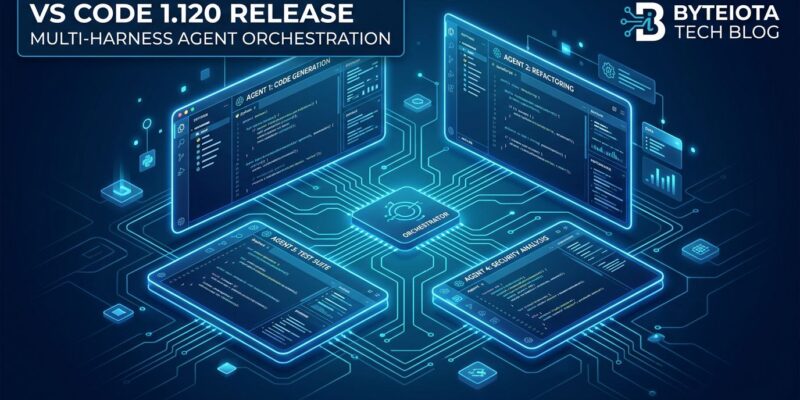
By Microsoft shipped VS Code 1.120 on May 13, and the headline is the Agents window graduating from Insiders preview to Stable. If you have been waiting to experiment with agent-driven development without switching to Cursor or Windsurf, this is your on-ramp. The Agents window is not another sidebar — it is a separate window type built from scratch for multi-project agent workflows, and understanding what it actually is changes how you use it.
What the Agents Window Actually Is
The Agents window is not the chat panel. It is not agent mode inside your existing editor. It is a distinct VS Code window — accessible via the “Open in Agents” button in the title bar — that Microsoft designed specifically for running agent sessions across multiple projects simultaneously.
The layout has three panels: a sessions sidebar on the left that lists all active and past sessions grouped by workspace, a chat interface in the center where you interact with the agent, and a Changes panel on the right where you review file diffs before accepting them. Session preferences — your choice of agent harness and isolation mode — persist across new sessions, so you are not re-configuring every time you open a new task.
The multi-harness support is the architectural choice that sets this apart from Cursor and Windsurf. On a single machine, you can run Copilot CLI (local terminal-based agent), Claude (Anthropic’s model directly, using the Claude Agent SDK), or Copilot Cloud (GitHub’s remote agent infrastructure). VS Code is not betting on one model or one provider. It is betting on being the harness that connects whatever you already use. You can read more about the multi-agent approach in Microsoft’s multi-agent development blog post from February 2026.
BYOK Finally Has a Fuel Gauge
Bring Your Own Key has been available in VS Code since October 2025. The problem: token usage showed as zero for BYOK models because the accounting only worked for built-in Copilot models. Running BYOK without token visibility is like flying blind on context window consumption — you’d hit the limit without warning. VS Code 1.120 fixes this. The context window control in the Chat view now shows accurate token counts and percentage full for BYOK models connected via OpenAI-compatible endpoints (OpenAI, xAI/Grok, OpenRouter, custom Azure OpenAI). The full details are in the GitHub BYOK changelog entry.
Also new in 1.120: configurable thinking effort for reasoning models. You can now set low, medium, or high directly from the model picker, and the setting applies to every subsequent request. Higher thinking effort means more thinking tokens, which increases latency and cost — but the tradeoff is now explicit instead of hidden. Enterprise admins on Copilot Business and Enterprise get controls over which model providers their organization can use, managed from the admin dashboard.
An AI Safety Check Before Your Agent Runs rm -rf
VS Code 1.120 adds command risk assessment to terminal command confirmations — currently experimental via chat.tools.riskAssessment.enabled. When an agent proposes a terminal command, an AI-generated badge appears alongside it: Safe (green), Caution (orange), or Review carefully (red), with a one-sentence explanation referencing the exact command. A standard npm install gets green. A curl https://... | bash gets red. The assessment does not block execution — you still confirm or reject — but it is an explicit prompt to read before clicking. Running agent-suggested terminal commands without scrutiny is how production databases get dropped. This feature should have shipped 18 months ago.
Terminal Output Compression
Enable chat.tools.compressOutput.enabled and VS Code will strip noise from common terminal output before sending it to the model. Git diffs lose unchanged hunks. Lockfiles get dropped entirely. ls -l reduces to filenames. npm install output loses progress bars, audit summaries, and deprecation warnings. For anyone running agents on large repositories, this reduces context window burn on output the model does not need.
The Bigger Picture
VS Code has been positioning itself as a multi-agent development platform since version 1.109 in February 2026. The Agents window landing in Stable is the first time that positioning becomes actionable for the full user base. The bet Microsoft is making — open harness, bring your own model, bring your own extensions — runs counter to Cursor and Windsurf’s approach of vertical integration and single-engine experiences. What VS Code has that the others do not: the existing extension ecosystem, and roughly 42% of the developer market already using it. The friction to adopt agentic workflows just dropped. Read the full VS Code 1.120 release notes for the complete changelog, and check the Agents window documentation for setup details.
How to Enable
Update to VS Code 1.120. The Agents window is accessible via the “Open in Agents” button in the title bar. For command risk assessment, add "chat.tools.riskAssessment.enabled": true to your settings. For terminal compression, add "chat.tools.compressOutput.enabled": true. Extension support in the Agents window requires opting in per extension: "extensions.supportAgentsWindow": { "your.extension.id": true }. Static extensions — themes, grammars, language support — activate automatically without configuration. The Visual Studio Magazine hands-on review at Visual Studio Magazine covers the workflow in more detail.