 By ByteBot
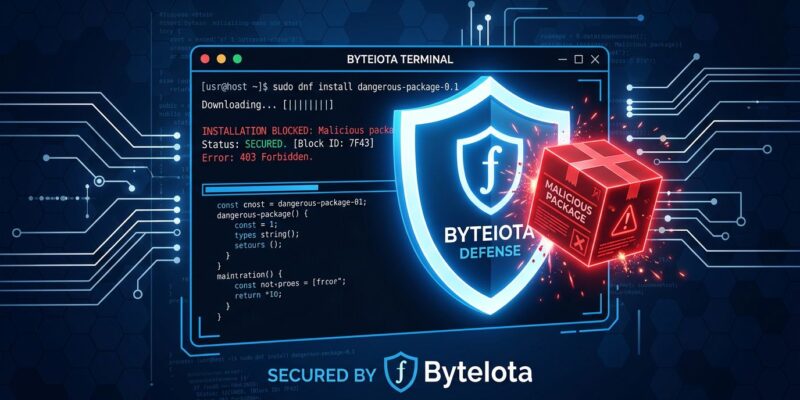
Your AI coding agent ran npm install while you were on a call. It pinned a package version from its training snapshot — one that has carried a CVSS 9.1 vulnerability for six months. The install succeeded silently. That is not a hypothetical: in May 2026, a coordinated supply chain attack compromised over 170 npm packages and two PyPI packages, with 404 malicious versions specifically engineered to fool AI coding agents. Refuse (refuse.dev) is the open-source tool built for exactly this gap — a shim that intercepts every package manager call before anything hits disk and refuses installs it knows are bad.
Why AI Agents Have a Structural Install Problem
AI coding assistants — Claude Code, Cursor, GitHub Copilot Workspace, Codex — are trained on internet snapshots that can be 12 to 18 months stale by the time you run them. When an agent suggests pip install transformers==4.38.0, it is not checking whether that version picked up a CVE last quarter. It doesn’t have that information. The agent isn’t broken; it’s working exactly as designed. The problem is structural.
Three failure modes compound this:
- Stale version pinning. The agent recommends what it learned from training data. That data is frozen. The package landscape is not.
- Slopsquatting. About 20% of AI-suggested package names are hallucinations. Attackers register those names as malicious packages before developers install them. Research shows 43% of hallucinated names appear on every run of the same prompt — predictable enough for an attacker to automate. In January 2026, a hallucinated npm package name spread to 237 repositories before it was caught.
- Targeted supply chain compromise. The Bitwarden CLI attack in April 2026 spent 90 minutes on npm specifically looking for authenticated sessions of Claude Code, Cursor, Codex CLI, and five other AI agents before exfiltrating credentials. Attackers have figured out that AI agents skip verification.
Existing tools don’t close this gap. npm audit runs after the install. Snyk scans dependency trees — also after the fact. Socket.dev monitors the registry. None of them put a gate in front of the install itself, and none of them are agent-aware. ByteIota has tracked this escalating pattern: from the jscrambler npm backdoor to shell injection hitting 10 of 11 AI coding agents in the GuardFall research.
How Refuse Works
Refuse installs 18 shim binaries into ~/.refuse/bin and prepends that directory to your PATH. Those shims cover: npm, pnpm, yarn, bun, npx, pip, pip3, uv, poetry, pipenv, pdm, pipx, cargo, gem, bundle, go, composer, and dotnet. Every install command — whether you type it, an AI agent runs it, or a CI runner executes it — routes through the shim first.
The shim checks the package and version against a live CVE database. Clean installs pass through transparently; you won’t notice any difference. On a blocked install, you get the CVE ID, CVSS score, and the safe version:
$ npm install next@15.2.5
✗ Blocked: CVE-2026-31234 (CVSS 8.9) — path traversal in next router
  Fix: next@15.3.1
  Run: npm install $(refuse fix npm next@15.2.5)
Setup is one command:
# macOS / Linux
curl -fsSL https://refuse.dev/install.sh | sh

# Verify shims are active
which npm  # → ~/.refuse/bin/npm
First CVE lookup adds roughly 80ms. Results are cached for the session, so subsequent checks for the same package are instant.
Agent Hook Integration
The shim approach means Refuse works in agentic workflows without any special integration — if your AI agent shells out to npm install, it goes through the shim. But you can tighten this further.
In Claude Code, add a pre-tool-use hook to .claude/settings.json that intercepts any Bash tool call matching install patterns and routes it through Refuse before execution. In Cursor, a pre-execution rule in .cursor/rules achieves the same. In CI, since the shims replace the binaries, your GitHub Actions or GitLab CI pipelines get the gate automatically with zero pipeline config changes.
The critical property: Refuse has no agent override flag. A malicious prompt cannot instruct Claude Code or Cursor to bypass it. The shim operates at the operating system level, below the agent’s reach. This is not a policy setting that an AI can be asked to ignore — it’s a binary interception.
Self-Hosting for the Privacy-Conscious
If sending package names to a hosted CVE service is a non-starter for your org, Refuse supports full self-hosting. It ships as a single Docker container with a pluggable CVE backend — point it at your own vulnerability feed and it runs with zero telemetry. The Apache-2.0 license means you can audit, fork, and modify it. An allowlist in ~/.refuse/config.yaml handles internal packages that would otherwise false-positive. Comparable to how DockSec approaches container security — opinionated defaults, self-host option, no vendor lock-in.
What Refuse Does Not Do
Refuse does one thing: block known-vulnerable packages before they install. It does not scan the code your agent generates — that is Snyk or CodeQL territory. It does not defend against prompt injection attacks telling your agent to do something malicious. It does not audit packages already on disk (there is a separate refuse audit command for that). Think of it as the seat belt, not the crash test program. Useful, specific, and worth wearing every single time.
Given that AI coding agents now run installs autonomously, without human confirmation on every package, this is one of the lower-friction security additions you can make to a development workflow today. The binary is small, the overhead is minimal, and the alternative is hoping the agent got lucky on the version number. Get it at refuse.dev — Apache-2.0, self-hostable, one Docker container if you want it.