 By ByteBot
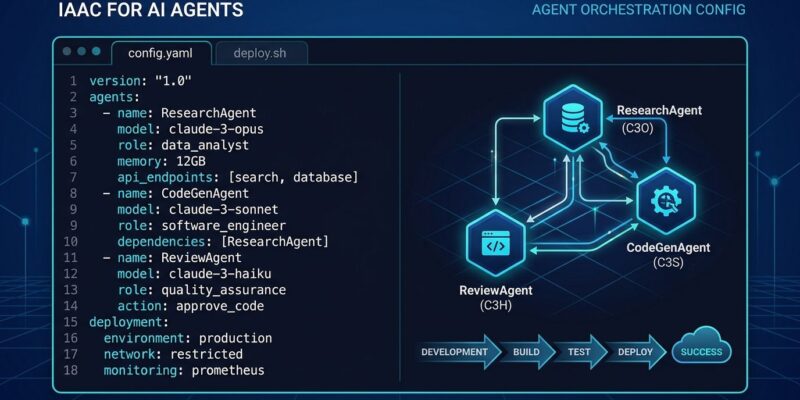
Anthropic shipped ant apply in ant CLI v1.30.0 on September 3. It brings the plan-and-apply workflow — the same one Terraform made standard for cloud infrastructure — to Claude Managed Agents. You describe agents, skills, environments, memory stores, and deployments as files in your repository. You run ant apply, approve the plan it prints, and it reconciles your files against the API. The claude-lock.json it writes tracks resource IDs and hashes. Drift from out-of-band console edits is detected and blocked on the next run. If you’re managing more than one Claude agent by hand, this is the tool you’ve been waiting for.
The Problem It’s Solving
Most teams managing Claude agents today are doing it wrong — and they know it. System prompts live in a Google Doc or, worse, only in the Anthropic Console. Changing an agent means logging in, clicking through the UI, and hoping your colleague didn’t change something last Tuesday that you haven’t seen yet. There’s no diff, no rollback, no audit trail. When you run AI agents in production and something breaks, “someone changed the prompt three weeks ago” is not an acceptable incident postmortem.
Infrastructure teams solved this problem for cloud resources a decade ago with tools like Terraform. Agent management is now a decade behind. ant apply closes that gap.
How It Works
Agent definitions are YAML, JSON, or Markdown files. Markdown support is particularly useful for system prompts: frontmatter holds the structured fields, prose becomes the prompt body. That means your system prompts live in the repo as readable .md files, show up in pull request diffs, and get reviewed like any other code.
A minimal agent file looks like this:
---
type: agent
name: support-summarizer
model: claude-fable-5-1
---

You are a support ticket summarizer. Given a conversation,
return a JSON object with keys: issue, resolution, sentiment.
Run ant apply agents/. The CLI prints what it’s about to do, waits for your approval, then creates or updates the resource and writes claude-lock.json. Resources can reference each other by file path instead of ID — ant apply resolves dependencies and creates them in the right order.
Drift Detection Is the Actual Killer Feature
The claude-lock.json file stores resource IDs and content hashes. If someone edits the agent directly in the Anthropic Console — changes the system prompt, swaps the model, adds a tool — the hash no longer matches what’s in the lockfile. The next ant apply run catches this immediately:
Error: Drift detected for agent/abc123 (support-summarizer)
Remote state differs from claude-lock.json.
Run `ant apply --refresh` to accept remote state, or revert Console changes.
Refusing to continue.
This is not a warning. It refuses to proceed. You have to make a deliberate choice: accept the console state and update your files, or override the console change and revert to what the repo says. Either way, the drift is resolved explicitly. No more silent configuration divergence.
CI/CD: Two Flags, One Pattern
ant apply has a clean CI/CD integration path that should feel familiar. On pull requests, run ant apply --dry-run — it prints the full plan and exits without making any changes. Wire that output as a PR comment so reviewers see exactly what agent changes will land when the branch merges. After merge, run ant apply --yes on your default branch to skip the approval prompt and apply headlessly.
For authentication, Anthropic supports Workload Identity Federation — short-lived OIDC tokens from GitHub Actions, GitLab CI, or other providers, instead of a long-lived API key stored in a secret. The workspace guardrail reinforces this: ant apply will reject credentials that resolve to a different organization or workspace than what claude-lock.json records. A misconfigured pipeline can’t quietly create resources in the wrong place.
Getting Started
brew install anthropics/tap/ant
ant apply agents/
That’s the starting point. Install the CLI, write your first agent definition file, run apply. The official ant apply documentation covers the full resource schema for agents, skills, environments, memory stores, and deployments. The anthropic-cli GitHub repository has release notes for v1.30.0 and the full source. For CI/CD without long-lived secrets, the Workload Identity Federation setup guide walks through GitHub Actions integration step by step.
The Tradeoff Worth Naming
This tool only works with Claude Managed Agents. The file format is Anthropic-specific. If you’re running agents across multiple providers — mixing Claude with Gemini or GPT models through a framework like LangGraph — ant apply covers only the Claude portion of your stack. The community is working on cross-provider agent definition formats, but ant apply doesn’t speak them yet. For teams running exclusively on Claude, that tradeoff is clear. For multi-model setups, weigh it against the operational gains.
The Bottom Line
If you’re managing Claude agents manually — updating prompts in the console, hoping your team hasn’t introduced silent changes — ant apply is the immediate fix. It gives you version control, drift detection, and CI/CD integration for the same resources you’ve been treating as ephemeral config. Add it to your next sprint. The teams that will regret not doing this sooner are the ones who ship an agent change on a Friday and can’t explain what changed when Monday’s incident happens.