 By ByteBot
Jujutsu (command: jj) is a Git-compatible version control system trending on Hacker News today that solves Git’s notorious complexity without forcing teams to abandon their existing workflows. Created by Martin von Zweigbergk, a Google engineer and former Mercurial maintainer, Jujutsu reads and writes the same .git directory as Git—meaning you can use jj locally while your teammates continue with git, with zero migration risk. Unlike previous Git alternatives that failed because they required complete ecosystem abandonment, Jujutsu’s Git compatibility means developers can experiment individually without team disruption. With 28,200+ GitHub stars and production use at Google, this is a genuine tool gaining real traction.
Git Compatibility: The Adoption Breakthrough
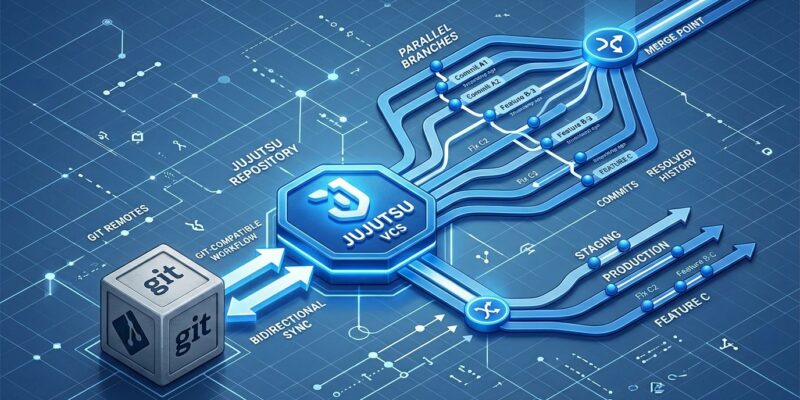
Jujutsu uses Git’s on-disk format as its backend storage. All jj commits are real Git commits. Your teammates can use git while you use jj on the identical repository. Git remotes—GitHub, GitLab, any standard remote—work normally with jj git push and jj git fetch.
This is the breakthrough previous Git alternatives lacked. Mercurial, Fossil, and Pijul all required abandoning Git entirely, forcing complete team migration. That’s why they failed despite technical merit. Jujutsu inverts the problem: Git compatibility isn’t a feature—it’s the entire adoption strategy.
Getting started is trivial. Run jj git init --colocate in any existing Git repository. Jujutsu and Git now share the same .git directory. Use jj for local workflows, git when needed, switch freely. Zero setup beyond installation, zero risk, zero team coordination required.
The Megamerge Workflow: Parallel Branches Made Simple
Jujutsu’s megamerge workflow combines multiple parallel feature branches into a single merge commit, enables working on all streams simultaneously, then intelligently distributes changes back to appropriate branches. This workflow transforms complex multi-branch development from exceptional to routine.
The basic pattern creates separate branches for parallel work, then merges them with jj new <branch1> <branch2> <branch3>. Your working copy now contains all changes merged together. Work on combined result, test integration, iterate freely. When ready, route changes back to appropriate branches.
# Create separate feature branches
jj new main -m "Add authentication"
jj bookmark set auth-feature

jj new main -m "Update documentation"
jj bookmark set docs-update

# Create megamerge combining both
jj new auth-feature docs-update
# Working copy now contains both features merged
# Work on both simultaneously, test integration
The magic happens with jj absorb. After making changes in your megamerge working copy, run jj absorb src/auth.ts to automatically route changes back to the branch where those lines were last modified. Jujutsu analyzes line history and distributes changes intelligently. No manual selection, no interactive rebasing, no Git archaeology to figure out which commit owns which lines.
Chris Krycho, experienced Jujutsu practitioner, explains the value: “I can keep them as distinct streams of work while continuing to iterate on the result of both streams.” Long-running upgrades managed incrementally. Discovered work (documentation fixes, refactors) separated into clean PRs without manual rebasing. Integration testing before separate merges. All routine.
No Staging Area = No Stashing Hell
Jujutsu eliminates Git’s staging area entirely. Your working directory is your current commit. Changes automatically become part of the latest commit. No git add, no git stash, no index confusion that trips up developers daily.
Consider the Git workflow for context-switching: git stash, git checkout other-branch, work, git checkout original-branch, git stash pop. In Jujutsu? jj new other-branch, work, jj new original-branch. Done. A Hacker News developer captured it perfectly: “You never have to fucking stash your changes.”
For partial staging, Git requires git add -p followed by git commit. Jujutsu uses jj split to interactively divide working copy changes across commits. Simpler mental model, fewer commands, zero staging ceremony. The official Git comparison guide provides detailed command mappings.
Comprehensive Undo and Production Readiness
Every Jujutsu operation—merge, rebase, commit amendment, branch move—is recorded in an operation log with complete repository snapshots. jj undo works universally. Made a mistake? jj op log shows history, jj undo reverts last operation, jj op restore <id> jumps to any previous state. No detached HEAD states, no “oh shit git” moments, no fragmented reflogs.
This makes experimentation fearless. Complex rebases, aggressive history rewrites, experimental merges—all safe because comprehensive undo catches mistakes. Instead of “commit everything to avoid losing work,” developers can use version control properly.
Production readiness is genuine. Google uses Jujutsu internally (enterprise-scale validation). 28,200+ GitHub stars, 47 releases, v0.40.0 released April 2026. The core developers exclusively use jj for development. Official benchmarks show jj outperforming git on repositories larger than 10,000 commits for log, status, and complex rebases.
However, ecosystem gaps exist. IDE integration is thin compared to Git’s mature tooling—VisualJJ exists for VS Code but remains basic. Git submodules aren’t supported. Email-based workflows like Linux kernel development won’t work. The project README is honest about “work-in-progress features, suboptimal UX, and workflow gaps.”
The realistic assessment: production-ready for command-line developers working individually, ecosystem maturation needed for team-wide adoption. Perfect for improving personal workflows now without team coordination. Not ready for organizations requiring extensive IDE support or submodule-heavy projects.
Key Takeaways
- Jujutsu’s Git compatibility solves the adoption problem that killed previous alternatives—use
jjlocally while teammates usegiton identical repository with zero migration risk - The megamerge workflow makes complex multi-branch development routine: combine parallel branches, work on all simultaneously, intelligently distribute changes with
jj absorb - Eliminating Git’s staging area removes daily friction—no stashing, no index confusion, simpler mental model for version control
- Comprehensive undo through operation logging enables fearless experimentation with rebases, merges, and history rewrites
- Production-ready for individual developers (Google uses it, 28K+ stars, v0.40.0 released), but ecosystem gaps exist: limited IDE integration, no submodules, thin tooling compared to Git
Try Jujutsu individually without forcing team adoption. Install it, run jj git init --colocate in a project, experiment with your workflow. Git compatibility means zero risk—switch back to git anytime. For developers frustrated with Git’s complexity, Jujutsu offers genuine workflow improvement today.