 By ByteBot
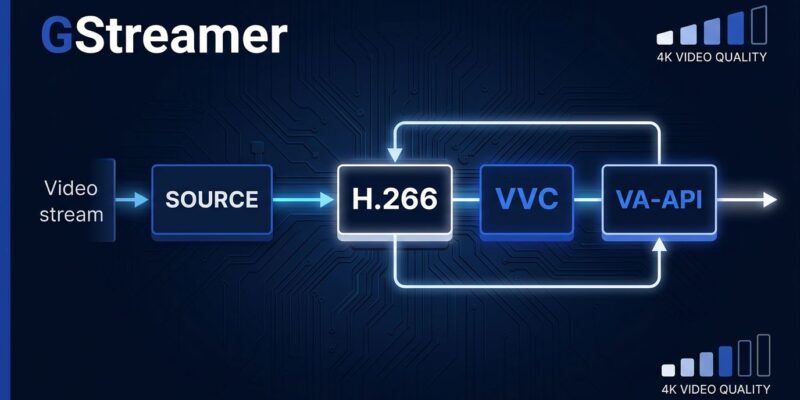
GStreamer 1.28.5 arrived July 8 with a fix that makes H.266/VVC hardware decoding actually work in production pipelines. The gopbuffer element — used in almost every adaptive streaming setup — now correctly parses VVC NAL unit headers to detect picture boundaries. Before this fix, gopbuffer couldn’t identify VVC access units, forwarded incomplete frames to decoders, and stalled GPU-accelerated playback. Hardware-accelerated VVC decoding via VA-API on Linux and Direct3D11/DXVA2 on Windows is now usable end-to-end.
Why gopbuffer Mattered More Than You Thought
If you’ve been testing H.266 pipelines and finding that software decode worked fine while hardware acceleration stalled, this was the reason. gopbuffer is a near-mandatory component for adaptive streaming: it buffers groups of pictures and feeds them to decoders in order, smoothing out burst playback from HLS or DASH sources. Without VVC NAL parsing, hardware decoders on Intel Arc, AMD RDNA3, and NVIDIA Ada GPUs were effectively blocked from end-to-end VVC playback in any real pipeline setup.
This fix is what graduates VVC decode in GStreamer from “it works in lab conditions with software-only stacks” to “it works in real applications targeting IPTV and broadcast.”
Your VVC Decoder Options
GStreamer 1.28.5 gives you three ways to decode H.266:
- FFmpeg (native VVC decoder since 7.1) — most portable, works everywhere GStreamer’s FFmpeg plugin is installed
- VVdeC (Fraunhofer’s fast software decoder,
vvdecin gst-plugins-rs) — optimized with SIMD for x86 and Arm - VA-API hardware (
vah266dec) — GPU-accelerated on Linux with compatible Intel/AMD hardware
A basic software pipeline with VVdeC:
gst-launch-1.0 filesrc location=vvc.mp4 ! qtdemux ! h266parse ! vvdec ! videoconvert ! autovideosinkVA-API hardware decode on Linux:
gst-launch-1.0 filesrc location=vvc.mp4 ! qtdemux ! h266parse ! vah266dec ! videoconvert ! autovideosinkOne thing not in stable GStreamer yet: VVC encoding. VVenC has a work-in-progress GStreamer element, and InterDigital maintains a separate GstH266Enc plugin, but neither is in a stable release. If your pipeline needs to encode VVC, GStreamer can’t do it end-to-end yet.
Fix the AMD Subtitle Regression While You’re at It
There’s a second reason to upgrade immediately if you deploy GStreamer applications on AMD GPU hardware: 1.28.5 fixes a subtitle flickering regression introduced in 1.28.4. The bug was a buffer synchronization race condition in d3d11videosink triggered by AMD’s driver handling of mapped texture surfaces. OBS Studio, custom Kodi builds, and Python GES-based tools were all affected. If you have users on AMD Radeon GPUs reporting subtitle overlays turning green and flickering, update to 1.28.5.
The Honest State of H.266 in 2026
H.266/VVC delivers approximately 40–50% better compression than H.265/HEVC at equivalent quality. Bitmovin’s testing shows consistent bitrate reductions across a range of content types. Brazil’s TV 3.0 standard, which launched commercially in August 2025, runs VVC to deliver 4K HDR at under 10 Mbps across 200 million viewers. The DVB Project and ATSC 3.0 both mandate VVC for broadcast-compliant devices.
But none of that helps if you’re shipping a web video application. Browser support for VVC is zero — Chrome, Firefox, Edge, and Safari have not added it. The patent situation (three separate pools: MPEG LA, Access Advance, and VVC Advance) has discouraged browser vendors the same way it delayed H.265 on the web. AV1 is royalty-free and handles browser delivery. VVC is for broadcast, IPTV, connected TV, and high-efficiency storage — not the web.
What to Do Now
1.28.5 is a drop-in upgrade within the 1.28.x stable series — no API or ABI changes. Upgrade if any of these apply:
- You’re building adaptive streaming pipelines and testing VVC decode
- Your users run AMD GPU hardware with subtitle overlays
- You’re targeting IPTV, broadcast, or DVB-compliant delivery
- You use GStreamer’s WebRTC components (webrtcsink negotiation improved)
Hold off on committing to VVC encoding through GStreamer in production — the encoder support isn’t stable yet. And if your delivery target is the browser, VVdeC and GStreamer’s VVC decode story are worth testing, but AV1 remains the practical choice for browser-delivered video in 2026.
Full release details are in the official GStreamer 1.28.5 announcement. Release binaries and source are available through the GStreamer download page.