 By
By GitHub Copilot’s usage-based billing went live June 1. Three weeks later, Microsoft expanded MAI-Code-1-Flash — its first in-house coding model — to every Copilot surface. The timing is not coincidental. When model choice directly determines how fast you burn through AI credits, picking the right model for each task stops being a preference and starts being a budget decision. If you’re still routing inline edits through Claude Sonnet by default, you’re likely spending four times more than necessary.
What MAI-Code-1-Flash Actually Is
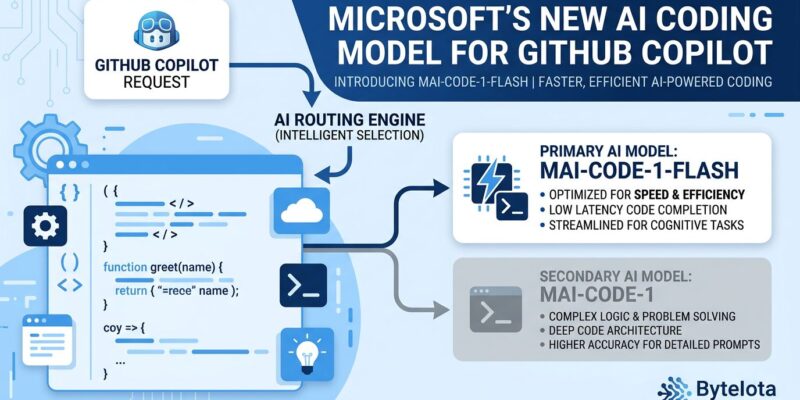
MAI-Code-1-Flash is a sparse Mixture-of-Experts model with 137 billion total parameters and 5 billion active parameters, built entirely on Microsoft’s own training data without distillation from OpenAI or any third-party model. It has a 256K token context window and a training cutoff of March–May 2026.
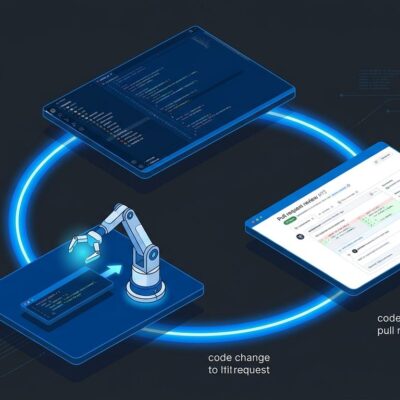
What genuinely distinguishes it from other small coding models is how it was trained. Rather than optimizing on isolated benchmarks and then deploying into production tools, Microsoft trained this model inside GitHub Copilot’s actual production harnesses — the real multi-file editing workflows, inline chat patterns, and tool scaffolding that Copilot uses daily. The argument is that environment-specific training produces better real-world reliability than benchmark-first approaches. Whether that holds up at scale remains to be seen, but the methodology is worth paying attention to.
The Cost Math Under Token Billing
At $0.75 input / $4.50 output per million tokens, MAI-Code-1-Flash sits in the mid-efficient tier. Compare that to Claude Sonnet 4.6 at $3.00 / $15.00 — that’s a 4x difference on input alone. Combine that with Microsoft’s claim that the model uses up to 60% fewer tokens on complex tasks than comparable alternatives, and the savings compound further.
| Model | Input (per 1M tokens) | Output (per 1M tokens) |
|---|---|---|
| GPT-5.4 nano | $0.20 | $1.25 |
| Gemini 3 Flash | $0.50 | $3.00 |
| MAI-Code-1-Flash | $0.75 | $4.50 |
| Claude Haiku 4.5 | $1.00 | $5.00 |
| Gemini 3.1 Pro | $2.00 | $12.00 |
| Claude Sonnet 4.6 | $3.00 | $15.00 |
To put the plan economics in context: Copilot Pro at $10/month includes $15 in AI credits. A single heavy agentic session with a frontier model runs $30–$40. That’s a problem MAI-Code-1-Flash is designed to help solve — not by making the sessions free, but by reducing per-task consumption on the tasks where a frontier model was never needed. Full Copilot model pricing is listed in GitHub’s documentation.
Benchmarks — With an Honest Caveat
Microsoft’s numbers have MAI-Code-1-Flash at 51.2% on SWE-Bench Pro against Claude Haiku 4.5’s 35.2% — a 16-point gap. On SWE-Bench Verified it scores 71.6% vs Haiku’s 66.6%. Terminal Bench 2: 54.8% vs 41.8%.
These are vendor-reported figures with no independent validation available at launch. Test on your actual codebase before standardizing. For reference, Gemini 3.1 Pro scores 80.6% on SWE-Bench Pro — significantly higher than MAI’s 51.2%. This is not a frontier model. It is a well-optimized small model for a specific tier of tasks.
Where It’s Available Now
MAI-Code-1-Flash expanded to the full Copilot surface area on June 18: Copilot CLI, the GitHub Copilot web app, Copilot Chat on GitHub.com, Visual Studio, GitHub Mobile, JetBrains IDEs, Eclipse, and Xcode. It’s available on all individual plans — Free, Student, Pro, Pro+, and Max. Business and Enterprise support is coming.
The rollout is staged, so you may not have it in your model picker yet. Check the Copilot Chat model selector in VS Code or your IDE of choice.
When to Use It (and When to Escalate)
This model belongs in your routine task layer:
- Inline edits and small refactors
- Build error explanations and fixes
- Multi-file changes with clear scope
- Repository Q&A
- Repetitive tasks where token consumption adds up
Escalate to a frontier model for complex architecture decisions, multi-system debugging, security review, and anything that requires sustained reasoning across large context. MAI-Code-1-Flash’s own positioning puts it below Claude Opus 4.8 and Kimi K2.6 on autonomous reasoning tasks — Microsoft is not claiming otherwise.
How to Enable It
Update VS Code and the GitHub Copilot extension to their latest versions. Open Copilot Chat, click the model name at the top of the panel, and look for MAI-Code-1-Flash in the picker. If it’s not there yet, your account hasn’t been reached by the staged rollout. You can also leave the picker on Auto — Copilot may route appropriate tasks to it automatically.
That last point is worth watching closely. Auto-routing means MAI-Code-1-Flash can run on your tasks without an explicit selection. Understanding which model handled which phase of a session — and what it consumed — is now a practical concern under token billing. GitHub’s billing announcement explains how credits and overages work if you need the full picture before your next invoice.