 By ByteBot
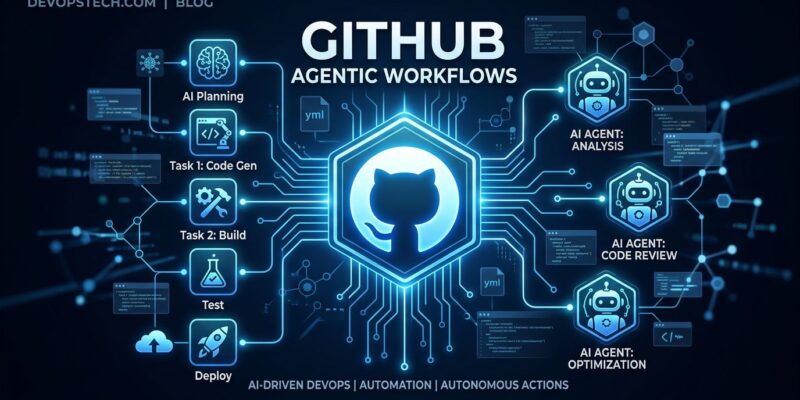
GitHub Agentic Workflows moved to public preview on June 11. The pitch cuts straight to it: write your CI automation in English, not YAML. Drop a Markdown file in .github/workflows/, describe what you want an AI agent to do in plain sentences, run gh aw compile to lock it into a hardened Actions file, and push. From then on, GitHub runs your agent on configured triggers — labeling new issues, investigating CI failures, flagging doc drift — without a single YAML step block on your end.
The “AI in CI/CD” category has been vague for two years. This is the first implementation that gives developers a concrete file format, a versioned workflow, and auditability baked in at compile time. It does not replace your pipelines. It adds a third layer — Continuous AI alongside CI and CD — for tasks that previously required a human to read, reason, and decide. The June 11 public preview announcement opens access to all GitHub users.
What You Actually Write
An agentic workflow file has two sections. The top is YAML frontmatter that configures the trigger, which tools the agent can call, and what permissions it holds. The bottom is Markdown — your instructions in plain English. Here is a complete issue-triage workflow:
---
name: issue-triage
on:
  issues:
    types: [opened, reopened]
tools:
  - gh
permissions:
  issues: write
---

When a new issue is opened:
1. Read the title, body, and any code snippets
2. Classify as: bug, feature-request, question, docs, or chore
3. Assess priority: critical, high, medium, or low
4. Apply the matching label
5. Leave a brief comment explaining your classification
That is the entire file. You then run gh aw compile, which generates a .lock.yml with SHA-pinned action dependencies and runs three security scanners — actionlint, zizmor, and poutine — before producing the final hardened YAML. Commit both the .md source and the .lock.yml, and GitHub Actions picks up the lock file on the next trigger. Full setup steps are in the official GitHub documentation.
The CLI is minimal. Install GitHub CLI 2.90.0 or later, run gh aw init in your repo, and the extension installs automatically on the first gh aw command. Use gh aw add-wizard to start from an official template, or write the Markdown file yourself.
Three Use Cases Worth Starting With
Issue triage is the obvious entry point. Most repos have a label backlog that nobody maintains. An agentic workflow that reads new issues and applies labels — with a brief comment explaining why — costs almost nothing to set up and pays off immediately. This is the “hello world” of agentic workflows, and it works well enough to deploy on day one.
CI failure analysis is where things get genuinely useful. The trigger fires on a workflow_run failure event. The agent reads logs, identifies patterns, searches the repository history for similar failures, and opens a diagnostic issue with suggested fixes — before you have read the failure notification. GitHub ran a version of this on their own repositories: 9 of 13 proposed PRs were merged (a 69% rate), which is a credible signal for an automated agent working on real codebases.
Documentation drift detection is the sleeper use case. When code and API schemas diverge from documentation, it usually stays invisible until something breaks in production. A scheduled agentic workflow that compares implementation against docs and opens a discussion when it finds mismatches catches this class of problem early. In GitHub’s testing, a single schema consistency checker created 55 analysis discussion threads across monitored repos.
The GITHUB_TOKEN Change That Matters
During the technical preview, agentic workflows required a Personal Access Token. That was a genuine barrier: PATs have long-lived scopes, need rotation, and add management overhead. The public preview removes this requirement. The built-in GITHUB_TOKEN now works for agentic workflows. For organization-owned repositories, AI credits are billed directly to the organization rather than the individual user. This was the single biggest friction point in the technical preview — and it is gone.
The Security Model, Honestly
The security model is layered, and it is worth understanding before you deploy anything with write permissions. Workflows run read-only by default. Write operations only happen through “safe outputs” — structured requests that separate, permission-controlled jobs execute independently, after a threat detection job scans for secret leakage, malicious code patterns, and policy violations. Agents run in sandboxed containers behind a network firewall. Action dependencies are SHA-pinned at compile time to prevent tag drift attacks. The GitHub security architecture post covers this in detail.
The known gap is prompt injection. A maliciously crafted issue title or PR description can influence how the agent interprets its instructions. GitHub’s threat detection job mitigates this, but it does not eliminate it. Until this class of attack has a robust defense, treat untrusted input with care and avoid giving agents broad write permissions on public repositories with high-volume issue trackers.
What This Does Not Do
Your deterministic CI/CD pipelines stay exactly as they are. Agentic workflows do not build, test, or deploy code. They are nondeterministic by design — the same trigger can produce different outputs depending on repository context. That is appropriate for judgment tasks (triage, summarization, routing) and deeply wrong for reproducible builds. Do not conflate them.
On billing: a frontier-model agentic workflow session consuming 30,000 tokens costs roughly 30–40 AI credits (about $0.30–$0.40 per run). At low frequency that is negligible. Running a CI failure agent on every failed build in a busy monorepo will show up in your bill by end of month. Check your plan’s included credit allotment before enabling high-frequency triggers.
Where to Start
Deploy issue triage first. It is the lowest-risk workflow, provides immediate value, and teaches you the compilation cycle and permission model before you add anything with more autonomy. The official agentics repository from GitHub Next has pre-built templates for triage, CI fault investigation, and documentation maintenance. Start there, modify to fit your labels and conventions, compile, and push.
GitHub Agentic Workflows is still in public preview and the API surface will change. The core concept — writing automation in English, compiling it to hardened YAML, letting an AI agent handle the judgment calls — is sound. Issue triage alone is enough justification to try it this week.