 By ByteBot
WWDC 2026 opened today, and most of the developer headlines were predictable: Gemini-powered Siri, Core AI replacing Core ML, App Intents now mandatory. But buried in the session notes is the story that will actually cost iOS developers real time this summer. The iOS 27 SDK ships today with foldable-aware APIs, a brand-new iPhone Fold simulator in Xcode 26, and a system-level adaptation layer called Parallel View that will reflow your app for the 7.8-inch inner display — whether the result looks good or not. The iPhone Fold lands in September. You have less than 90 days.
What the iPhone Fold Actually Is (and Why Your App Will Have a Bad Day)
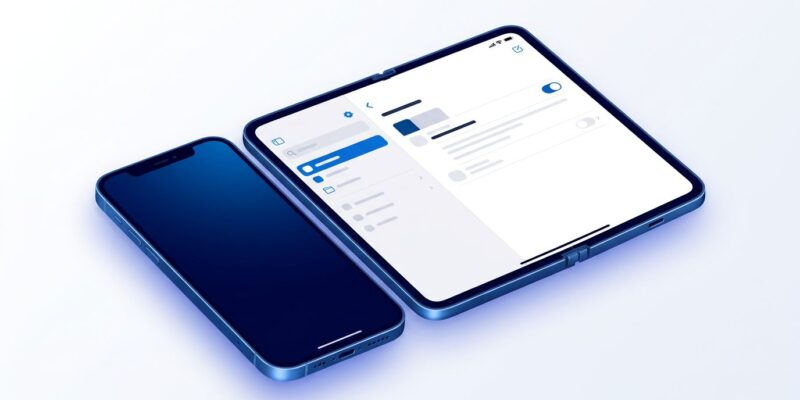
The iPhone Fold has a 5.5-inch outer cover display — roughly current iPhone SE territory — and a 7.8-inch near-square inner display when unfolded. That inner canvas is bigger than an iPad mini’s. It runs iOS 27, not iPadOS. iPad apps do not transfer. Your existing iPhone app will run on it — which is the problem.
Every iPhone app written in the last decade assumed a tall, narrow portrait screen. That assumption just expired. On the unfolded 7.8-inch display, a single-column app occupying the full width looks like a newspaper column stretched across a billboard. The device ships in September at an expected price of around $2,000, powered by the A20 Pro chip.
Parallel View: The Free Pass That Is Not Free
Apple built a safety net. iOS 27 includes a system-level reflow mechanism — called Parallel View — that automatically adapts apps to wider displays without any developer changes. This is Apple’s version of what Huawei’s HarmonyOS has done for years: let the OS figure it out so developers do not have to.
The catch is that “automatic” and “good” are not the same thing. Apple’s own apps — Mail, Messages, Notes, Safari, Maps — ship with hand-crafted two-column sidebar layouts. Parallel View reflows mechanically; native layouts are designed. Users will notice the difference immediately. If your app looks embarrassing under Parallel View, you have two real options: adopt the native sidebar APIs, or opt out entirely and run in the folded-state display only.
NavigationSplitView Is the API You Should Already Be Using
The good news is that Apple introduced the right solution four years ago. NavigationSplitView, available since iOS 16, handles the two-column sidebar layout natively. On the iPhone Fold (unfolded), it shows sidebar and detail side-by-side. On every current iPhone and on the Fold in its closed state, it collapses automatically to standard push-pop navigation. No branching logic required.
Here is the migration pattern. The before code is a plain NavigationStack. The after code is a NavigationSplitView that handles both form factors with the same code path:
// Before: NavigationStack only
NavigationStack {
    ArticleListView()
}

// After: NavigationSplitView — foldable-aware, collapses on compact screens
NavigationSplitView(columnVisibility: $columnVisibility) {
    ArticleListView()
        .navigationTitle("Headlines")
} detail: {
    if let article = selectedArticle {
        ArticleDetailView(article: article)
    } else {
        ContentUnavailableView("Select an article",
                               systemImage: "newspaper")
    }
}
The iOS 27 SDK adds .adaptiveSidebar() as a scene modifier and new Liquid Glass design tokens for sidebar backgrounds. Apps that adopt NavigationSplitView now will automatically pick up the polished visual treatment without extra work. Check the NavigationSplitView documentation for the full API surface.
If you already migrated to NavigationSplitView at any point since iOS 16, the Fold support cost is minimal. If you are still on NavigationStack only, plan for one to three days of work. If you are on UIKit’s UISplitViewController with patterns from 2016, block out a week.
Install Xcode 26 and Run the 10-Minute Test
Xcode 26 beta is available today at developer.apple.com. It ships with a new “iPhone Fold” simulator configuration that supports fold and unfold state toggling directly from the toolbar. The View Debugger includes a Fold State overlay that highlights layout regions that break under either display configuration.
The 10-minute test: install Xcode 26 beta, run your app in the iPhone Fold simulator, toggle between folded and unfolded states. You will know within that window whether you have a cosmetic problem or a structural one. Cosmetic problems — padding, typography — are afternoon work. Structural problems — portrait-only orientation lock, hardcoded CGFloat literals — need triage. Review the Xcode 26 release notes for the full list of simulator options and known beta issues.
When to Opt Out
Some apps should not touch the foldable canvas. Camera apps with custom overlays, AR experiences, games with fixed-orientation physics, apps with hard pixel-perfect layout requirements — these are legitimate portrait-lock use cases. The opt-out is a single Info.plist key:
<key>UIRequiresFullScreen</key>
<true/>
This tells iOS 27 to skip Parallel View for your app. It will still run on the iPhone Fold, just on the 5.5-inch cover display, not the inner canvas. For camera or AR apps, that is the correct call. For productivity or content apps, it is a missed opportunity.
The Window Is 90 Days
Apple will feature foldable-ready apps at the iPhone Fold launch in September. This is not speculation — it happened with iPad in 2010, iPhone 6 Plus in 2014, iPhone X in 2017, and Liquid Glass in 2025. Apps that adopt the new form factor APIs at launch get editorial featuring, press coverage, and a visibility bump at the exact moment when a new device brings a wave of new users.
The shortlist of featured apps is being assembled now, based on which apps have demonstrated foldable support in beta. Read through the WWDC 2026 session library — specifically “What’s New in SwiftUI” and “Platforms State of the Union” — for the foldable API coverage in detail. Follow the reporting on iOS 27’s split-screen adaptation feature to track what lands in each beta drop.
Parallel View means your app will not crash on the iPhone Fold. But Parallel View is the floor, not the ceiling. The apps users will remember are the ones that felt at home on a new device from day one — not the ones that looked like they got squeezed into a shape they were not designed for. The APIs are here. The simulator is here. The launch window is 90 days out.
Read the Human Interface Guidelines for split views and then go run the 10-minute test.