 By ByteBot
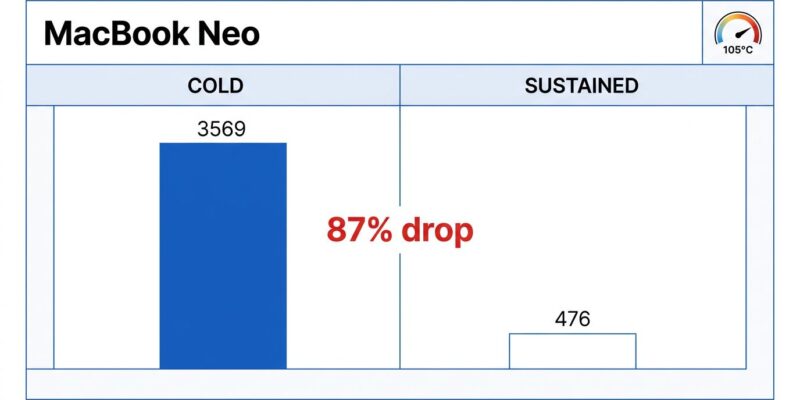
Apple’s $599 MacBook Neo is trending on Hacker News this week, and not because the reviews are glowing. A deep-dive benchmark analysis dropped showing the A18 Pro hitting 3,569 single-core on Geekbench 6 — faster than the M1, within 6% of the M4. Then the same tester ran it hot for 90 seconds and recorded 476. That’s an 87% collapse. The benchmarks Apple doesn’t publish are the ones developers actually need before buying a MacBook Neo.
The Thermal Wall Is Real
The MacBook Neo is fanless. That’s acceptable for a $599 laptop until you understand what it means for sustained workloads. Under continuous load, the A18 Pro chip maintains full clock speeds for roughly 60 seconds, then the die temperature hits 105°C and macOS cuts CPU utilization from 570% down to 207% within 15 seconds. Clock speeds drop from 3.3 GHz to around 2.3 GHz and stay there.
For short tasks — a quick script, a small TypeScript compile, a git operation — you never notice. For anything sustained, you’re running on a throttled chip. A Kubernetes codebase with 3.3 million lines of Go takes 3 minutes 22 seconds on the Neo versus 1 minute 38 seconds on the M5 MacBook Air. Twice as slow, and that’s before factoring in that running Claude Code in the background causes an additional 80% single-core performance drop. That’s not a workflow. That’s waiting.
Apple’s marketing benchmarks are not wrong — they’re just measuring a scenario that doesn’t reflect how developers use a laptop. Burst performance benchmarks should carry a disclosure. They don’t. You’re expected to find out yourself.
The 8GB Math Doesn’t Add Up
Eight gigabytes of unified memory sounds reasonable until you boot the machine and open Activity Monitor. A fresh macOS install consumes approximately 5GB out of the gate, leaving around 3GB of actual headroom. That’s the OS, kernel, and system services doing their job — it’s not a software bug, and there’s no fix.
What this means in practice for MacBook Neo developer workflows:
- Cursor AI requires approximately 7GB RAM. It is effectively incompatible with this machine.
- Docker Compose with four or more services pushes the Neo into memory pressure. A single container is manageable; a real microservices stack is not.
- Android Studio with an emulator regularly exceeds 8GB.
- Windsurf uses ~3GB and becomes the practical AI coding tool choice — not because it’s better, but because Cursor won’t fit.
macOS’s memory compression is legitimately good. Testing showed zero swap-outs even under pressure, as the OS compresses inactive pages faster than typical workloads can overwhelm capacity. But compression cannot save you when Cursor alone needs 7GB and you have 3GB free. There’s no algorithm for that gap.
Why Apple Built It This Way
The 8GB cap and the fanless design are not accidents — they’re the product of deliberate economics. The A18 Pro die measures roughly 105mm², yielding approximately 500 functional chips per 300mm TSMC wafer at an estimated cost of $38–47 per chip. That’s roughly one-third the cost of an M4. Apple runs 230 million iPhone shipments per year, amortizing the A18 Pro’s R&D across a volume no Mac chip can match.
The first production run used binned A18 Pro chips — units with one defective GPU core, disabled and sold at a lower cost. Apple never disclosed this. The chips performed normally for CPU-intensive work, but buyers were getting hardware that didn’t clear full quality control for iPhones. The strategic framing is clear: Apple exploited a DRAM shortage that pushed competitors out of the sub-$700 market, used iPhone-volume economics to price a Mac at $599 with healthy margins, and banked on macOS’s memory management to cover the RAM ceiling. That’s a sharp business move. It also benefits Apple more than it benefits the developer buying this as a primary machine for five years.
The $599 Price May Not Last
MacRumors reported on May 7 that Apple is weighing whether to drop the $599 base configuration entirely. The initial supply of binned chips is exhausted. Fresh A18 Pro production runs cost more. The DRAM crisis driving AI data center demand has pushed 32GB memory kit prices from $120 to $350 — component costs that eventually reach Apple’s bill of materials. If the base model is discontinued, the effective starting price becomes $699. The $599 MacBook Neo may be a limited-time window, not a permanent entry point.
Who Should Buy the MacBook Neo
Buy it if you’re a student, a developer doing single-stack web work (Node, React, Python, TypeScript), or you need a travel machine and already have a primary workstation. Sub-60-second tasks feel fast, the build quality is solid, and battery life is genuinely good. At $599, nothing else offers M3-class single-core performance in a fanless chassis.
Don’t buy it if Docker Compose with multiple services is a daily requirement. If you run Cursor AI. If Android development is in scope. If this will be your only machine for the next five years. If local LLM inference or ML work is part of your workflow.
The MacBook Neo is a machine built for a specific workflow, priced to undercut the competition, and likely to get more expensive as input costs rise. It’s not a bad product. It’s a precisely constrained one — and the developers who buy it without understanding those constraints are the ones who will be disappointed. The ones who buy it as a lightweight secondary machine or travel companion will be fine.
The benchmarks don’t lie. They just don’t tell you what happens after the first minute.