 By ByteBot
Oh My codeX (OMX) exploded to 26.7K GitHub stars in April 2026, with 1,789 stars added in a single day. Released just weeks ago (v0.13.1 on April 7), OMX solves a critical gap in AI-assisted coding: while Codex is powerful, it lacks structured workflows, state persistence, and multi-agent coordination. OMX adds 36 workflow skills, agent teams running in parallel tmux panes, and persistent memory—all in under 2 minutes of setup.
If you’re using OpenAI’s Codex CLI or evaluating AI coding tools, OMX is trending for good reason. It transforms Codex from a single autonomous agent into a coordinated team with approval gates, isolated git worktrees, and automated verification loops. Think of it as oh-my-zsh for Codex: it doesn’t replace the underlying tool, just makes it dramatically more productive.
What Is Oh My codeX (OMX)?
OMX is an MIT-licensed orchestration layer that wraps around OpenAI’s Codex CLI to add structure missing from raw agent workflows. Codex excels at autonomous coding, but developers struggle with unstructured prompting: agents execute without approval, forget context across sessions, and lack coordination when working on multiple files concurrently. OMX fills these gaps with four core workflow skills.
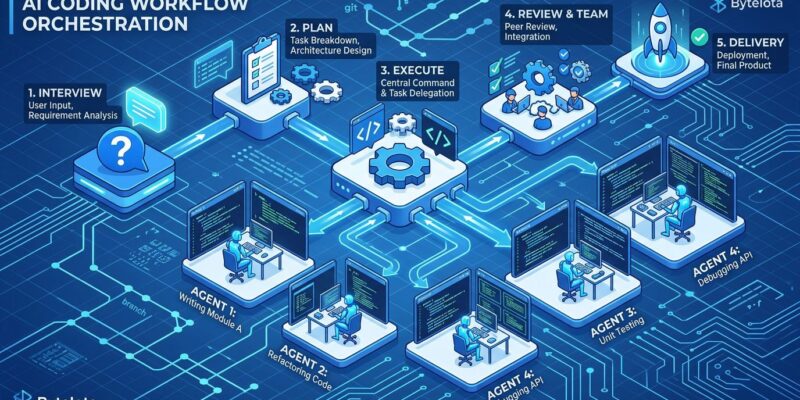
The canonical pipeline runs $deep-interview (clarify vague requests), $ralplan (generate and approve implementation plans), $ralph (persistent completion loops), and $team (parallel execution with isolated git worktrees). As creator Yeachan Heo explains: “Start Codex stronger, then let OMX add better prompts, workflows, and runtime help when the work grows.” Installation is trivial—`npm install -g oh-my-codex && omx setup` takes under 2 minutes.
State persists in the .omx/ directory across sessions, storing plans, logs, and project-specific memory. This durable state means agents recall context you’d otherwise repeat manually. Hook support via .codex/hooks.json enables event-driven automation: trigger tests after file changes, block commits without security verification, or auto-update documentation after merges. For teams running substantial multi-agent operations, OMX has become the de facto orchestration standard for Codex CLI.
Getting Started: OMX Installation and First Workflow
Requirements are minimal: Node.js 20+, Codex CLI installed and authenticated, and tmux (macOS/Linux) or psmux (Windows) for team features. OMX works best on macOS and Linux—Windows users should use WSL2 due to weaker native support. Installing and verifying takes three commands:
# Install OMX (requires Node.js 20+ and Codex CLI)
npm install -g @openai/codex oh-my-codex
omx setup

# Verify installation
omx doctor
Your first workflow demonstrates the core pipeline. Start with $deep-interview to clarify vague requests—this reduces rework from misunderstood requirements. Then use $ralplan to generate implementation plans with trade-off analysis for team review. Finally, $ralph executes with persistent completion loops, retrying until tests pass and verification hooks clear:
# Clarify vague request
omx $deep-interview "improve authentication"

# Generate and approve implementation plan
omx $ralplan "implement OAuth 2.0 with Google provider"

# Execute with persistent completion loop
omx $ralph "execute approved OAuth plan"
The $deep-interview skill prompts questions: OAuth or session-based auth? Login only or full user management? Security requirements like 2FA? This upfront clarification prevents agents from executing based on assumptions. The $ralplan output shows files to modify, dependencies to add, security considerations, and rollback strategy. You review and approve before $ralph executes.
Team Coordination: Parallel Execution with Isolated Worktrees
OMX’s killer feature is the $team command, which spawns multiple workers in isolated git worktrees for safe concurrent development. Each worker runs in a separate tmux pane, handles an assigned subset of work, and commits changes independently. The leader agent merges completions incrementally, logging conflicts automatically to .omx/conflicts.log. This enables coordinated refactors without merge chaos.
Consider migrating 30 components from class-based to functional. A single-agent approach takes hours sequentially and risks context loss. OMX’s team workflow parallelizes this: the leader analyzes the codebase, identifies components, then spawns three workers. Worker 1 handles components A-J, Worker 2 handles K-T, Worker 3 handles U-Z. Each executes concurrently in an isolated worktree—no merge conflicts until the leader incrementally merges verified completions.
# Spawn 3 workers for concurrent refactoring
omx $team --workers=3 "migrate all components from class to functional"

# Monitor in real-time
omx hud --watch
Community feedback confirms impact: developers report 40-60% fewer errors in multi-file changes compared to single-agent approaches. The worktree isolation is key—workers operate independently, reducing context loss in complex projects. However, limit workers to CPU cores minus one (e.g., 8-core machine → max 7 workers) to avoid tmux pane crashes from overload.
Related: Cursor 3 Bets Developers Will Orchestrate, Not Write Code
When to Use OMX vs Cursor and Claude Code
OMX fits a specific niche: Codex CLI users wanting orchestration. It complements rather than replaces other AI coding tools. Use Cursor for daily IDE coding with Supermaven autocomplete and visual diffs, Claude Code for large codebase analysis with 1M token context, and OMX for autonomous background tasks with team coordination. Many developers use all three together—Cursor for interactive coding, OMX for async execution, Claude Code for complex refactors.
Pricing converges at $20/month for individuals across all three tools. The differentiator isn’t cost but workflow fit. OMX shines for background execution: assign OMX a refactor in a tmux session while you continue coding in Cursor. Its $ralph completion loops run independently until verified done—tests passing, security hooks cleared, documentation updated. Cursor excels at real-time editing; OMX excels at structured async orchestration.
Common Gotchas and Best Practices
The most common pitfall is running $team without tmux installed—the command fails silently. Install tmux first: `brew install tmux` on macOS, `apt install tmux` on Linux, or use WSL2 for Windows. Another gotcha is ignoring .omx/ state corruption: if OMX behaves erratically or repeats completed tasks, run `omx reset` to clear corrupted state.
State directory growth is real. Long projects accumulate logs in .omx/ until disk fills. Manually clean periodically. Hook execution is synchronous—slow hooks like full test suites block execution. Use background jobs for expensive operations. Failed $team runs leave orphaned git worktrees; clean them with `git worktree prune`.
Best practices: use AGENTS.md to document project conventions once—all agents reference automatically. Enable quality gates via .codex/hooks.json: automate linting, testing, security checks. Monitor multi-agent operations with `omx hud –watch` for real-time visibility into progress and blockers. Start with solo workflows ($deep-interview, $ralplan, $ralph) before adopting team features—the learning curve is gentler.
Key Takeaways
- OMX adds structured workflows, state persistence, and multi-agent coordination to Codex CLI—filling critical gaps without replacing the underlying agent.
- Installation takes under 2 minutes; first workflow (interview → plan → execute) demonstrates value in 5-10 minutes.
- Team workflows with $team enable safe parallel execution via isolated git worktrees—community reports 40-60% fewer errors in multi-file changes.
- OMX complements (not replaces) Cursor and Claude Code: use Cursor for interactive IDE coding, OMX for async orchestration, Claude Code for deep codebase analysis.
- Gotchas are real but manageable: tmux dependency, worker limits (CPU cores – 1), state cleanup, and WSL2 requirement for Windows users.
OMX’s explosive growth (26.7K stars in weeks) reflects real developer need for structured AI coding workflows. If you’re already using Codex CLI, the adoption friction is minimal. If you’re evaluating AI coding tools, OMX demonstrates where the ecosystem is heading: less raw prompting, more orchestration. For teams coordinating multi-agent development, OMX has become the standard. For solo developers, it transforms Codex from powerful but chaotic to structured and reliable.