 By ByteBot
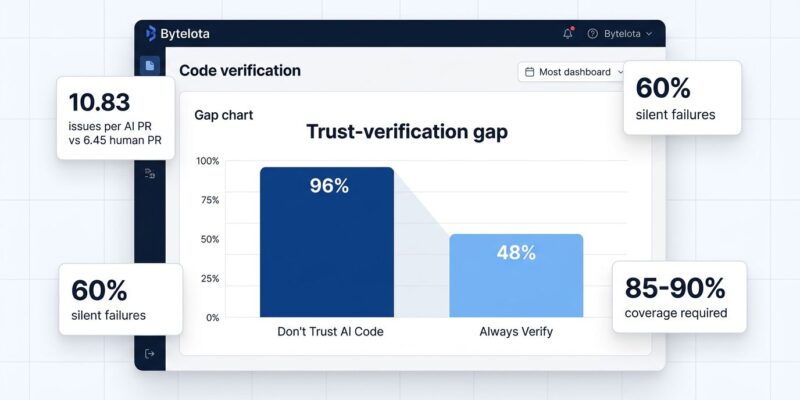
AI coding assistants have taken over development. Developers use AI for 42% of all committed code, expected to hit 65% by 2027, according to SonarSource’s State of Code 2026 survey of 1,100+ developers. However, the productivity paradox is striking: while 90% use AI to write new code, only 55% find it “extremely or very effective.” The reason? 96% don’t fully trust AI-generated code, yet only 48% always verify it before committing. This gap created what researchers call “the great toil shift”—teams moved from writing code to verifying it, and the verification bottleneck is offsetting speed gains from AI generation.
The Trust Gap is Real
SonarSource’s survey found 38% of developers say reviewing AI code requires more effort than human code, compared to just 27% who say less. Moreover, that’s not what the productivity narrative promised.
The technical debt impact is stark. In fact, 88% report negative effects, with 53% citing AI creating “correct-looking but unreliable” code (67% SMB vs 56% enterprise). AI-generated PRs contain 10.83 issues per PR versus 6.45 for human PRs—a 1.7x increase in critical findings.
Currently, AI code accounts for 42% of commits and will climb to 65% by 2027. The question isn’t whether AI will write your codebase—it’s whether your team can verify it fast enough. This is where understanding the current reality of AI coding becomes critical.
Why AI Code “Looks Correct But Isn’t”
AI generates code through pattern matching, not semantic understanding. It learns patterns from training data without grasping intent or context, creating bugs that human reviewers miss initially.
Significantly, sixty percent of AI code faults are “silent logic failures”—code that compiles and runs but produces wrong results in edge cases. Common patterns include off-by-one errors, incorrect conditionals, and flawed loop logic. Furthermore, error handling gaps appear twice as often in AI code versus human code. Missing null checks and array bounds validation cause runtime crashes. Security vulnerabilities exist in 45-62% of AI-generated code samples, with authentication bypass and cryptographic weaknesses most common, according to academic research on AI code bugs.
The training data bias compounds this. AI models overrepresent common scenarios from training sets. Therefore, edge cases—empty arrays, null values, max integers, Unicode—appear less frequently, so AI handles them poorly. Your codebase works great with typical inputs but fails at boundaries.
Real example: A startup used AI to generate password reset functionality. The code passed review and testing. However, security researchers found reset tokens in client-side JavaScript. Anyone could generate valid tokens for any account. Consequently, they had to move logic server-side and notify 50,000 users.
The AI Code Verification Workflow That Works
Teams successfully deploying AI code use a five-step verification process. The key difference: AI code requires 85-90% test coverage versus 70-80% for human code, as detailed in system-level testing guides. AI passes happy paths but consistently fails edge cases.
Step 1: Static analysis on every commit. Run ESLint, Semgrep, or SonarQube before human review. This catches common patterns and security issues automatically.
Step 2: Enforce higher coverage. Write unit tests before AI generates implementation—forces thinking through edge cases AI misses. Test with inputs that break AI: null values, empty arrays, max integers, Unicode.
Step 3: Manual logic analysis. Trace boundary conditions by hand. Check off-by-one errors, loop termination, conditionals. Additionally, validate error handling on every code path.
Step 4: Security review checklist. Check authentication bypass, cryptographic weaknesses, missing null checks, array bounds validation, and rate limits. These are areas where AI consistently creates exploitable code.
Step 5: Human review for business logic. Measure p99 latency before and after AI changes. Similarly, track errors per 1,000 requests by code origin. This data tells whether verification works or the bottleneck grows.
The Experience Paradox
Interestingly, junior developers trust AI more, but seniors ship more AI code. Specifically, 78% of juniors (0-2 years) trust AI specificity versus 39% of seniors. Yet 32% of seniors ship over half AI code compared to only 13% of juniors—a 2.5x difference.
The reason: verification discipline. Seniors ship more because they verify thoroughly despite lower trust. They’ve seen production bugs and know what breaks. In contrast, juniors trust more but lack pattern recognition to spot subtle issues.
This creates a skill gap. Verification is now a core competency separating effective developers from those blindly accepting AI output. Ultimately, career development in 2026 requires learning to systematically verify AI production, not just prompt it.
What’s Next: Automating Verification
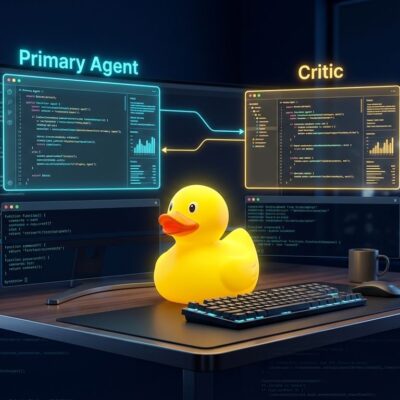
The verification bottleneck won’t disappear—it will move. The next frontier involves using AI to verify AI code through multi-agent testing where one model generates and another validates. Early frameworks like OpenAI Evals, LangSmith, and Braintrust are standardizing this approach.
Meanwhile, CI/CD pipelines embed quality gates earlier. Shift-left practices estimate costs and quality at PR stage, not after deployment. Automated rollback on verification failures is becoming standard.
Nevertheless, human oversight remains critical for business logic and architecture. The emerging workflow: AI generates, AI verifies against test suites and security, humans approve based on business requirements.
The challenge: verification tools must catch up to generation speed. Right now AI writes code faster than we can verify it safely. Until automation closes that gap, teams choose: ship fast with quality risk, or verify thoroughly and lose the speed advantage. Teams winning in 2026 designed workflows for verification from the start, not after production issues emerged.