 By ByteBot
AI agents are already visiting your website. Right now, they are taking screenshots, parsing DOM trees, and making expensive multimodal inference calls just to figure out what your search box does. Google and Microsoft think this is absurd — and so they built WebMCP, a proposed browser standard that lets you expose your site’s functionality as typed, callable tools. No scraping. No guessing. Just direct function calls.
The Chrome origin trial opened in June with Chrome 149 and runs through Chrome 162. Shopify shipped it across millions of storefronts in March. Chrome 153 and 154 just added a WebMCP debugger to the Application panel in DevTools. This is no longer a “watch this space” story.
What WebMCP Actually Does
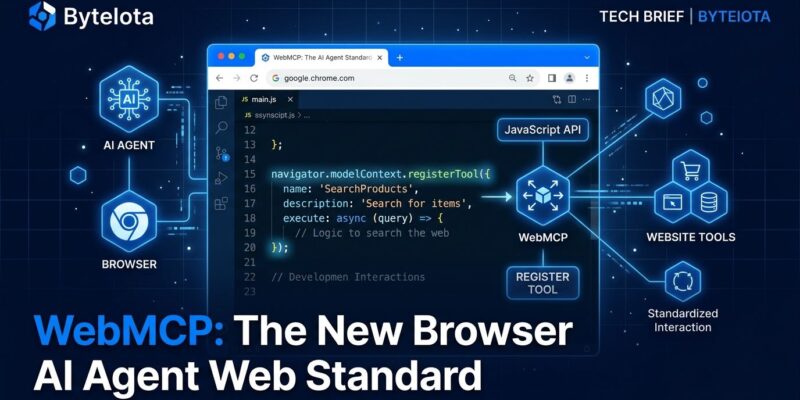
The standard introduces a new browser API — navigator.modelContext — that lets pages register tools with JSON Schema definitions. An AI agent visiting your site calls navigator.modelContext.getTools(), gets back a typed manifest, and invokes functions directly. The agent knows exactly what parameters you expect, what types they should be, and what the function does. No inference required.
The name borrows from Anthropic’s Model Context Protocol, but WebMCP is not MCP. MCP is a backend protocol — JSON-RPC, server-to-server, no browser involved. WebMCP operates entirely client-side, inside an open browser tab, within the user’s live authenticated session. The emerging mental model for 2026: MCP handles agent-to-backend, WebMCP handles agent-to-website, and A2A standards handle agent-to-agent coordination. You will eventually need all three.
Two Ways to Implement It
The spec provides a declarative path for sites with existing HTML forms. Add three attributes — toolname, tooldescription, and optionally toolautosubmit — and the browser registers the form as a callable tool automatically. Zero JavaScript required. For a legacy site with standard search forms, this is an afternoon’s work.
For dynamic interactions, use the imperative API:
if ('modelContext' in navigator) {
  navigator.modelContext.registerTool({
    name: 'searchAvailability',
    description: 'Search hotel rooms by check-in date, check-out date, and guest count',
    inputSchema: {
      type: 'object',
      properties: {
        checkIn:  { type: 'string', format: 'date' },
        checkOut: { type: 'string', format: 'date' },
        guests:   { type: 'integer', minimum: 1 }
      },
      required: ['checkIn', 'checkOut', 'guests']
    },
    async execute(args) {
      const results = await fetch('/api/search', {
        method: 'POST',
        body: JSON.stringify(args)
      }).then(r => r.json());
      return { content: [{ type: 'text', text: JSON.stringify(results) }] };
    }
  });
}
The inputSchema uses standard JSON Schema — the same format Claude, GPT-6, and Gemini use for native tool calling. Any major model can consume your WebMCP tools without a custom adapter. That is a significant design choice: the site exposes tools once, and every agent benefits.
Always wrap in a feature check ('modelContext' in navigator). WebMCP is a Chrome origin trial, not a shipping standard. Non-Chrome browsers fall back to scraping, which makes this progressive enhancement rather than a hard dependency.
Shopify Already Shipped It at Scale
The fastest proof that WebMCP is not vaporware is that Shopify turned it on for every Liquid storefront on March 24. Ten tools covering the full commerce flow are now live by default: catalog search, product and variant lookup, cart management, checkout initiation, order management, and policy lookup. Merchants did nothing — Shopify registered the tools and will maintain them as the spec evolves.
Expedia, Booking.com, Credit Karma, TurboTax, Redfin, Etsy, Instacart, and Target are also in the origin trial. The pattern is clear: transactional sites see immediate value. An agent that can reliably call search_catalog(query, filters) instead of scraping a product grid is faster, cheaper, and does not break when you redesign your homepage. For a deeper look at what Shopify actually registered, the tool manifest is a useful production reference.
The Security Problem Nobody Is Fully Solving Yet
Chrome’s own security documentation flags a real attack vector: prompt injection via context hijacking. Adversarial pages can register fake tools with misleading descriptions, or embed hidden white-text instructions that redirect agent behavior. A third-party script can modify registered tools mid-session — Chrome calls this “Mid-Session Tool Injection.”
The spec requires HTTPS and enforces same-origin policy. Sensitive tool calls require explicit user consent via requestUserInteraction(). Cross-origin iframes need allow="tools". These are reasonable defaults, but the security model is not production-ready for high-stakes workflows. Finance, identity, and healthcare use cases should wait.
For informational, search, and e-commerce sites, the risk profile is manageable today. For anything touching money movement or personal identity, implement the tools and hold off on production deployment until the spec hardens. The Chrome agent security documentation lays out the current threat model in detail.
What You Should Do Now
Your website now has two types of visitors: humans and AI agents. Humans benefit from good UX. Agents benefit from structured tools. These are not the same thing, and the gap will widen as agentic browsing becomes mainstream.
Start with Chrome’s official WebMCP documentation. Enable the flag at chrome://flags/#enable-webmcp-testing in Chrome 149 and inspect what your tools look like to an agent using the new Application panel in DevTools. If your site has existing HTML forms, the declarative API is a low-risk starting point — a few HTML attributes and you have agent-callable functionality without touching your backend.
WebMCP will not be a W3C recommendation for years. Safari and Firefox have made no commitments. But the origin trial is live, major platforms are adopting it, and the window to build familiarity before it becomes an expectation is right now — not when every agent is already using it.