 By
By VS Code 1.143, shipped October 21, makes the Copilot SDK harness the default for all new agent sessions. Sessions now run through a shared Agent Host — they persist across window closes, stay accessible from both the editor and the dedicated Agents window, and no longer vanish the moment you close a folder. The release also delivers experimental on-device AI inference that does not consume GitHub credits, a model comparison tool that runs Copilot, Claude, and Codex against the same task simultaneously, and a worktree cleanup utility for developers buried in stale agent branches.
The Harness Shift: What Actually Changed
The old Local harness was window-bound. Close the editor while a session was running and you lost the work. The Copilot SDK harness fixes that: sessions run through the Agent Host runtime, survive window closes, and sync between the VS Code window and the Agents window. You can start a task, close your editor, and come back to a running session later.
Performance improved significantly. Cold-open time for large chat histories — a session with around 1,150 requests — dropped from 35.6 seconds to 9.0 seconds. Window unresponsiveness during open fell from 28.3 seconds to 0.6 seconds. If you have ever opened a long agent session and watched VS Code lock up for half a minute, that specific pain is gone. The harness also reduces latency from MCP servers that had been slowing tool loading.
Local AI: Free Credits, Monster Hardware
The headline feature is on-device AI. VS Code 1.143 lets you download MAI Code 1.1 Flash and run it locally via llama.cpp. Responses are labeled “On-device” and consume zero GitHub AI credits. The model is capable: 137 billion total parameters in a mixture-of-experts architecture with 6.8 billion active, 3-bit quantized to 53GB on disk, retaining a full 256K context window. Microsoft’s benchmarks show 22% improvement on Terminal-Bench 2.1, 15% on .NET tasks, and 25% faster token streaming in Copilot versus the previous version.
The catch is the hardware. Running MAI Code 1.1 Flash locally requires an NVIDIA GPU with at least 96GB of GPU memory — and Microsoft’s own recommendation is over 120GB of RAM for best performance. The hardware that comfortably handles this — NVIDIA RTX Spark systems like the Surface Laptop Ultra — runs ,000 and up. Most developer workstations cannot run this today.
That is not a reason to dismiss the feature — it is a preview of where local IDE inference is heading. Within a few hardware generations, these requirements will drop to something practical. Today it is for well-equipped early adopters, and the experimental tag is accurate.
One more note: bugs shipped with 1.143.0. A developer reported a local BYOK llama.cpp session that ran 517 model turns over 55 minutes without completing. Version 1.143.1 addresses some of this, but local inference in VS Code is not production-ready yet.
Compare Models: Let Them Fight
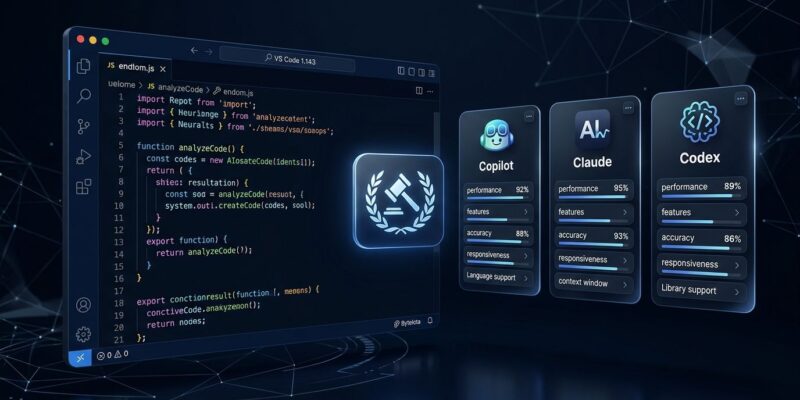
The more immediately useful addition is Compare Models, enabled via sessions.chat.compareAgents.enabled in the Agents window. You submit a task once; multiple models attempt it in parallel — mix Copilot, Claude, and Codex harnesses with different reasoning levels. An optional Judge model evaluates all attempts and produces a scorecard with time, token usage, rationale, and validation evidence. A Synthesize action then lets you build on the recommended attempt while incorporating ideas from the others.
The practical workflow this enables: have Codex review Claude’s code automatically, loop until the reviewer approves, ship. Developers running this report meaningful quality improvements over single-model outputs. Multi-model review loops are becoming standard in production agent setups, and VS Code now supports this natively without any glue code.
Worktree Cleanup and Other Additions
If you run agents on feature branches, worktrees pile up fast. The new Chat: Open Worktree Cleanup command shows disk usage, filters by inactivity, and handles selective deletion. Merged PR sessions are cleaned automatically; active and running sessions are protected.
Other changes worth knowing: the diagnostics limit per file increased from 500 to 5,000, background shell output from dev servers and file watchers is now streamable in the chat view, GitHub Copilot CLI is bundled in installers, and the multi-file diff editor gained a navigable file list.
What to Do With This Release
The harness change is automatic — new sessions use the Copilot SDK harness without configuration. The Local harness remains available but is being phased out; existing sessions can continue with the Copilot harness going forward. Check the official VS Code 1.143 release notes for the full list of changes.
For Compare Models: enable sessions.chat.compareAgents.enabled in the Agents window and run it on a task you have already solved with one model. The Judge output is worth the experiment. For local AI: unless your setup has 96GB+ GPU memory, skip for now and revisit in six months. The feature direction is right; the hardware reality is not there yet for most developers.