 By
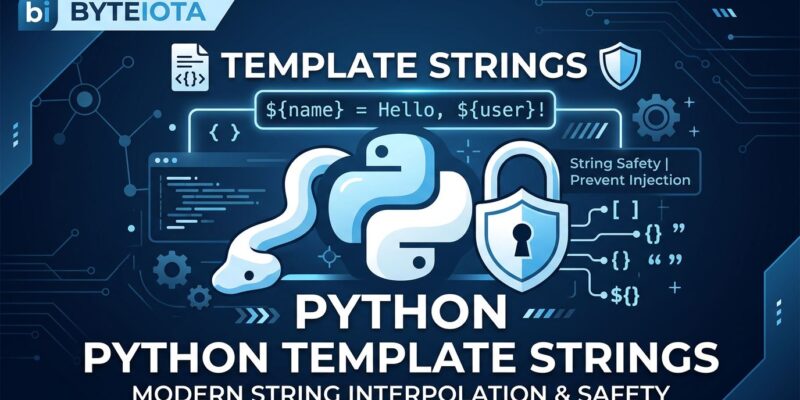
By f-strings made Python string formatting fast and readable. They also made it dangerously easy to embed untrusted data directly into SQL queries and HTML. Python 3.14 ships t-strings — a new literal type that looks nearly identical to f-strings but returns a Template object instead of a str. That single difference is what makes SQL injection structurally impossible and XSS prevention automatic. Here’s what changed and when you should use it.
One Line, Two Different Types
The syntax is deliberate: swap the f prefix for t and you get a completely different object back.
name = "Alice"

f"Hello, {name}!"  # Returns: '''Hello, Alice!'''   — a str
t"Hello, {name}!"  # Returns: Template(...)      — not a str
The f-string evaluates immediately and discards the structure. The t-string preserves it. You get a Template object with two key properties: the static string chunks (written by you, the developer — trusted) and the interpolated values (coming from users, databases, APIs — untrusted). Any code that processes the Template gets to decide how to handle each part. The interpolated values never get joined in blindly.
This is the whole idea. Static parts are your code. Interpolated parts are data. t-strings make that distinction a runtime type distinction, not a convention you hope everyone follows.
SQL Injection Made Structurally Impossible
The most compelling use case is SQL. You’ve probably seen this pattern in code reviews:
from string.templatelib import Interpolation

def parameterize(template):
    parts, params = [], []
    for item in template:
        if isinstance(item, str):
            parts.append(item)
        else:
            parts.append("?")
            params.append(item.value)
    return "".join(parts), tuple(params)

user_input = "'; DROP TABLE users;--"
query, params = parameterize(t"SELECT * FROM users WHERE name = {user_input}")

# query:  "SELECT * FROM users WHERE name = ?"
# params: ("'; DROP TABLE users;--",)
The malicious payload lands in params, not in the query string. Pass both to your database driver’s parameterized query interface and the injection is impossible — not because you remembered to sanitize, but because the structure of the Template made it impossible to join them unsafely. This is a meaningful step toward correctness by construction.
HTML Escaping Without the Ceremony
The same pattern applies to HTML. Write a renderer once, use t-strings everywhere that touches user content:
import html
from string.templatelib import Interpolation
def render(template):
out = []
for item in template:
if isinstance(item, str):
out.append(item)
else:
out.append(html.escape(str(item.value), quote=True))
return "".join(out)
username = "<script>alert('xss')</script>"
safe_html = render(t"<p>Hello, {username}!</p>")
# <p>Hello, <script>alert('xss')</script>!</p>Your static HTML passes through as-is. User-supplied content gets escaped automatically. Every developer who calls render(t"...") gets XSS prevention by default — even the junior who didn’t read the security wiki.
The Interpolation Object: More Than a Value
Each {...} slot becomes an Interpolation with four attributes: .value (the evaluated result), .expression (the source code string, like "user_id"), .conversion, and .format_spec. The .expression attribute is underrated — it gives you the variable name from source code, not just its value.
user_id = 42
action = "login"
template = t"User {user_id} performed {action}"

ctx = {i.expression: i.value for i in template.interpolations}
# {"user_id": 42, "action": "login"}
Build a structured logging wrapper around this and you get machine-readable log entries with typed values — no manual key-naming, no forgetting to add the variable to the dict. The template is the schema.
When to Use t-strings (and When Not To)
t-strings are not a drop-in replacement for f-strings. They solve a different problem. Use t-strings when:
- You’re interpolating untrusted user input into SQL, HTML, or shell commands
- You’re writing a library API that accepts template-style arguments
- You need structured, machine-parseable logging with preserved variable names
- You’re building a DSL or custom template engine
Keep using f-strings for everything else: print statements, exception messages, debug output, internal formatting where the data is trusted. The community shorthand is “t-string the API, f-string the body” — a reasonable rule of thumb.
One important caveat: subprocess support for t-strings is deferred to Python 3.15. Safe shell command construction isn’t available yet. Django and SQLAlchemy are discussing native t-string APIs, but nothing has shipped as of Python 3.14.5 (May 2026). You’ll write your own renderers for now — a 10-20 line function in most cases.
To use t-strings today, you need Python 3.14. There’s no backport — it’s a syntax feature that raises SyntaxError on 3.13 and earlier. Check your minimum supported Python version before adopting them in libraries. In application code, the upgrade is the bottleneck, not the feature itself.
PEP 750 is one of the more thoughtful additions to Python in recent years. It doesn’t try to fix everything — it gives you the tools to fix the right class of problems correctly, which is more useful than a magic sanitization function that gets bypassed the moment someone finds an edge case. If you want to go deeper, the Real Python guide to t-strings covers the full API surface with additional patterns, and the official string.templatelib docs have the complete reference.