 By
By Google accepted 6,000 community pull requests on Gemini CLI, then shut it down for everyone who isn’t paying enterprise rates. GitHub Copilot moved to AI Credits billing with reported 10–50x cost spikes. Anthropic blocked third-party OAuth access to Claude Pro accounts in January. In this environment, OpenCode v1.16.0 shipped on June 5 with managed workspace cloning, interactive session replay, and 38% faster startup — MIT licensed, model-agnostic, and not beholden to any vendor’s monetization pivot. It now has 162,000 GitHub stars, more than Claude Code, and 7.5 million monthly active developers.
What OpenCode Is
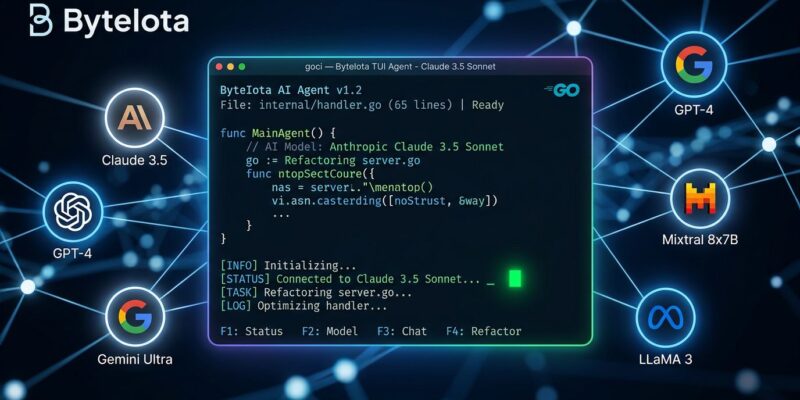
OpenCode is a terminal-native AI coding agent built in Go. It ships as a single binary that opens a polished TUI, connects to your chosen LLM provider, and lets you write, debug, refactor, and document code without leaving the terminal. It’s also available as a desktop app and IDE extension, but the terminal is where it’s designed to feel at home.
The architecture splits work into two agents: a Build agent that writes code and makes file changes, and a Plan agent that reasons about architecture without touching files. LSP integration gives it genuine code understanding rather than blind text manipulation. Multi-session support runs parallel conversations each with their own context.
Provider support spans 75+ LLMs via Models.dev — OpenAI, Google Gemini, Ollama, AWS Bedrock, and more. Claude access requires using the direct API (not OAuth subscription), available through OpenCode Zen, the project’s curated hosted model service.
What’s New in v1.16
The headline additions are workspace management improvements and session replay.
Managed workspace cloning now preserves dirty and untracked files. Previously, cloning a workspace to run a parallel agent session could silently discard in-progress changes. If you’re running multiple agent sessions against the same repository — each in its own Git worktree — your uncommitted work stays intact across clones.
Session mobility lets you move sessions between workspaces and directories. Useful when a project restructures mid-session or you want to hand off a session context to a different working directory.
Interactive session replay is the most useful new addition. Run opencode run --replay to review and resume a previous agent session interactively. For long-running agent work — debugging a tricky refactor, resuming after a context reset — the ability to step back through what the agent did is a meaningful workflow improvement.
Startup time dropped by approximately 38%, which matters if you open sessions frequently. Vue syntax highlighting landed for frontend developers. AWS Bedrock now properly routes OpenAI models. The desktop app got a refresh with color themes and a thinking-level selector.
Getting Started
Install takes under a minute on macOS, Linux, or Windows:
curl -fsSL https://opencode.ai/install | bashOr via npm: npm install -g opencode-ai
Configure your provider in opencode.json at the project root. Use environment variable references rather than hardcoding keys:
{
  "provider": {
    "openai": { "apiKey": "{env:OPENAI_API_KEY}" },
    "gemini": { "apiKey": "{env:GEMINI_API_KEY}" }
  },
  "model": "gpt-5"
}
Key commands:
opencode                    # launch TUI in current project
opencode run "task"         # non-interactive, single task
opencode run --replay       # interactive session replay (new in 1.16)
opencode models             # list available models and providers
If you’d rather not manage API keys across providers, OpenCode Zen is a pay-as-you-go hosted service with 50+ curated, benchmarked models.
The Model-Agnostic Advantage Is the Point
OpenCode’s most important feature isn’t workspace cloning or session replay. It’s that no vendor controls what model you run — and no vendor can change that without you noticing and switching.
The pattern is clear enough to name. Anthropic blocked third-party OAuth access to Claude. Google killed Gemini CLI for non-enterprise users after accepting 6,000 external contributions. GitHub Copilot’s billing change hit developers with unexpected cost spikes. Closed platforms extract more revenue as adoption grows.
OpenCode’s response is structural: support 75+ providers, implement MCP natively, stay MIT licensed. When a vendor changes pricing or restricts access, you change a config value. The Anthropic block that cost the project Claude OAuth access generated 18,000 new GitHub stars in two weeks. Community trust in an MIT-licensed tool turned a restriction into a growth event.
MCP and Skill Discovery
v1.16 adds file-based agent loading — skill discovery that auto-loads AGENTS.md-style definitions from the project directory. This aligns with a growing convention: Next.js 16.2 shipped AGENTS.md support as a standard way to declare what a coding agent is allowed to do and how it should behave in a given project.
MCP support makes OpenCode a universal tool integration host. Add GitHub, PostgreSQL, filesystem, or custom integrations through config and they appear as tools inside every agent session. MCP is now standard across VS Code, Cursor, Zed, Xcode 27, and Apple Foundation Models — an MCP-native agent inherits the entire ecosystem without custom integrations for each new tool.
The Bottom Line
OpenCode isn’t trying to beat Claude Code on benchmark scores or Cursor on UI polish. It’s building a different kind of tool: one that treats model choice as a developer right rather than a vendor decision, stays open when competitors are closing, and ships consistently. v1.16 is a useful release — workspace cloning and session replay are practical additions, not marketing features.
If you’ve been on Gemini CLI and need an alternative before June 18, or you’re evaluating terminal coding agents and want something that won’t surprise you with a pricing restructure, the documentation is solid and the install is one command.