 By ByteBot
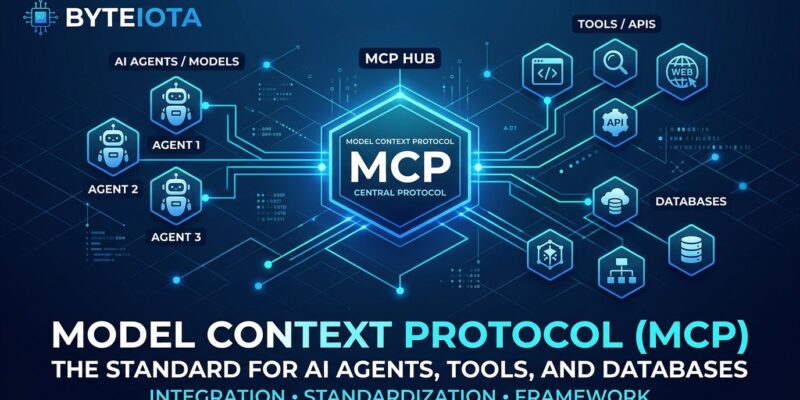
Model Context Protocol crossed 97 million installs in March 2026 and became the industry standard for connecting AI agents to external tools, databases, and APIs. What started as Anthropic’s experimental protocol in late 2024 is now supported by every major AI platform—Claude, ChatGPT, VS Code, Cursor, and over 10,000 community-built servers. OpenAI deprecated its proprietary Assistants API in favor of MCP with a mid-2026 sunset date. For developers building AI-native applications, understanding MCP is no longer optional.
The Three Core Primitives
MCP’s architecture is elegantly simple. A host orchestrates the session, clients connect to servers, and servers expose three types of capabilities that cover nearly every AI agent use case.
Tools are executable functions your AI can invoke. Think of them as the “verbs” in your agent’s vocabulary—making API calls, writing files, querying databases, triggering workflows. Each tool declares its input schema and output schema, so the agent always knows what parameters to send and what structure to expect back. This eliminates the guesswork that plagues brittle AI integrations.
Resources are data sources the agent can read. Unlike tools, resources aren’t actions—they’re context. Files, logs, database records, API responses, configuration documents. If a tool is “what can the AI do,” a resource is “what can the AI know.” The distinction matters because it shapes how your agent reasons about the world.
Prompts are reusable templates that structure interactions. Instead of hardcoding system prompts in your application layer, you expose them through MCP. This lets different agents discover and use the same high-quality prompts without duplicating prompt engineering work across codebases.
Building Your First MCP Server
There are two ways to build MCP servers in Python. The official Python SDK gives you low-level control and stays in sync with spec changes. FastMCP, built by Jeremiah Lowin, wraps the official SDK with a Flask-like decorator API that makes simple servers trivial to write.
Here’s a complete MCP server in FastMCP that exposes all three primitives:
from mcp.server.fastmcp import FastMCP

mcp = FastMCP("Demo", json_response=True)

@mcp.tool()
def add(a: int, b: int) -> int:
    """Add two numbers"""
    return a + b

@mcp.resource("greeting://{name}")
def get_greeting(name: str) -> str:
    """Get a personalized greeting"""
    return f"Hello, {name}!"

@mcp.prompt()
def greet_user(name: str, style: str = "friendly") -> str:
    """Generate a greeting prompt"""
    return f"Please write a greeting for {name}."

if __name__ == "__main__":
    mcp.run(transport="streamable-http")
Install it with uv init mcp-server then uv add "mcp[cli]" and you’ve got a working server. FastMCP version 3.0 shipped in February 2026 with over 100,000 downloads, which tells you the community has settled on patterns that work.
Choosing Your Transport: stdio vs Streamable HTTP
MCP defines two transport mechanisms, and picking the wrong one means architecture headaches later.
stdio runs locally. Your client spawns the MCP server as a child process and talks to it over standard input and output. Zero infrastructure, zero network config, perfect isolation. Use stdio for CLI tools, desktop applications, and any scenario where the server runs on the same machine as the client.
Streamable HTTP is for remote servers. The client sends JSON-RPC messages via HTTP POST, and the server responds with either an SSE stream or a JSON object. This works through firewalls, load balancers, and CDNs without special configuration. Use Streamable HTTP when your MCP server needs to be accessible over the network or when multiple clients connect to the same server.
WebSocket transport is being proposed for long-lived bidirectional connections with session persistence, but it’s not in the spec yet. For now, stdio and Streamable HTTP cover the vast majority of use cases.
The MCP Ecosystem: 10,000+ Production Servers
Don’t build what already exists. Over 10,000 MCP servers are available, with the GitHub registry listing 1,200+ community-built options. The most popular servers have hundreds of thousands of installs, which means they’re battle-tested in production.
GitHub’s MCP server leads with 398,000 installs, handling PR reviews, issue triage, and branch management. Filesystem has 485,000 installs for local file operations. PostgreSQL has 312,000 installs and defaults to read-only mode, which is exactly what you want when an AI agent is generating SQL against your data. Brave Search has 287,000 installs for web search integration.
Official vendors have shipped MCP servers too. Stripe provides customer lookup and invoice checks. Supabase connects your database. Vercel handles deployments. Red Hat maintains infrastructure tooling. The pattern is clear: if it’s a service developers use regularly, there’s probably an MCP server for it.
Real Production Workflows
Developers using MCP report 40% faster workflows on complex multi-step tasks. That’s not marketing—it’s what happens when your AI agent can coordinate across multiple systems without you writing custom integration glue for each one.
A common software development workflow: the agent creates a new branch, implements features using the Supabase MCP server for auth, deploys to Vercel’s staging environment, and opens a pull request with a generated summary. All automated, all using standardized MCP servers.
On the business operations side, teams automate revenue recovery by checking yesterday’s MRR, identifying customers with failed payments, creating Linear tickets for recovery campaigns, and drafting outreach copy in Notion. That’s five different systems coordinated by one agent.
Infrastructure teams automate incident response: check production pod status, roll back deployments if error rates exceed 5%, create GitHub issues with diagnostic context. The AI doesn’t just alert you to problems—it takes the first-line response actions that used to require an on-call engineer.
MCP vs REST and GraphQL
MCP isn’t replacing REST or GraphQL. It solves a different problem.
REST is stateless with fixed endpoints, designed for HTTP caching and human-readable URLs. GraphQL lets clients request exactly the data shape they need, reducing over-fetching and under-fetching. Both assume you know what endpoints exist and what data you want.
MCP is stateful and designed for dynamic discovery. An AI agent doesn’t know ahead of time what tools are available—it discovers them at runtime. The session maintains context across multiple tool calls, which is critical when an agent is executing a multi-step workflow. Use MCP when AI agents are the primary consumers and they need to discover capabilities without hardcoded knowledge.
Start Building Today
MCP is no longer experimental. Anthropic donated it to the Linux Foundation’s Agentic AI Foundation in December 2025, signaling long-term commitment. Every major framework—LangGraph, CrewAI, Microsoft’s Agent Framework, Google’s ADK—either supports MCP or is adding it. The ecosystem is mature, the tooling is stable, and the community has settled on patterns that work.
Get started with the official MCP documentation, explore the Python SDK on GitHub, and take Anthropic’s Introduction to Model Context Protocol course if you want structured learning. The three primitives, two transports, and a massive ecosystem of ready-to-use servers give you everything needed to build production AI agents today.