 By
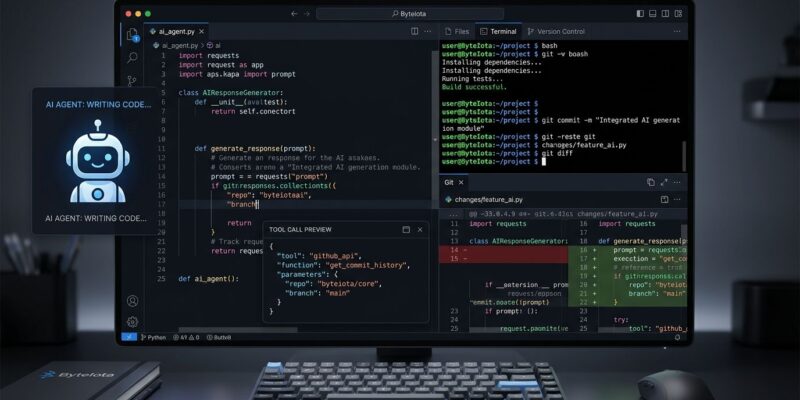
By Google Antigravity 2.10 shipped August 25 with two features developers had been asking for since the IDE launched: an embedded terminal and Git-native version control. They sound mundane — every other editor has had these for years — but for Antigravity they change the fundamental workflow loop. The agent can now operate in a closed cycle: write code, run tests in the terminal, inspect diffs in the Review pane, commit. You no longer have to leave the tool to verify what it actually did.
The Terminal Finally Shows Up
The embedded terminal lives in the sidebar and opens with Ctrl/Cmd + ` — the same shortcut VS Code uses, which means zero muscle-memory retraining. It supports builds, test runners, linters, package managers, Git CLI, and any shell command. The agent can use it too, not just you.
This closes the feedback loop that was genuinely broken in earlier versions. Before 2.10, the workflow was: agent edits files → you switch to your system terminal to run tests → context break → paste output back → repeat. The interruption was frequent enough that many developers just stayed in Cursor, where the terminal was already there. Now it isn’t an issue. Google’s own blog post on the VCS and terminal explains the design decision behind combining both in the right-side panel.
Git Integration That Tracks Everything
The Git integration lives in the Review pane and goes further than most developers probably expected. It tracks your full working tree diff — not just what the agent changed, but changes from scripts, external editors, manual edits, and Bash commands too. You can stage and unstage files in-app and commit without touching a separate Git client.
The important detail is the scope: it tracks the entire current branch from all sources. If you run a migration script outside Antigravity and it modifies 40 files, those changes appear in the Review pane alongside anything the agent did. That gives you a single audit trail instead of two sources of truth to reconcile.
Granular staging matters here. You can accept an agent’s changes to three files and reject the fourth. Previously, rejecting part of an agent’s output required manual reverting — fragile and slow for large changesets. AlternativeTo’s breakdown of the 2.10 release covers the Git feature implementation in detail.
MCP Tool Previews: The Trust Lever
Version 2.10 also adds rich MCP tool execution previews. When the agent calls an external tool — a database query, an API call, a file system operation — you now see exactly which tool was invoked and with what parameters, not just the result.
The capability argument for agentic tools has mostly been won. The blocking issue is trust. Developers need to know what the agent did before they ship it. Showing tool calls in real time is the correct answer to that problem, and it’s the kind of feature that should have shipped at launch.
Antigravity vs. Cursor: The Updated Picture
With 2.10, Antigravity now matches Cursor on the basics that matter most for day-to-day use. Here’s where they stand:
| Feature | Antigravity 2.10 | Cursor |
|---|---|---|
| Terminal | Built-in | VS Code integrated |
| Git UI | Built-in Review pane | GitLens / VS Code SCM |
| Extensions | None | VS Code marketplace |
| Agent model | Gemini 3.5 Flash | Multi-model |
| Pro pricing | $20/mo | $20/mo |
The comparison is closer than it was three months ago. But the extension ecosystem gap is still large and unaddressed in this release. Cursor runs every VS Code extension you’ve spent years configuring. Antigravity runs none of them. For developers with deep VS Code setups, that’s a real switching cost, not a talking point. LogRocket’s August 2026 AI dev tool rankings put Antigravity at #3-4, still behind Claude Code and Cursor in practical adoption.
What’s Still Missing
The honest list: no extension marketplace, default model lock-in to Gemini (no native multi-model switching without MCP workarounds), and a $249.99/mo Ultra tier that’s pricier than Cursor’s $200/mo equivalent. Enterprise SSO and audit logs are also less mature.
There’s also the trust deficit that predates 2.10. An early Antigravity agent deleted a developer’s entire D: drive in late 2025 instead of clearing a cache folder. That incident is still reliably cited in every “should I switch?” thread. Terminal and Git in the UI don’t erase it — they give developers better tools to supervise the agent before damage happens, which is meaningful but not the same thing as forgetting it happened.
Who Should Evaluate Antigravity Now
Antigravity 2.10 is worth a serious trial if you’re starting a greenfield project without an established VS Code extension setup. Google’s shipping cadence — Remote Control on August 20, terminal and Git on August 25 — signals aggressive feature parity work. The browser agent, which Cursor doesn’t have, remains a genuine differentiator for full-stack teams who want the AI to test UI behavior, not just edit files.
If you’re embedded in the VS Code ecosystem with extensions you depend on daily, wait. The extension story hasn’t changed in 2.10. Antigravity’s public changelog is worth watching — if an extension API ships, that changes the calculus entirely.