 By
By GitHub Agentic Workflows hit public preview today. After a four-month closed technical preview, it’s now available to every GitHub Copilot subscriber — and it’s the first time a coding agent has been built directly into GitHub Actions with a security architecture designed for unattended, production use. You no longer have to choose between “automated CI pipeline” and “AI that understands context.” This is GitHub’s bet that you can have both.
What GitHub Agentic Workflows Actually Is
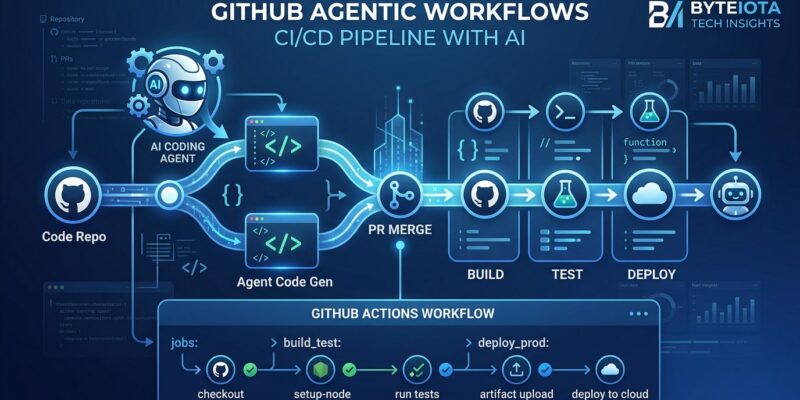
Regular GitHub Actions is deterministic: you define every step in YAML, and the workflow executes them in order. Agentic Workflows flips that model. You describe what you want in Markdown — natural language — and a coding agent decides how to do it at runtime.
The terminology GitHub is pushing is “Continuous AI”: the agentic evolution of CI/CD. Principal researcher Eddie Aftandilian put it plainly: “Continuous AI is the agentic evolution of continuous integration.” The analogy holds. CI automated builds and tests. CD automated deployments. Continuous AI automates the judgment calls — the tasks that previously needed a human to look at context and decide.
How the Compilation Model Works
You don’t just hand raw Markdown to an LLM and hope for the best. GitHub built a compile step that keeps the AI contained:
- Write a
.mdfile in.github/workflows/with YAML frontmatter (trigger, permissions, agent engine) and a Markdown body describing the task in natural language - Run
gh aw compileto convert your Markdown into a deterministic Actions YAML lockfile (.lock.yml) - The lockfile lives in your repo and gets reviewed in PRs like any other code
- At runtime, Actions executes the lockfile, which invokes the agent within defined boundaries
The lockfile is the contract. The agent doesn’t rewrite it at runtime — it operates within the boundaries it defines. That’s a meaningful constraint on non-determinism, and it’s the right answer to “I don’t know what my CI will do.”
What You Can Automate Right Now
The use cases GitHub highlights for public preview cover most of the judgment-heavy tasks teams currently handle manually:
- Issue triage — When a new issue opens, an agent reads the content, assigns labels, routes it to the right team, and posts an acknowledgment. Semantic understanding, not regex matching.
- CI failure analysis — When tests fail, the agent reads the failure log, cross-references changed code, identifies probable root cause, and posts a diagnostic comment on the PR. Especially useful for multi-file failures requiring cross-file reasoning.
- Documentation updates — When a PR merges, an agent reads the diff and drafts updates to affected documentation sections, opening a separate PR. No more “we’ll update the docs later” that never happens.
- Test coverage monitoring — On a schedule, an agent identifies uncovered code paths and drafts new test cases.
The Security Model Is the Real Story
GitHub had to design for unattended execution: no human watching each run, agents with write access to real repositories, AI output that could be adversarially manipulated. Their answer is a layered model that separates agent intent from execution:
- Agent Workflow Firewall — The agent container has restricted network access. It can reach GitHub’s API and your model provider. Nothing else. No exfiltration via outbound HTTP.
- Read-only by default — Agents can’t write anything unless you explicitly declare write permissions in the frontmatter.
- Safe Outputs — Even with write permissions, the agent cannot directly push commits or update issues. It produces structured JSON that a separate, trusted downstream job sanitizes and applies. The AI’s output is never executed with raw repository access.
- Integrity filter — The agent can only read repository content that passes an integrity check, guarding against prompt injection via issue body or PR description.
This architecture — separating “agent decides” from “trusted step executes” — solves the core trust problem with giving AI write access to production repos. It’s the right design, and it’s why the technical preview took four months instead of four weeks.
Four Agent Engines, Your Choice
You’re not locked into Copilot. The frontmatter lets you declare your engine:
agent: copilot    # COPILOT_GITHUB_TOKEN
agent: claude     # ANTHROPIC_API_KEY
agent: codex      # OPENAI_API_KEY
agent: gemini     # GEMINI_API_KEY
Teams with existing Anthropic or Google API contracts can plug in their model. GitHub is being pragmatic: tying this to Copilot-only would have slowed adoption from teams already committed to other models.
Getting Started
gh extension install github/gh-aw
gh aw setup             # select agent engine, configure secrets
gh aw add issue-triage  # install a prebuilt workflow
gh aw run issue-triage  # trigger manually for testing
The compiled lockfile lands in .github/workflows/ alongside your existing Actions YAML. No new runtime to learn — it’s still Actions underneath. The official quickstart walks through the full setup in about ten minutes, and prebuilt workflows for triage, reporting, and compliance are in the GitHub Changelog announcement.
What This Means for Your CI/CD
GitHub Agentic Workflows doesn’t replace CI/CD — it adds a judgment layer above it. Deterministic steps still run where determinism is right: container builds, artifact packaging, deployment gates. The agentic layer handles judgment-heavy tasks where you’ve historically needed a human or accepted that nothing would happen.
The technical preview feedback loop shaped the security model. The lockfile and safe outputs pattern emerged specifically from teams who said they’d never give an LLM unconstrained write access to production repos. GitHub listened. Public preview is the result. Test it with issue triage first — low-stakes, high-visibility, and exactly the kind of reasoning-heavy task where agents outperform scripts. Read the technical overview on the GitHub Blog and The New Stack’s analysis for deeper context before you wire it into anything production-critical.