 By ByteBot
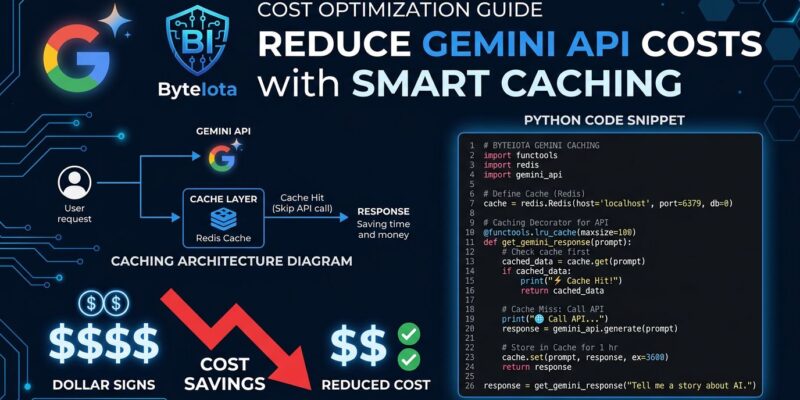
Gemini 3.5 Flash launched on May 19 at $1.50 per million input tokens — exactly three times what Gemini 3 Flash cost. If you are running production agents and have not touched your API setup since the upgrade, you are paying the full 3x penalty. You do not have to. The mitigation is built into the API and costs nothing to turn on.
The Price Jump Is Real — The 3x Number Is Not the Whole Story
The comparison is stark. Gemini 3 Flash sat at $0.50/M input and $3.00/M output. Gemini 3.5 Flash is $1.50/M input and $9.00/M output. Google did not obscure this — the price change was in the I/O announcement — but most coverage focused on benchmark improvements and buried the cost implications. For developers running agent loops at any meaningful scale, the arithmetic hits hard.
The 3x number assumes you are treating every token as a first-class, uncached request. Most production agent workloads do not work that way. A typical agent loop sends the same system prompt and tool definitions on every request. Those tokens are the cacheable portion, and the Gemini API’s caching system exists precisely to handle them. If you are not using it, you are leaving money on the table at three times the rate you used to be.
Implicit Caching: Free, Automatic, Already On
The easiest fix is implicit caching, which is enabled by default on all paid Gemini projects for 3.5 Flash models. You do not write a single line of code. The API hashes your prompt prefix and, if it matches a recent request, bills the matched tokens at the cached rate — roughly $0.15–$0.20 per million instead of $1.50. That is a 90% reduction on cached tokens, according to Google’s API documentation.
There is one structural requirement: the stable portion of your prompt must appear at the top. If your system prompt and tool definitions come before user-specific content, implicit caching works out of the box. If you are dynamically assembling the prompt in a different order — user message first, then instructions — you are breaking the prefix match and getting zero cache hits. Check your prompt structure before anything else.
The minimum for a cache hit is 1,024 tokens. Anything below that threshold is not eligible. Most production system prompts plus tool definitions clear this easily — a moderately complex agent setup runs 3,000 to 8,000 tokens before the user says a word.
What the Effective Price Increase Actually Is
Run the numbers on a realistic agent loop: 2,000-token system prompt, 3,000-token tool definitions, 1,500-token dynamic user context, 500-token output. That is 5,000 cacheable tokens and 2,000 non-cacheable tokens per request.
Without caching: 7,000 input tokens at $1.50/M plus 500 output tokens at $9.00/M — roughly $0.0150 per request. At 10,000 requests per day, that is $150/day.
With implicit caching: 5,000 cached tokens at $0.15/M plus 2,000 standard tokens at $1.50/M plus the output — about $0.0082 per request. Same volume: $82/day.
The old Gemini 3 Flash bill for the same workload was around $48/day. So the real comparison is $48 to $82, not $48 to $150. The effective price increase, once caching is in play, is closer to 70 percent, not 200 percent. Still significant — not the apocalyptic number in the headlines.
Explicit Caching: More Control, One Trap to Avoid
Explicit caching lets you create a named cache object with a specified TTL, reference it by name in subsequent requests, and track hits directly via response.usage_metadata.cached_content_token_count. The cached token rate is $0.15/M — the same discount as implicit — but you also pay $1.00 per million tokens per hour for storage.
That storage cost is where developers get burned. If your request volume is low — say, 50 requests per hour — the storage cost on a 5,000-token cache is $0.005/hour, while the savings per request are fractions of a cent. The storage eats the discount.
Explicit caching makes financial sense when you are hitting the same cache object at least 20–30 times per hour with a prompt context large enough that the per-request savings outweigh the hourly storage overhead. For bulk document processing, overnight batch jobs, or high-frequency agent loops, it works well. For low-volume or experimental setups, skip it and rely on implicit caching.
from google import genai
from google.genai import types

client = genai.Client()

cache = client.caches.create(
    model="gemini-3.5-flash",
    config=types.CreateCachedContentConfig(
        display_name="agent-system-prompt",
        system_instruction="You are a coding agent...",
        ttl="3600s",
    ),
)

response = client.models.generate_content(
    model="gemini-3.5-flash",
    contents=user_message,
    config=types.GenerateContentConfig(cached_content=cache.name),
)
print(response.usage_metadata.cached_content_token_count)
Batch Mode: The 50% Off Option
If your workload is not user-facing — bulk analysis, overnight processing, report generation — Gemini 3.5 Flash has a batch tier at $0.75/M input and $4.50/M output, exactly half the standard rate. Results come back asynchronously within 24 hours. Stacked with caching, this is as close to Gemini 3 Flash pricing as you can get in 2026. XDA Developers called it the end of cheap AI — but batch plus caching is a reasonable counter-argument for async workloads.
One Known Quirk to Watch
There is a documented edge case with implicit caching in Gemini 3.5 Flash: prompt prefixes in the 9,000 to 17,000 token range can cause cache hit rates to drop unexpectedly. This is a known issue in the googleapis/python-genai repository. If your system prompt plus tools lands in that window, switch to explicit caching for predictable behavior. Outside that range, implicit caching is reliable.
The Bottom Line
The Gemini 3.5 Flash price increase is real and it matters. If you are using it as a drop-in replacement for Gemini 3 Flash with no architecture changes, the 3x cost hit is exactly what you will see. With implicit caching properly structured — which requires only a prompt reorder in most cases — the effective increase on a realistic agent workload drops to roughly 70 percent. With explicit caching or batch mode on top of that, you can get closer to parity. The tools are there. The question is whether you spend 30 minutes checking your prompt structure or pay 3x indefinitely.