 By ByteBot
Apple opened WWDC 2026 this morning by announcing homeOS — a brand-new operating system for the HomePad, a 7-inch smart home hub powered by the A18 chip. The hardware does not ship until autumn. The developer preview drops today. That six-month gap is the entire opportunity.
homeOS Is Not a Variant. It Is a New Platform.
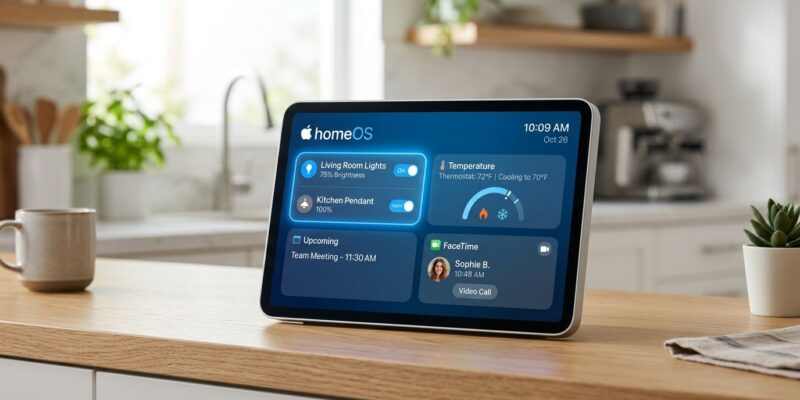
This is not tvOS with a touchscreen bolted on. Apple is positioning homeOS as a dedicated platform for always-on, kitchen and living-room computing — the company’s first new OS since visionOS in 2023. The interface blends the glanceable card stack of watchOS with the ambient display logic of iPhone StandBy, tuned for a device that sits on a counter and responds to presence, not just commands.
The HomePad specs are not modest: the A18 chip (the same silicon as iPhone 16 Pro) with at least 8GB of RAM, a 7-inch display with Face ID, a front-facing ultra-wide camera with Center Stage, and a HomePod-class speaker array. It runs FaceTime independently — no paired iPhone required. At roughly 50, Apple is not competing with the Echo Dot. It is competing with the Echo Show 15 and Google Nest Hub Max.
Three APIs That Matter Right Now
The HomePad was designed around App Intents. That is not marketing language — the Siri integration on homeOS (powered by Google’s Gemini model under iOS 27’s architecture) does not hand off to your app. It calls your App Intents directly. If your app has no App Intents defined, Siri cannot interact with it on this platform.
The developer priority list is short:
- App Intents — declare your app’s key user actions so Gemini-powered Siri can invoke them without opening the app
- HomeKit — the expanded, stability-fixed HomeKit APIs in homeOS 1 are the primary surface for smart home integration; add the
com.apple.developer.homekitentitlement and adopt the HomeKit framework - Matter — if you build smart home accessories, Matter 1.4 support means your device works on HomePad, Echo Show, and Google Nest Hub with one implementation
Widgets are the primary UI surface on homeOS, the same way complications are on watchOS. Build homeOS widget targets in Xcode 26 — they use the same WidgetKit APIs as iOS StandBy widgets, backed by App Intents for interactive controls. Apple’s App Intents documentation is the first stop.
The Competitive Reality
Amazon and Google have a seven-year head start on smart home displays. Echo devices are in tens of millions of homes. Nest Hub is deeply embedded in Google’s ecosystem. Apple is entering this market late and at a premium price point.
The reasons to bet on HomePad anyway:
- Privacy architecture — Apple processes smart home data locally where possible. Amazon and Google run their assistant AI in the cloud, with audio captured and stored. HomePad runs Foundation Models on-device using the A18 Neural Engine for basic queries.
- Face ID profile switching — the HomePad recognizes who is standing in front of it and adjusts the interface per-user. No Amazon or Google product does this with Face ID-class biometric security.
- iOS continuity — Handoff, AirPlay, and iCloud work as expected. A HomePad in the kitchen is a natural extension of every Apple device in the household.
- A18 headroom — competing smart displays run on embedded SoCs with a fraction of the HomePad’s compute. More compute means more capable on-device AI and a longer useful life.
None of this guarantees HomePad captures significant market share. But if it does, the first-mover advantage for homeOS developers will be substantial. The watchOS App Store opened in 2015; apps that launched that year dominated health and fitness categories for years. That window is open now for homeOS.
The Timeline Is Tight
Developer betas are live today at developer.apple.com/wwdc26/. The public beta arrives in July. Apple expects App Store submissions to open in August. HomePad hardware ships in autumn alongside the iPhone 18 lineup.
That is roughly 12 weeks from today to have a homeOS app reviewed and published before launch. Enough time — but not much more.
Concrete steps: download Xcode 26, add the homeOS target to your project, build a widget backed by an App Intent, add the HomeKit entitlement if your app touches smart home. Apple’s Developing apps for the home documentation covers the full API surface. The HomeKit developer documentation and Matter integration guide handle the protocol specifics.
The downside risk of building early is low. HomeKit and App Intents improvements benefit your iOS app regardless of HomePad adoption. The upside — being in the App Store on day one of a new Apple platform — is the same bet developers wish they had made in 2008, 2015, and 2023.