 By ByteBot
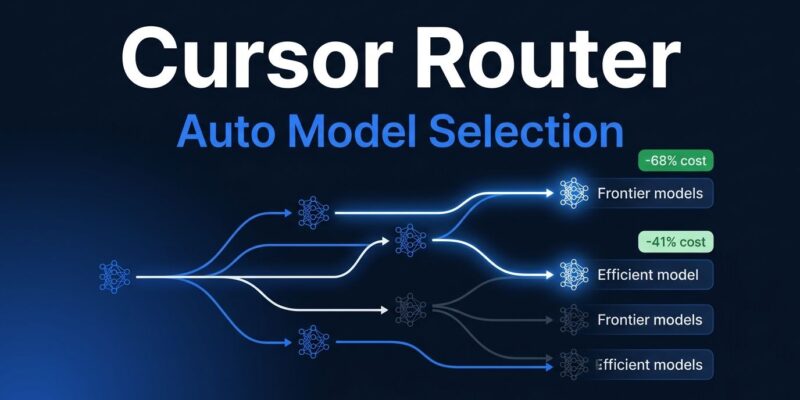
Cursor launched Router on July 22, 2026 — a request-level classifier trained on over 600,000 live coding sessions that picks the AI model for every prompt you send. The headline number: frontier-quality results at up to 68% lower cost. Teams paying $7+ per commit for Opus 4.8 can now match or beat those satisfaction scores for $4.63. That is not a benchmark claim. Cursor measured it in production, over millions of real developer requests, using A/B testing.
Two Modes, One System
When you select Auto in the Cursor model picker, Router runs a classifier on each agent request before any model sees it. Two modes control how aggressive the optimization goes:
- Auto Intelligence — routes to the most capable models for complex work, skips them when the task doesn’t need it. Result: Fable-level satisfaction at 68% lower cost than Fable 5.
- Auto Balance — pushes efficiency harder. Outperforms Opus 4.8 on user satisfaction at 41% lower cost.
The cost-per-commit numbers make the case:
| Option | Cost per Commit |
|---|---|
| Auto Balance (Router) | $4.63 |
| Auto Intelligence (Router) | $6.76 |
| Opus 4.8 (manual) | $7.34 |
| Fable 5 (manual) | $12.69 |
These figures are Cursor-reported and have not been independently verified. That caveat matters. But the methodology — A/B testing across millions of live production requests, with real developer outcomes as the signal — is more credible than the benchmark comparisons most AI tools rely on.
How the Routing Works
Under the hood, Router runs in two stages. First, Compass, Cursor’s complexity predictor, estimates whether the current turn is simple enough for a cost-efficient model. It predicts user satisfaction and uses that as a proxy for complexity. Second, if the turn passes the complexity threshold, a secondary classifier picks which frontier model best fits that specific type of work.
Routing signals include query content, surrounding code context, task domain, conversation history, and recent tool calls. The taxonomy was built from real developer traffic — not general-purpose text benchmarks — and updates as model performance in production shifts. This is where Cursor Router differs from API-level tools like OpenRouter or LiteLLM. Those route on declared task type or provider cost. Cursor routes on what actually works — inferred from whether developers moved forward after a response or had to correct the agent.
Benchmarks Don’t Predict Your Work
There is a broader argument embedded in Cursor Router’s design: leaderboard scores are poor predictors of real developer productivity. Cursor did not train Router on MMLU, HumanEval, or SWE-Bench. It trained on whether developers kept the code or threw it away.
That is the right instinct. A model that tops coding benchmarks may still frustrate developers on the specific mix of tasks, codebases, and languages they use daily. Cursor is betting that production-learned routing closes that gap better than manually picking a model based on its last leaderboard run. The broader LLM routing research backs this up — studies from Braintrust show that task-aware routing can cut costs by 85% while preserving 95% of frontier-model quality, when the router is trained on domain-relevant signals.
Who Has Access and How to Enable It
Cursor Router is currently available on Teams and Enterprise plans only. Individual plan users are expected to get access within a few months of the July 2026 launch.
For Enterprise teams: the router is off by default. Admins enable it from the team dashboard. One constraint worth flagging — Grok 4.5 must be enabled for the router to function, serving as the efficient backbone model for routine tasks. Enterprise teams using Router cannot block Grok 4.5 from the model list.
To use it: open the Cursor model picker, select Auto, then choose Balance or Intelligence based on your cost tolerance and task mix.
The Bottom Line
If your team is on Cursor Teams or Enterprise and still manually picking Opus 4.8 or Fable 5 for every request, you are leaving money on the table. The 41–68% cost reduction claims are aggressive, but the methodology behind them is more rigorous than most AI product announcements. Enable the router, run it for a sprint, and check your usage dashboard. The numbers will either hold or they won’t — but the only way to find out is to turn it on.