
 By ByteBot
The headline writes itself: run a 744-billion-parameter model on a laptop. The fine print is less spectacular — on a typical CPU-only machine, you’ll clock roughly 0.05 tokens per second. But that framing misses the point. Colibri isn’t a trick. It’s a genuinely novel inference architecture that changes the economics of running frontier-scale models locally, and for the right workloads, it works today.
Why Disk Streaming Works for MoE Models
Colibri’s core insight is deceptively simple: Mixture-of-Experts models are sparse. GLM-5.2 has 744 billion parameters on paper, but only activates roughly 40 billion per token. For each layer, just 8 of 256 available experts fire — the other 248 sit idle. Colibri exploits that sparsity by splitting the model into two tiers:
- Dense layers (attention, shared experts, embeddings — ~17B params) stay resident in RAM, quantized to int4, consuming about 9.9 GB.
- Routed experts (21,504 of them across 75 MoE layers, ~370 GB total) live on disk and stream on demand via a per-layer LRU cache.
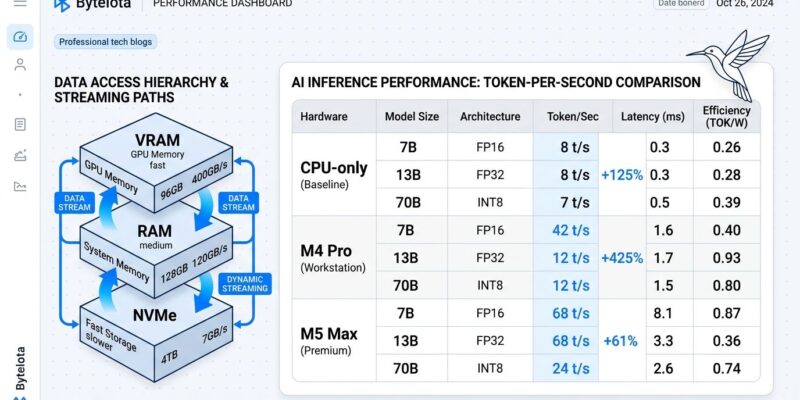
A typical inference step loads two to four expert weight blocks from disk — roughly 50 to 100MB each — completing those reads in 5 to 15 milliseconds on a modern NVMe drive. The disk, not GPU FLOPS, is now the throughput bottleneck. That’s a counterintuitive design decision, and it’s the right one: the GPU-centric inference orthodoxy assumed you need everything in VRAM simultaneously. MoE sparsity invalidates that assumption.
What Speed You Will Actually Get
Most coverage of Colibri buries the performance numbers or glosses over them. Here’s the honest breakdown for GLM-5.2:
| Hardware | Speed | Practical Use |
|---|---|---|
| CPU-only (25GB RAM) | 0.05–0.1 tok/s | Batch jobs only |
| M4 Pro (48GB) | ~0.30 tok/s | Slow batch |
| M5 Max (standard) | ~1.06 tok/s | Marginal interactive |
| M5 Max (128GB, Metal + expert pin) | ~2.06 tok/s | Usable interactive |
Speculative decoding via the MTP head pushes that to 2.2–2.8 tokens per forward pass on capable hardware. Apple Silicon machines perform disproportionately well because their unified memory architecture provides a high-bandwidth path between RAM and storage — exactly what disk-streaming inference needs. An AMD or NVIDIA GPU adds acceleration via the Vulkan and CUDA backends, respectively, but only for the expert computation after the disk read; you still need the fast NVMe underneath.
The realistic floor: 0.05 tok/s is not viable for interactive chat. It is, however, entirely adequate for overnight batch runs, privacy-sensitive document processing, or exploratory research where you queue queries and retrieve results later.
Getting Started
Colibri ships prebuilt binaries for Linux, macOS, and Windows — no compilation required. The minimum footprint is 25GB RAM and roughly 400GB of free NVMe space for the GLM-5.2 int4 weights, available on HuggingFace. Run coli doctor first to verify your setup before committing to the download.
# Verify your setup before downloading 370GB
./coli doctor

# Inspect the planned VRAM/RAM/disk placement
./coli plan

# Interactive chat
COLI_MODEL=/path/to/glm52_i4 ./coli chat

# OpenAI-compatible API server (drop-in for any OpenAI SDK client)
COLI_MODEL=/path/to/glm52_i4 ./coli serve --port 8080

# Web dashboard with API
COLI_MODEL=/path/to/glm52_i4 ./coli web
Run coli tune after setup to have the engine measure and persist your machine’s fastest safe execution profile. On disk-constrained machines, the dual-SSD striping option in v1.8.0 spreads the model across two drives, doubling I/O bandwidth where the hardware supports it.
Nine Model Families, One Engine
GLM-5.2 is the flagship, but Colibri v1.8.0 supports eight other model families with identical command interfaces. The practical entry points for most developers:
- OLMoE (7B): Run this first to validate your setup without downloading 370GB.
- Qwen3.6 (35B-A3B): Good balance of size and speed for machines with 32GB RAM.
- DeepSeek V4 Flash (284B): Native fp4 expert streaming; strong performance for its size.
- GLM-5.2 (744B): The headline model — reserve this for machines with an M5-class chip or dedicated NVMe RAID.
- Kimi K3 (2.8T): Exists. Requires extreme hardware. File under “impressive that it runs at all.”
When to Use Colibri Instead of a Cloud API
The cases where local Colibri inference wins today:
- Privacy-sensitive tasks: Code review of proprietary systems, analysis of PII-laden documents, anything your legal team would flag going to a third-party API.
- High-volume batch jobs: Summarizing a 10,000-document corpus via API at $0.006/1K tokens adds up fast. At $0 local compute, Colibri pays for itself in SSD cost within weeks for heavy users.
- Data sovereignty requirements: EU and APAC regulations are making cross-border data processing increasingly complicated. Local inference sidesteps the problem entirely.
- Offline development: Build and test LLM-integrated applications without network dependency or API costs during dev cycles.
Where the cloud still wins decisively: real-time interactive chat, latency-sensitive applications, and any scenario where you need throughput above 10 tok/s without M5-class hardware. The gap is real and significant.
One More Thing: The Expert Atlas
Colibri’s web dashboard includes an expert atlas — a 3D visualization mapping all 13,260 characterized experts by measured routing affinity. Experts cluster visibly by domain: poetry, law, Chinese, SQL, mathematics. It’s a map of how the model organizes knowledge, rendered as a navigable galaxy. Not a productivity feature, but the most visually interesting window into frontier model internals available to anyone with a laptop and 400GB of free space. BetterStack’s setup guide walks through the full dashboard workflow if you want a deeper walkthrough.
The Verdict
Colibri is not vaporware and it’s not magic. It’s a well-engineered C runtime that makes a genuine architectural bet: MoE sparsity plus cheap NVMe storage can substitute for scarce GPU VRAM at the cost of throughput. On Apple Silicon hardware with a fast SSD, that bet pays off at roughly 1–2 tok/s — usable for a meaningful subset of real workloads. On a commodity CPU machine, you’re running experiments and batch jobs, not interactive applications.
If you have an M4 Pro or better, 48GB RAM, and a fast NVMe drive, try Colibri this week. Start with OLMoE to validate the setup, then graduate to GLM-5.2. If you’re on a CPU-only machine, the architecture is sound — the hardware just needs to catch up to the ambition. Check the performance reality breakdown before committing to the 370GB download.














