 By ByteBot
Anthropic shipped a vulnerability scanner directly into Claude Code on July 22 — no new terminal tab, no separate SaaS dashboard, no CI/CD pipeline to wire up first. You run /claude-security inside your existing session, pick a scan scope, and a swarm of Claude agents maps your architecture, threat-models every component, and comes back with CWE-tagged findings and style-matched patch suggestions. It is in public beta. It costs real tokens. And it catches a class of bugs that Semgrep and Snyk do not.
It Is Not a Pattern-Matcher — That Is the Point
Most static analysis tools work by matching your code against a library of known bad patterns. That approach is fast, cheap, and catches the obvious stuff. It also fails systematically at anything context-dependent: an auth bypass that only triggers when service A passes data to service B without re-validating, or a business logic flaw that a linter has no way to model.
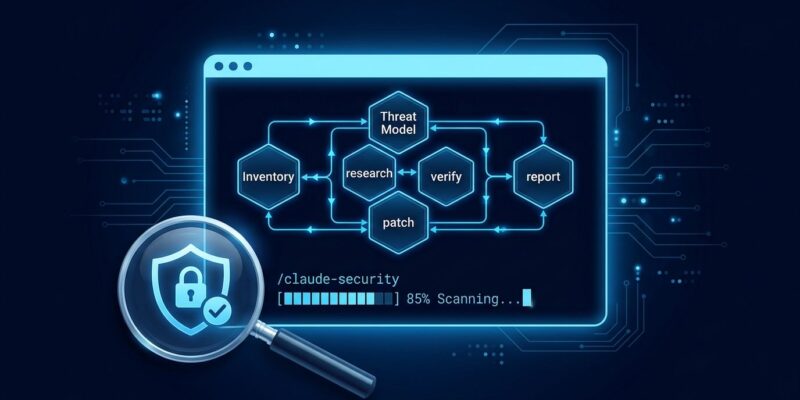
Claude Security takes a different approach. It runs a six-phase multi-agent pipeline: inventory (partition the repo into components), threat modeling (one agent per component, building entry points, sinks, and trust boundaries), research (agents fanned across flagged code paths), triple verification, patch generation, and final report.
The triple-verification stage is worth understanding. Three independent verifier agents — reachability, impact, and defenses — each vote TRUE_POSITIVE or FALSE_POSITIVE with a decisive file and line number. A unanimous panel caps confidence at high; a 2-of-3 quorum caps it at medium. This is a deliberate attempt to cut false positives, the historical failure mode of SAST tools at scale.
Setup: Three Commands, But Read the Requirements
Installation is straightforward. Open a Claude Code session and run:
# Install the plugin
/plugin install claude-security@claude-plugins-official

# Reload plugins
/reload-plugins

# Start a scan
/claude-security
The requirements are less trivial. You need a paid Claude Code plan, version 2.1.154 or later, and dynamic workflows enabled in /config. You also need Python 3.9.6+ available on your PATH as python3 and Git installed. If you are on a managed team, your org admin must first enable the plugin via the admin console at claude.ai/admin-settings/claude-code — individual users cannot self-enable in managed organizations.
Pick Your Scan Mode Before You Start
The plugin offers three scan modes and the difference matters, especially once you see the token numbers.
- Scan Changes — targets a PR, a single commit, or your current branch diff. This is the mode to run before every commit. Fast, bounded, and cheap enough to use routinely.
- Medium Codebase — targets approximately 20 files. Suitable for regular audits of a specific module or service boundary.
- Max Codebase — full repository deep audit with red-team style simulations. One developer’s real-world report clocked 754k tokens and 20-50 spawned agents for a single run. Full-repo Max scans can reach $600 in token costs.
The plugin tells you the estimated file count and relative cost before you commit to a scan. Use that information. Max is for pre-release audits, not daily use.
Where It Fits in Your Security Stack
Claude Security is not a Snyk replacement. Snyk’s dependency CVE database and SCA reachability analysis cover open-source package vulnerabilities — a completely different attack surface. SonarQube covers code quality gates and compliance reporting. Semgrep is a rules engine for enforcing known bad patterns. Claude Security covers first-party code vulnerabilities that require semantic reasoning: injection flaws, broken auth across service boundaries, logic bugs that only manifest when you read across multiple files simultaneously.
The expert consensus is direct: run Claude Security alongside Snyk, not instead of it. The tools cover different bug classes. Anthropic has also published a defending-code-reference-harness on GitHub — an open-source reference implementation showing the full autonomous vulnerability discovery pipeline that underlies the plugin.
The Limitations Worth Knowing Now
This is a beta. Scan results are nondeterministic — the same codebase, scanned twice, may return different findings. That is expected behavior from a probabilistic multi-agent system, not a bug, but it means you cannot use this as an authoritative compliance gate yet.
The plugin has no sandbox isolation. It runs inside your Claude Code session under your permissions. Committed .claude/ settings, hooks, and CLAUDE.md apply to the scan. Do not point it at untrusted or hostile repositories — use sandbox-runtime for that use case.
All scans count against your plan’s token limits. A Max scan on a large codebase is a significant spend. The pre-scan estimate is there for a reason — check it before running.
The Verdict
If you are already on a paid Claude Code plan, install the Claude Security plugin now. Start with Scan Changes as a pre-commit habit — it is cheap, quick, and will catch real issues before they reach CI. Reserve Medium and Max scans for module audits and pre-release reviews where the token spend is justified.
The architecture is genuinely different from existing SAST tools. The class of bugs it targets — context-dependent, cross-file, business logic — is exactly the class pattern matchers miss. The beta caveats are real and nondeterminism means a single scan result is not definitive. But as a layer in a defense-in-depth stack, it is worth adding today.