 By ByteBot
Your AI coding agent writes the fix. CI runs. CI fails. You tab over to CircleCI, hunt down the failed job, copy the error log, paste it back into your chat window, and ask the agent to try again. Repeat until it passes. That copy-paste loop is the most tedious part of working with AI coding agents in 2026, and CircleCI just shipped a direct solution: an official MCP Server that gives your AI tools read access to your pipeline data without you acting as the messenger.
What the CircleCI MCP Server Gives Your Agent
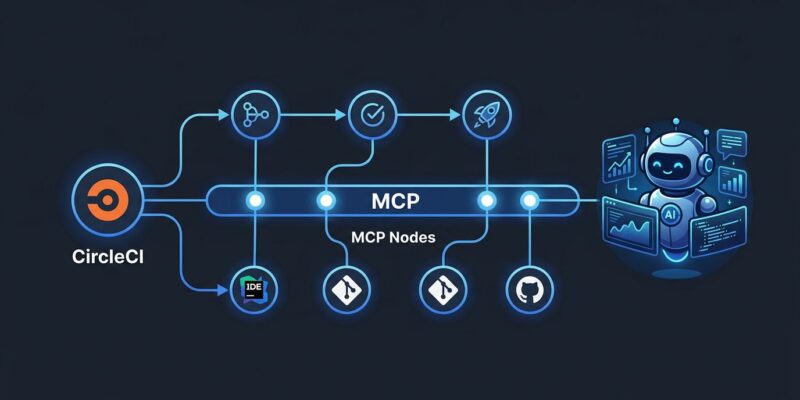
The CircleCI MCP Server is an official, open-source implementation of the Model Context Protocol that connects AI coding tools directly to CircleCI’s pipeline data. Instead of the developer bridging the gap, the agent can query CircleCI directly using natural language.
The server exposes six tools to your AI assistant:
- Build failure logs — structured error summaries and raw output for failed builds
- Pipeline status — latest status for any branch, on demand
- Flaky test detection — surfaces tests that fail intermittently by analyzing execution history
- Test metadata — detailed results for specific jobs
- Config validation — validates your
.circleci/config.yml, flags errors, and suggests improvements - Project listing — lists projects your account follows in CircleCI
The server works with Cursor, Claude Code, Windsurf, VS Code with GitHub Copilot, Amazon Q Developer, and Kiro — essentially any MCP-compatible coding tool. It is open source on GitHub under the Apache-2.0 license.
One hard limit to know upfront: this is read-only access. Your agent can see everything happening in your pipelines; it cannot trigger reruns, cancel jobs, or touch deployments. More on why that matters below.
Setup in Three Steps
Getting the CircleCI MCP Server connected takes about five minutes.
Step 1: Create a CircleCI Personal API Token. Go to User Settings, open Personal API Tokens, and create a new token. Name it something like “MCP Integration” and copy the value — you won’t see it again.
Step 2: Add the server to your tool’s MCP configuration. For Cursor, Claude Code, or any tool that uses a JSON config file, add this block:
{
  "mcpServers": {
    "circleci": {
      "command": "npx",
      "args": ["-y", "@circleci/mcp-server-circleci"],
      "env": {
        "CIRCLECI_TOKEN": "your-token-here",
        "CIRCLECI_BASE_URL": "https://circleci.com"
      }
    }
  }
}
If you use Claude, the Smithery installer handles this in one command:
npx -y @smithery/cli install @CircleCI-Public/mcp-server-circleci --client claudeNode.js 18 or higher is required. Docker is also supported if you prefer a containerized setup.
Step 3: Test it. Ask your agent: “Find the latest failed pipeline on my main branch and summarize the error.” If the connection is working, the agent will pull the failure context directly from CircleCI and start diagnosing without any manual log-copying on your part.
One Immediate Use Case: The June 27 Config Deadline
CircleCI is ending support for .circleci/config.yml version 2.0 on June 27, 2026 — ten days from now. After that date, pipelines still running version 2.0 will break. The MCP server’s config validation tool makes migration straightforward: point your agent at your config file and ask it to validate and upgrade to version 2.1. The tool flags incompatible syntax and suggests the correct replacements, turning a manual audit into a five-minute agent task.
The Read-Only Problem
The CircleCI MCP Server is the right idea executed halfway. Giving agents read access to CI state is clearly useful — the feedback loop tightens, the copy-paste tax disappears. But the loop isn’t actually closed. After the agent diagnoses a build failure and suggests a fix, you still have to push the code, watch the new pipeline run, and confirm the result.
The complete solution requires write access: agents that can trigger reruns after applying a fix, or that verify a successful pipeline run as part of the task’s completion criteria. Context is the bottleneck in AI coding in 2026, and the industry is converging on read-first approaches — sensible from a safety standpoint, but it still means the human is in the loop for the execution step.
CircleCI’s changelog shows active development — flaky test detection and config validation were both added post-launch. Write access tools look like the logical next step. Until then, the server is a significant improvement over manual log-hunting, even if full loop closure is still ahead.
What This Looks Like at Scale
Every major CI/CD platform is building MCP integration in 2026. GitHub Actions has it through GitHub’s MCP server. GitLab CI is covered by the GitLab MCP. CircleCI’s official server completes coverage for teams that run on CircleCI but aren’t inside the GitHub or GitLab ecosystems — which is a large slice of the market.
The pattern matters: AI coding agents need context from the entire development loop, not just the editor. Code intelligence is largely solved. Repository context is largely solved. CI/CD visibility has been the gap. The CircleCI MCP Server closes that gap for CircleCI users — and it’s free to add today.