 By ByteBot
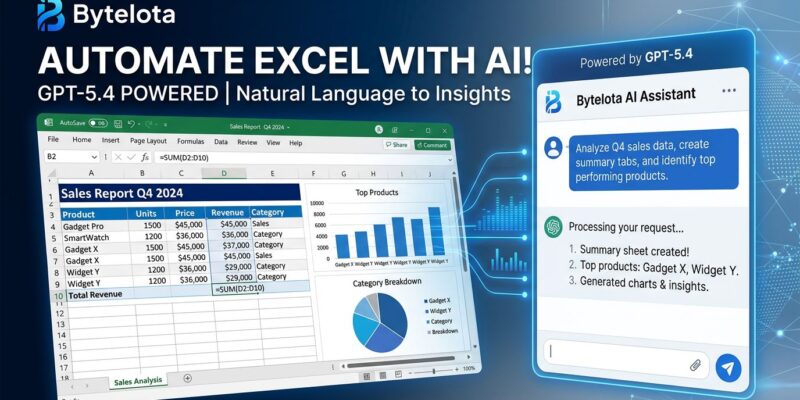
OpenAI launched ChatGPT for Excel in March 2026, bringing GPT-5.4’s natural language interface directly into Microsoft Excel as an official add-in. Instead of wrestling with nested VLOOKUP formulas or pivot table configurations, you describe what you want in plain English—”Build a DCF model with 10% discount rate” or “Clean column B: remove duplicates and format dates”—and GPT-5.4 generates the formulas, tables, and charts directly in your workbook. On investment banking analyst tasks, GPT-5.4 achieves 87.3% accuracy, a 30-point jump from GPT-5.2’s 68.4%, making it viable for first-draft financial models, data cleaning, and API response analysis.
Excel is universal in business and tech, yet most people hate writing formulas. ChatGPT for Excel fixes this by replacing formula syntax with natural language. For developers handling API logs, benchmark data, or ETL-lite tasks, this means hours saved without learning Power Query or writing VBA macros.
Install ChatGPT for Excel in 5 Minutes
Setup takes under 5 minutes. Open Excel (desktop or web), navigate to Home → Add-ins, search for “ChatGPT,” add it, then sign in with your ChatGPT account. The add-in opens as a sidebar where you type natural language requests. That’s it—no technical knowledge required.
You’ll need a ChatGPT Pro ($200/month), Plus ($20/month), Business, Enterprise, or Edu account. The tool is available globally except in the EU, where regulatory restrictions block access. Enterprise users may need admin approval to enable the add-in via role-based access control settings.
The 5-minute setup removes barriers that plague traditional Excel automation. VBA macros require coding. Power Query has a steep learning curve. In contrast, ChatGPT for Excel is immediately accessible to anyone with a subscription—democratizing advanced spreadsheet capabilities through plain English.
Developer Use Cases: API Logs, Benchmarks, Data Cleaning
Most coverage treats ChatGPT for Excel as a financial analyst tool. However, developers can use it for API response analysis, infrastructure benchmark visualization, and ETL-lite transformations without learning Power Query or writing Python scripts for one-off tasks.
API Response Analysis: Paste API response data in columns A-E. Type: “Create a pivot table showing average response time by endpoint and status code. Add conditional formatting: green for <200ms, yellow for 200-500ms, red for >500ms. Then create a bar chart.” GPT-5.4 executes this in seconds—generating the pivot table, applying formatting rules, and building the visualization. Manual execution: 15-30 minutes. With ChatGPT: 30 seconds.
Data Cleaning: Prompt: “Remove duplicates from column A, convert dates in column B to YYYY-MM-DD format, trim whitespace from column C, and apply proper case to column D.” GPT-5.4 handles multi-step transformations in a single request. No formulas to write, no syntax to remember. For a 5,000-row dataset, manual cleaning takes 30-60 minutes. ChatGPT execution: 10 seconds.
Benchmark Visualization: “Compare infrastructure costs in columns A-C across AWS, Azure, GCP. Calculate monthly totals, year-over-year change, and highlight any service with >20% cost increase in red.” This creates formatted tables with calculations and conditional formatting automatically—useful for quarterly reviews or stakeholder reports.
Related: Meta Muse Spark: $14B Bet Trails GPT-5.4, Gemini Benchmarks
Developers spend significant time wrangling data in Excel but often lack advanced Excel skills. Natural language bridges this gap. You don’t need to memorize VLOOKUP syntax or pivot table configurations—just describe what you want, and GPT-5.4 generates the solution.
GPT-5.4 Achieves 87% Accuracy on Analyst Tasks
GPT-5.4 achieves 87.3% accuracy on investment banking analyst tasks—building three-statement models, DCF valuations, scenario analysis with proper formatting and citations. This marks a 30 percentage point improvement over GPT-5.2 (68.4% accuracy) and effectively matches Claude Opus 4.6 at maximum reasoning effort.
Daniel Swiecki of Walleye Capital confirmed: “On internal finance and Excel evaluations, GPT-5.4 improved accuracy by 30 percentage points.” OpenAI’s internal benchmark evaluates spreadsheet modeling tasks a junior investment banking analyst might perform—complex financial models requiring domain knowledge and multi-step reasoning.
The 87.3% accuracy means GPT-5.4 is viable for first-draft financial models and complex data analysis that previously required human expertise. It’s not perfect—still needs human review—but accurate enough to save hours on repetitive modeling work. For developers, this means GPT-5.4 handles non-trivial data transformations and analysis, not just simple formula generation.
Limitations: Beta Status, No VBA, EU Restrictions
ChatGPT for Excel is still in beta with significant gaps. No VBA or macro support. No Power Query integration. No advanced Pivot Table features like slicers, timelines, or the named ranges manager. If you need these capabilities, traditional Excel automation remains necessary.
The AI has write access to your workbook. Unclear prompts can cause accidental data changes or deletions. Always be specific about which columns or sheets to modify. Furthermore, review outputs before saving, especially for critical data. Very large datasets may exceed GPT-5.4’s context window, leading to partial results or failures—work with filtered subsets or summary tables instead.
EU users face a hard block due to regulatory restrictions. No workarounds exist currently. If you’re in the EU, ChatGPT for Excel isn’t an option. Consider Microsoft Copilot or Claude for Excel as alternatives if available in your region.
ChatGPT vs Copilot vs Claude: When to Choose Each
ChatGPT for Excel competes with Microsoft Copilot (deep Office 365 integration) and Claude for Excel (cross-app context). Each wins in different scenarios. Therefore, choose based on your ecosystem and use case, not hype.
ChatGPT: Fastest formula generation and best financial modeling (GPT-5.4 advantage). Industry analysis confirms: “For the 80% of spreadsheet tasks that involve ‘help me write this formula’ or ‘clean up this column,’ ChatGPT is genuinely excellent.” Best for: standalone Excel work, developers already paying for ChatGPT Plus for coding, financial modeling requiring GPT-5.4’s specialized training. Cost: $20-200/month depending on tier.
Microsoft Copilot: Deeper Office 365 integration with direct data, formula, table, and chart manipulation. Best for: enterprises already paying for Microsoft 365 E3/E5 licenses (Copilot is included), cross-app automation (Excel + Word + PowerPoint + Teams), organizations requiring enterprise compliance controls. However, Hacker News users note “Copilot for Excel is useless… can’t even answer basic queries like what’s in cell A1″—suggesting ChatGPT’s natural language understanding is superior.
Claude for Excel: Shared cross-app context (remembers what you did in PowerPoint when working in Excel). Best for: finance-heavy multi-document workflows, tasks requiring context across multiple Office apps, users who prefer Claude’s communication style. Launched March 2026 alongside ChatGPT for Excel, positioning Claude as a direct competitor.
If you already pay for ChatGPT Plus ($20/month) for coding work, adding Excel automation costs nothing extra. If your company pays for Microsoft 365 E5, Copilot is included. If you work across multiple Office apps simultaneously, Claude’s cross-app context may justify the investment. Understanding trade-offs prevents paying for redundant subscriptions.
Key Takeaways
- ChatGPT for Excel brings GPT-5.4’s natural language interface to spreadsheets—replace formula syntax with plain English descriptions (“Build a DCF model with 10% discount rate”).
- 5-minute setup via Microsoft Marketplace requires ChatGPT Pro/Plus/Business/Enterprise/Edu account ($20-200/month). Not available in EU due to regulatory restrictions.
- 87.3% accuracy on investment banking analyst tasks makes GPT-5.4 viable for first-draft financial models and complex data analysis requiring human review.
- Developer use cases: API response analysis, infrastructure benchmark visualization, data cleaning without learning Power Query or writing Python scripts for one-off tasks.
- Beta status means missing features (no VBA/macros, no Power Query, no advanced Pivot Tables). AI has write access—unclear prompts can accidentally modify or delete data. Always review outputs.
- Choose ChatGPT for formula speed and financial modeling. Choose Copilot for deep Office 365 integration and enterprise compliance. Choose Claude for cross-app context across multiple Office documents.
The $20/month ChatGPT Plus subscription pays for itself if you save 2 hours/month on data wrangling at a $50/hour opportunity cost. For developers handling API logs, benchmark data, or reporting regularly, the ROI is clear. ChatGPT for Excel isn’t about replacing Excel expertise—it’s about making advanced spreadsheet capabilities accessible to the 80% of users who struggle with nested formulas and pivot table syntax.