 By ByteBot
Apple released apple/container v1.0.0 on June 9, 2026 — an open-source, Swift-native tool for running Linux containers as lightweight virtual machines on Apple Silicon Macs. The repository hit 36.9K GitHub stars within days and trended second globally this week, adding 9,173 stars in seven days alone. That kind of momentum is not curiosity. Developers running Docker Desktop on Mac pay $15–$24 per user per month in enterprise licensing, and Apple just handed them a free, Apache 2.0 licensed alternative.
One VM Per Container Changes the Security Model
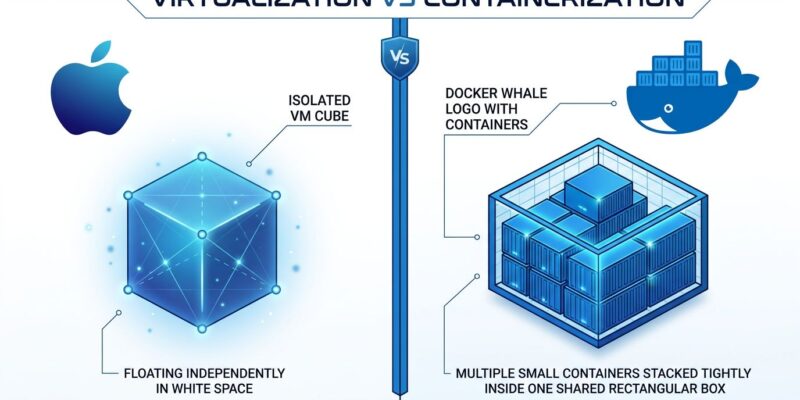
Docker Desktop on Mac runs every container inside a single shared Linux VM. All your containers share the same kernel and process namespace, which means a compromised container can see its siblings. Apple Container takes a fundamentally different approach: each container gets its own dedicated micro-VM, powered by Apple’s macOS Virtualization framework.
This one-container-per-VM model is not new — OrbStack pioneered it and proved it practical. What is new is Apple shipping it as an officially maintained, open-source tool built directly into the macOS ecosystem. The result is hardware-level isolation that makes cascade failures structurally impossible. A crashed or compromised container cannot touch anything outside its VM boundary. For security-sensitive environments — fintech, healthcare, anything handling regulated data — this is the architecture that actually makes sense. The tool is fully OCI-compatible, so images from Docker Hub work without modification, and built images push to any standard OCI registry. The CLI feels familiar:
container system start
container run alpine sh        # pulls from Docker Hub
container build -t myapp .
container push myapp
Where Apple Container Wins, and Where Docker Fights Back
Benchmarks on an M4 Mac mini — using a 20-sample methodology and Alpine 3.20 images — tell a nuanced story. According to repoflow.io’s benchmark analysis, Apple Container beats Docker Desktop on CPU throughput by 2.8% in multi-threaded workloads and by a substantial 33% on memory throughput (108,588 MiB/s vs Docker’s 81,634 MiB/s). For long-running services and compute-heavy workloads, the performance advantage is real.
However, Docker Desktop wins cold-start latency by a wide margin: 0.21 seconds versus Apple Container’s 0.92 seconds. That four-fold difference is noticeable when you’re in a tight TDD loop tearing down and rebuilding containers repeatedly. Small-file I/O also lags, because each container gets its own EXT4 block device filesystem — the right choice for isolation, but it creates overhead when installing npm packages with 80,000 files in node_modules. Neither issue is a blocker for most workflows, but both are real trade-offs worth understanding before you switch.
Related: Docker Engine v29: containerd Is Now Default — Fix These 4 Issues Now
The One Gap That Matters: Docker Compose
Docker Compose is not supported, and that single limitation defines who can switch today. Real local development setups run multi-service stacks: an app server, a database, Redis, background workers. With Docker Desktop or OrbStack, that is docker compose up. With apple/container, you are stitching it together manually or waiting for third-party Compose bridges to mature. The most-discussed thread in the project’s GitHub community is the Compose support request, with over 150 replies and no official timeline from Apple.
VS Code DevContainers also has only partial support, with known issues around networking and setup scripts. These are not edge cases — they are the daily workflows of most development teams. Until Apple ships Compose support or a reliable third-party solution emerges, teams depending on multi-service environments should stay on Docker Desktop, OrbStack, or Colima. The trajectory is clear: Docker Desktop’s enterprise pricing at $15–$24 per user per month is pushing teams to look for alternatives, and Apple Container will close the gap. The question is when, not if.
Key Takeaways
- Apple Container v1.0.0 delivers hardware-level VM isolation per container — a security model that Docker Desktop’s shared-VM architecture on Mac cannot match
- CPU and memory throughput beat Docker Desktop; cold-start latency (0.92s vs 0.21s) and small-file I/O favor Docker in tight iteration loops
- Docker Compose is not supported — multi-service local stacks still require Docker Desktop, OrbStack, or Colima
- For solo developers on Apple Silicon running single-container workflows: switch now, zero friction
- For teams on multi-service Compose stacks: the ecosystem is not there yet — wait, or use OrbStack as the middle ground